



Most print shops mess up their mixed-batch costing completely. Not because they can't do math, but because standard costing methods assume one job per press run. That's not how modern print shops work.
A shop owner showed me his pricing spreadsheet last month. He thought he made 40% margin on $85 business cards (500 quantity). After properly splitting setup costs across the seven jobs sharing that press run, his real margin was 12%. The other six jobs were carrying his profits.
This isn't unusual. Print shops gang jobs for efficiency, but their costing stays locked in single-job mode. You subsidize some clients while overcharging others, never knowing which jobs actually make money.
The Mixed-Batch Reality Nobody Talks About
Monday morning, you've got seven jobs queued: business cards for the dentist, flyers for the restaurant, postcards for three realtors, door hangers for the gym, rack cards for the hotel. Different quantities, different sizes, but all CMYK on 14pt gloss.
-
Split setup costs equally (500 business cards pay the same setup as 5,000 rack cards)
-
Ignore shared setups (pretend each job ran separately)
-
Wing it with percentages (small jobs get 10%, big jobs get 40%, whatever feels right)
All of these distort your true costs, leading to the same problem: you're guessing at profitability.
Why Traditional Costing Breaks Down
Textbook costing seems straightforward: Materials + Labor + Overhead = Cost. Add markup, done.
Eliminate order confusion and delays.
GoInkly helps you manage every print order efficiently from submission to delivery.
- Centralized order tracking
- Production workflow management
- Inventory and supply monitoring
No credit card required
Except textbooks assume each job runs independently. They don't account for jobs sharing resources in complex ways.
Fully shared costs:
-
Press makeready
-
Plate creation
-
Initial color matching
-
Wash-up time
Partially shared costs:
-
Press runtime (varies by impression count)
-
Operator attention (changes with complexity)
-
Quality checks (more for tight tolerances)
Independent costs:
-
Paper/substrate
-
Cutting (usually)
-
Packaging
-
Shipping prep
Standard costing treats everything as either fully shared or fully independent. Reality sits in between, and that's where your profits hide.
The Stepwise Method That Actually Works
Step 1: Categorize Your Costs
| Cost Type | What Goes Here | Allocation Method |
|---|---|---|
| Truly Shared | Press setup, plates, initial makeready | Weighted by complexity factor |
| Volume-Dependent | Press time, ink usage, operator hours | Per impression or linear foot |
| Job-Specific | Materials, finishing, packaging | Direct to each job |
Step 2: Calculate Complexity Factors
-
Simple jobs (business cards, basic flyers)
1.0
-
Moderate complexity (multi-panel, spot UV)
1.5
-
Complex jobs (tight registration, special finishing)
2.0
-
Nightmare jobs (you know them)
3.0
Step 3: Apply the Weighted Allocation
Monday morning gang run with $280 in shared setup costs:
Job Mix:
-
Business cards (500)
Complexity 1.0
-
Restaurant flyers (2,000)
Complexity 1.5
-
Realtor postcards #1 (1,000)
Complexity 1.0
-
Realtor postcards #2 (1,500)
Complexity 1.0
-
Realtor postcards #3 (750)
Complexity 1.0
-
Gym door hangers (3,000)
Complexity 2.0
-
Hotel rack cards (5,000)
Complexity 1.5
Total complexity units: 1.0 + 1.5 + 1.0 + 1.0 + 1.0 + 2.0 + 1.5 = 9.0
Cost per complexity unit: $280 ÷ 9.0 = $31.11
Allocated setup costs:
-
Business cards
$31.11
-
Restaurant flyers
$46.67
-
Each realtor postcard set
$31.11
-
Gym door hangers
$62.22
-
Hotel rack cards
$46.67
Already way more accurate than dividing by seven or pretending each had separate setup.
Step 4: Add Volume-Based Costs
Layer in costs that scale with production: Press time at $120/hour, total run takes 2.5 hours = $300 Total impressions across all jobs: 13,750 Cost per thousand impressions: $21.82 Each job pays based on actual impression count. Business cards pay for 500 impressions, rack cards pay for 5,000.
Step 5: Direct Costs Stay Direct
Materials, cutting, special finishing — these never get shared. The job that uses them pays for them.
Here's a quick diagram of the allocation workflow.
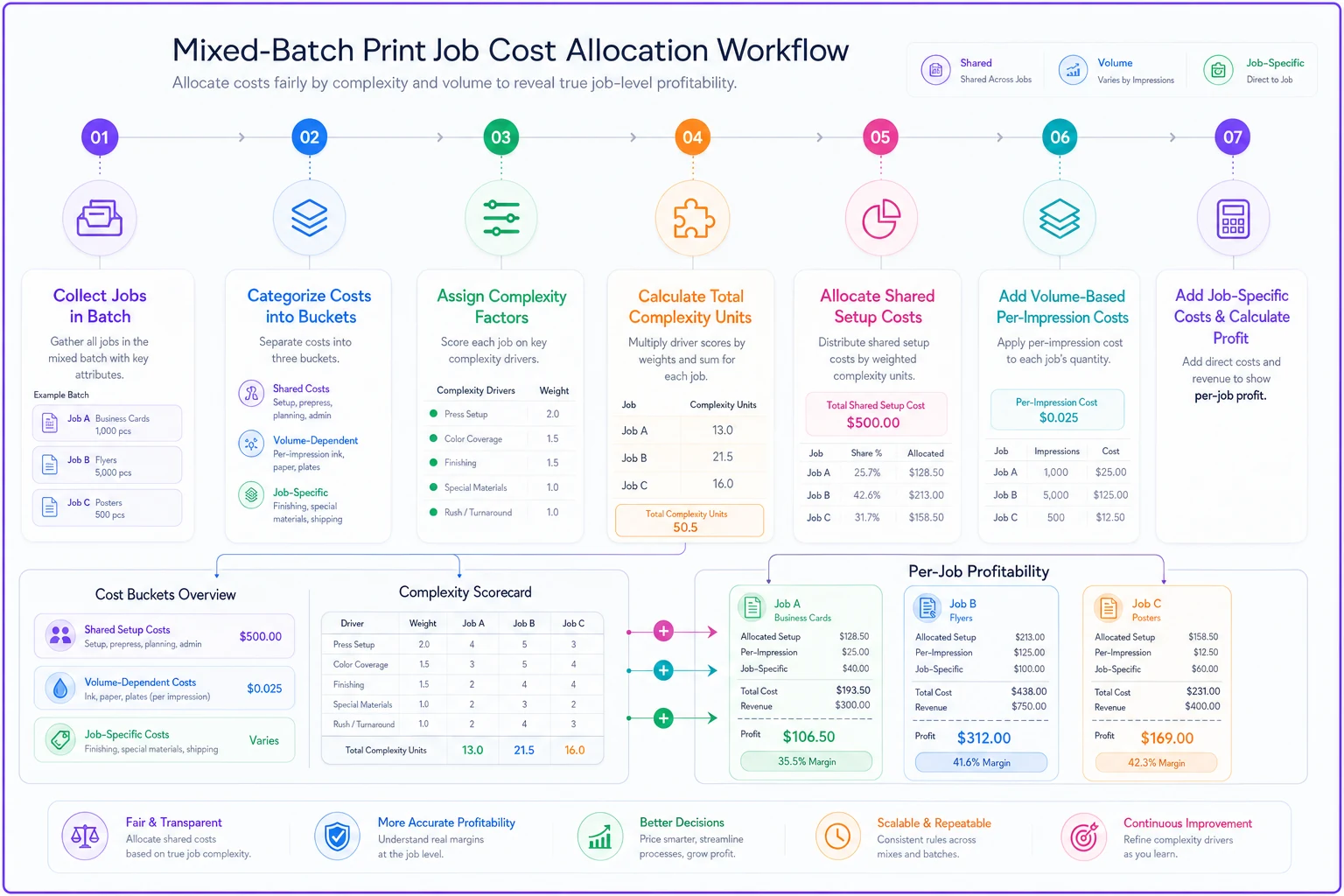
This diagram shows the flow from cost categorization to final per-job profitability.
A Real Mixed-Batch Breakdown
Here's how this works with actual numbers from that Monday morning gang run:
Business Cards (500 for dentist):
-
Shared setup allocation
$31.11
-
Press time (500 impressions)
$10.91
-
Paper
$12.00
-
Cutting
$5.00
-
Total cost
$59.02
-
Price charged
$85.00
-
Actual margin
30.5%
(not the 40% they thought)
Door Hangers (3,000 for gym):
-
Shared setup allocation
$62.22 (complex die cut)
-
Press time (3,000 impressions)
$65.46
-
Paper
$85.00
-
Die cutting
$45.00
-
Total cost
$257.68
-
Price charged
$340.00
-
Actual margin
24.2%
Rack Cards (5,000 for hotel):
-
Shared setup allocation
$46.67
-
Press time (5,000 impressions)
$109.10
-
Paper
$95.00
-
Cutting
$8.00
-
Scoring
$15.00
-
Total cost
$273.77
-
Price charged
$425.00
-
Actual margin
35.6%
Without proper allocation, you'd think small jobs were more profitable than they are, or you'd overload them with setup costs and think they're losers.
When to Use This Method
This allocation approach makes sense when you regularly run mixed batches. Clear signals you need it:
You gang jobs without thinking about cost allocation. Production combines jobs for efficiency but pricing stays single-job focused.
Small-quantity prices feel wrong. Either you're not competitive (fully loading setup) or losing money (ignoring setup).
Different salespeople have wildly different margins. Usually means some sell jobs that get subsidized by others in shared runs.
When This Gets Messy
Not every shop should implement this. If you mostly run large, dedicated jobs, the complexity isn't worth it. Warning signs:
You rarely gang different clients together. If each job gets its own press run, standard costing works fine.
Your jobs are too varied to share setups. Digital shops mixing paper types, sizes, and finishes constantly might spend more time allocating than they save.
Your volumes are huge. At 50,000+ impressions, setup costs become negligible anyway.
Building Your Own Allocation Rules
Start simple, add complexity later:
Week 1-2: Track what gets shared Note which jobs run together. Document setup times, changeover requirements, shared plates. You need baseline data.
Week 3-4: Create complexity factors Look at setup time variations. Jobs needing color matching get higher factors. Standard gang-run items stay at 1.0.
Week 5-6: Run parallel calculations Keep your old method but calculate the new way too. See the differences. Identify which jobs subsidize others.
Week 7-8: Adjust pricing gradually Don't shock customers with sudden changes. Ease problem jobs toward their real costs over several quotes.
The Spreadsheet That Makes This Manageable
Manual tracking will drive you insane. You need a spreadsheet that handles allocation automatically:
Input Section:
-
Job details (client, quantity, specs)
-
Complexity rating (dropdown menu)
-
Which gang run it joins
-
Direct costs (materials, special finishing)
Calculation Engine:
-
Pulls shared costs for that gang run
-
Calculates total complexity units
-
Allocates based on each job's share
-
Adds volume-based costs
-
Sums everything for final cost
Output Reports:
-
Individual job profitability
-
Gang run summary
-
Monthly allocation analysis
-
Product line margins
Make input dead simple. Three dropdowns and two number fields max, or your team won't use it.
Common Allocation Mistakes
The same problems surface repeatedly when shops implement this:
Limit complexity factors to three levels to keep adoption simple and avoid calculation paralysis.
Over-complicating complexity factors. Start with three levels max. You can add nuance later, but 15 different factors guarantees failure.
Forgetting seasonal patterns. That profitable business card job in January might lose money in July when you can't gang it with anything.
Ignoring machine differences. Setup on your old Heidelberg takes twice as long as your new Komori. Same job, different allocations depending on which press runs it.
Not updating regularly. Your mix changes. New clients, different products, seasonal shifts. Review allocations quarterly or they drift from reality.
Converting to Operational Software
Spreadsheets work initially but hit limits fast. Once you're running 20+ mixed batches weekly, manual allocation becomes a bottleneck. The repetitive data entry, constant formula checking, version control nightmares — they pile up.
Operational software starts making sense here. Not for fancy features, but because basic automation saves hours weekly. The software pulls job specifications directly from quotes, automatically groups compatible jobs, calculates allocations in real-time, and shows actual margins immediately.
The automation handles tedious parts — matching jobs to gang runs, calculating complexity units, allocating costs, tracking actuals versus estimates. Your team focuses on decisions: which jobs to combine, when to run them, how to price competitively while maintaining margins.
More importantly, software prevents allocation drift. Rules stay consistent. Calculations don't mysteriously change when someone "fixes" a formula. Historical data builds automatically, showing patterns you'd never spot manually.
The Real-World Impact
A commercial printer in Dallas implemented this allocation method six months ago. They discovered:
-
Business cards were losing $8-15 per order when properly costed
-
Large postcard runs were subsidizing everything else
-
Their "profitable" real estate clients were actually their worst margin category
After repricing based on true costs:
-
Overall margins improved from 24% to 31%
-
They lost two unprofitable clients (and revenue went up)
-
Gang run efficiency increased because they started scheduling based on margin optimization, not just operational convenience
The biggest surprise wasn't finding unprofitable jobs. It was discovering how many mid-sized jobs — the 2,000-3,000 quantity range — were actually their profit engines when properly allocated.
Making the Transition
Don't flip everything overnight. Realistic timeline:
Month 1: Track and categorize. Build your complexity factors. Run test calculations.
Month 2: Start allocating internally but keep pricing unchanged. See what you learn.
Month 3: Adjust quotes for new customers using real costs. Keep existing customers at old pricing temporarily.
Month 4: Gradually migrate existing customers. Focus on the most mispriced jobs first.
Month 5: Full implementation. All jobs priced using allocated costs.
Month 6: Review and refine. Adjust complexity factors based on actual data.
Some shops try jumping straight to Month 5. They usually retreat to old methods within weeks. The gradual approach sticks.
Your Next Steps
Mixed-batch costing isn't optional anymore. Not when competitors use gang runs to drop prices while maintaining margins. Not when customers expect small quantity prices that only work with shared setups.
Start this week. Pick your five most common gang-run products. Track one week of actual runs. Calculate proper allocations. Compare to your current pricing.
The gaps will probably shock you. Some jobs you thought were dogs are actually profitable. Some "money makers" get subsidized by everything else.
Once you see the real numbers, you can't unsee them. You'll schedule differently, price differently, sell differently. Your P&L will finally match operational reality.
That's when your shop stops guessing at profitability and starts managing it.
The math isn't complex. The discipline to track it consistently? That's the hard part. But that's also what separates profitable shops from everyone else wondering where their margins went.
Ready to simplify your print shop operations?
Join 500+ print shops using GoInkly to save time, reduce errors, and improve customer satisfaction.