


Walking through a print shop last month, I watched their production manager spend twelve minutes hunting for a batch of custom letterheads that were supposedly "somewhere near finishing." They were actually sitting on the wrong shelf in the bindery area, labeled with a handwritten sticky note that had fallen off. The customer was waiting in the lobby.
This happens constantly. Most small print shops run on job tickets, sticky notes, verbal handoffs, and pure memory. Works fine until someone's out sick or you get slammed with orders.
Barcode labeling fixes the tracking mess without requiring a massive investment. You don't need $50,000 worth of equipment or ripping apart your entire operation. You need a smart rollout plan that starts small and grows with your actual needs.
Start with job tracking, not inventory
Biggest mistake I see? Shops try to label everything at once. They buy a printer, generate thousands of SKU labels for paper stock, spend weeks applying them, then realize they still can't track customer jobs through production.
Start where it actually hurts: job tracking through production stages.
Your first barcodes should track jobs, not materials. Simple 8-digit job number in Code 128 format works perfectly. Job 00012345 becomes a scannable barcode that follows that order from intake through delivery. Every production area gets a basic USB scanner (about $35 each) connected to any computer or tablet.
The workflow: Customer order comes in, gets job number 00012345. Print the barcode label, stick it to the job folder. When prepress starts, they scan it. Printing begins, scan. Moves to finishing, scan. Ships out, scan.
Start with an 8-digit job number in Code 128 to keep labels simple and scannable.
Creates a digital trail showing exactly where every job sits. No more wandering around looking for orders. No more calling different departments asking if they've seen job X.
Label standards that survive production environments
Print shops are dusty, chemical-heavy places. Your office printer labels won't last a week. Here's what actually works:
Eliminate order confusion and delays.
GoInkly helps you manage every print order efficiently from submission to delivery.
- Centralized order tracking
- Production workflow management
- Inventory and supply monitoring
No credit card required
Label Material: Synthetic polypropylene labels resist toner dust, cleaning chemicals, and handling. Paper labels die within days. Thermal transfer printing (not direct thermal) creates labels that won't fade under UV exposure or equipment heat.
| Type | Size |
|---|---|
| Job tracking | 2" x 1" labels for folders and small items |
| Shelf/bin locations | 3" x 1.5" for distance visibility |
| Equipment/asset tags | 1" x 2" to fit without interfering |
Barcode Formats:
-
Code 128 for alphanumeric data (job numbers with prefixes)
-
Code 39 for simple numeric sequences (shelf locations)
-
QR codes only for customer-facing stuff (pickup receipts)
``
[BARCODE IMAGE]
JOB: 00012345
Customer: ABC Corp
Due: 10/15
Quantity: 5000
``
Human-readable text below every barcode prevents scanning failures from stopping work. Workers can manually enter the number if needed.
Sample label configurations for common workflows
Different areas need different approaches. Here's what works based on what I've seen across various shop sizes:
Digital Print Area: Jobs arrive as PDFs but need physical tracking once printed. Labels include:
-
Job number (scannable)
-
File name reference
-
Color profile used
-
Paper type required
-
Finishing requirements
A recurring catalog job might get:
``
[BARCODE: 00012789]
JOB: 00012789
File: ABCCatalogFall24_v3
Profile: GRACoL2006
Stock: 100# Gloss Text
Finish: Saddle stitch, trim to 8.5x11
``
Wide Format Section: These jobs often involve multiple pieces that must stay together. Parent-child labeling prevents separation:
``
[PARENT BARCODE: 00013001]
Banner Set - 3 pieces total
This is piece 1 of 3

[CHILD BARCODE: 00013001-01]
48" x 96" vinyl banner
Hemmed and grommeted
``
Bindery and Finishing: Where jobs often disappear into black holes. Moveable status labels that stick to job containers work better than fixed locations:
``
[BARCODE: 00014555]
STATUS: Cutting - Station 2
Next: Folding
Final: Shrink wrap
``
Real scanning workflows that don't slow down production
Bad barcode implementation adds steps without solving problems. Good implementation replaces existing inefficient processes.
Take typical offset press workflow. Currently, pressman gets job ticket, sets up press, runs job, marks complete on whiteboard. With barcodes, they scan when pulling plates (setup start), scan at first good sheet (production start), scan when moving to bindery (production complete).
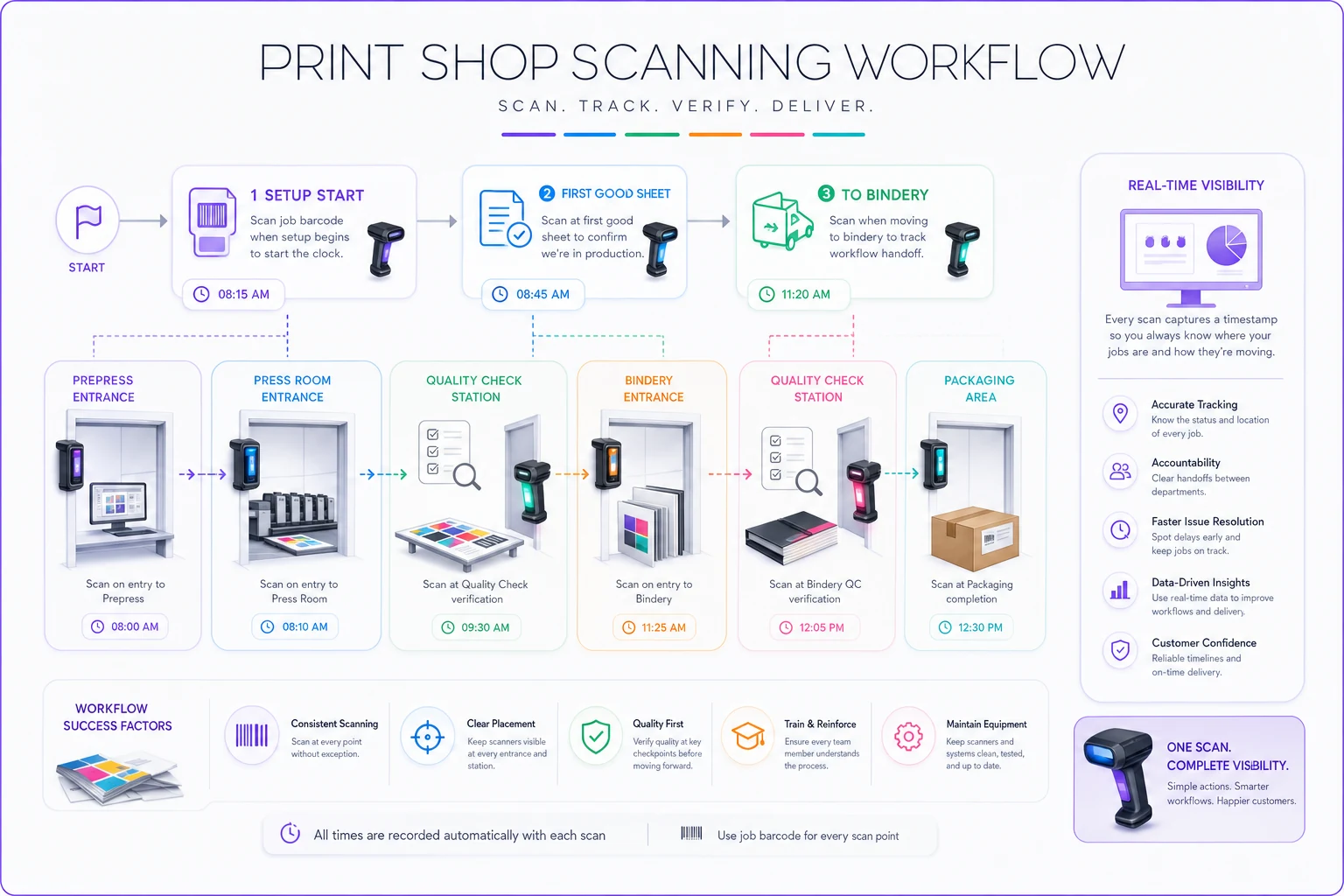
Visualizing the scan points helps teams place scanners where they're most useful.
Three scans taking 2 seconds each replace multiple manual logging steps. The operational software automatically calculates setup time, run time, and throughput.
Integration into natural movement patterns matters. Mount scanners where workers already pause:
-
At department entrances
-
Next to material storage areas
-
At quality check stations
-
Near packaging areas
Workers shouldn't walk to scan. Scanner should be within arm's reach of where they already work.
-
Scan location barcode (Shelf A-3)
-
Scan paper SKU barcode (80# Gloss Cover)
-
Enter quantity on keypad
-
Stack paper
Total time: 15 seconds per SKU vs 45 seconds for manual entry. For a typical 10-SKU delivery, that's 5 minutes saved.
ROI breakdown with actual shop numbers
Real numbers from a 4-person shop that implemented basic barcode tracking last year. They spent:
-
$140 on four USB scanners
-
$89 on basic label printer
-
$156 on label supplies (6-month supply)
-
$28 on barcode font software
-
Total hardware investment
$413
They ran around 350 jobs monthly, averaging 4 production touches each. Before barcodes, tracking each touch point (manually logging on boards, updating spreadsheets) took roughly 30 seconds. After implementation, scanning took 2 seconds.
Math: 350 jobs × 4 touches × 28 seconds saved = 653 minutes saved monthly.
At shop labor rate of $35/hour, that's $380 in labor savings per month. System paid for itself in under 6 weeks.
But the real savings came from catching problems:
-
Identified laminating bottleneck causing 20% of delays
-
Caught double-printing of three jobs monthly (average reprint cost
$180)
-
Reduced customer "where's my order" calls by about 75%
Year one actual ROI: $8,400 in labor savings, $6,480 in prevented reprints, roughly $2,000 in retained customers who previously left due to communication issues. Total return: around $16,880 on a $413 investment.
Time savings in daily operations
Time savings show up in weird places once you have real tracking data.
Morning Meetings: Instead of 15-minute production meetings where everyone tries to remember job statuses, you pull up a dashboard showing every job's location. Meeting drops to 5 minutes.
Customer Service: "Where's my order?" calls that required walking the floor now take 10 seconds. Look up job number, see last scan location and time.
End of Day: Rather than department heads staying late to count and report completions, scan data already shows what moved through each area.
Reorder Decisions: When wide-format printer scans the last roll of 36" matte vinyl, system flags for reorder. No more surprise stockouts mid-job.
A shop processing 15-20 jobs daily saves roughly 90 minutes per day just in job location and status checking. That's 7.5 hours weekly that shifts to actual production.
Common rollout mistakes that kill adoption
Certain patterns predict failure:
The "Big Bang" Approach: Trying to barcode everything at once overwhelms staff and systems. One shop printed 10,000 labels in week one, applied them to everything, then realized their workflow couldn't handle the scanning volume. Abandoned the whole thing within a month.
Skipping the Human Element: Forcing scanning without explaining benefits creates resentment. Workers see it as surveillance, not help. Successful shops spend time showing how scanning makes their specific job easier—less paperwork, fewer interruptions, clearer handoffs.
Over-Engineering from Day One: Starting with RFID, automated conveyors, or complex routing before proving basic scanning works. One shop spent $45,000 on RFID gates that couldn't read through metallic inks. Simple barcodes would have worked perfectly.
No Backup Process: Scanner breaks, software crashes, network drops—what happens to production? Always maintain human-readable info on labels and a manual fallback process.
When barcode implementation makes sense (and when it doesn't)
Barcodes solve specific operational problems. They make sense when:
-
You lose track of jobs between departments
-
Customer service can't provide order status quickly
-
Jobs get produced multiple times by mistake
-
Inventory counts are consistently wrong
-
You want to identify production bottlenecks
They're overkill when:
-
You run fewer than 50 jobs monthly
-
Everything happens in one room with one person
-
Your entire workflow is digital until final delivery
-
You have zero plans for growth
One shop I worked with ran 30 jobs monthly, all handled by the owner. They didn't need barcodes—they needed a simple job board. Another running 400+ monthly jobs was drowning in sticky notes and verbal handoffs. Barcodes transformed their operation within weeks.
Building gradually toward automated operations
Starting with simple barcode tracking creates the foundation for increasingly sophisticated automation without forcing massive changes.
Phase 1 (Months 1-2): Basic job tracking through production Phase 2 (Months 3-4): Add inventory location scanning Phase 3 (Months 5-6): Integrate customer notification triggers Phase 4 (Months 7+): Connect to operational software for analytics
Each phase builds on previous success. Workers get comfortable with scanning before new capabilities appear. The shop that starts with basic tracking often finds themselves running sophisticated operations management within a year—not because they planned it, but because each improvement naturally led to the next.
Modern AI-powered operational software can layer onto this barcode foundation to automate routine decisions. When the system knows job 00012345 just completed printing (via barcode scan) and sees bindery has capacity (via production data), it automatically schedules the job's next step and notifies the relevant operator. Barcodes provide the real-time data stream; software handles the coordination.
Getting started this week
Week-one implementation checklist:
-
Monday Order one USB scanner and basic label printer. Don't overthink models—any $35 scanner and $89 thermal printer works for testing.
-
Tuesday Design your label template. Include barcode, job number, customer name, due date. Keep it simple.
-
Wednesday Print 50 test labels. Apply them to current active jobs only.
-
Thursday Set up one scanning station at your busiest transition point (probably between prepress and printing). Have operators scan jobs as they move through.
-
Friday Review what got scanned, what got missed, and why. Adjust the process based on actual behavior, not theoretical workflows.
By the following Monday, you'll have real data about job movement and clear insights into where scanning helps most. Build from there.
Start with the job that's currently lost somewhere on your production floor. Put a barcode on it. Scan it at each step. Build from that single success.
The path from chaos to clarity doesn't require revolutionary change—just a methodical approach to tracking what you're already doing. Once you can see where everything actually is, improving the flow becomes obvious.
Ready to simplify your print shop operations?
Join 500+ print shops using GoInkly to save time, reduce errors, and improve customer satisfaction.