

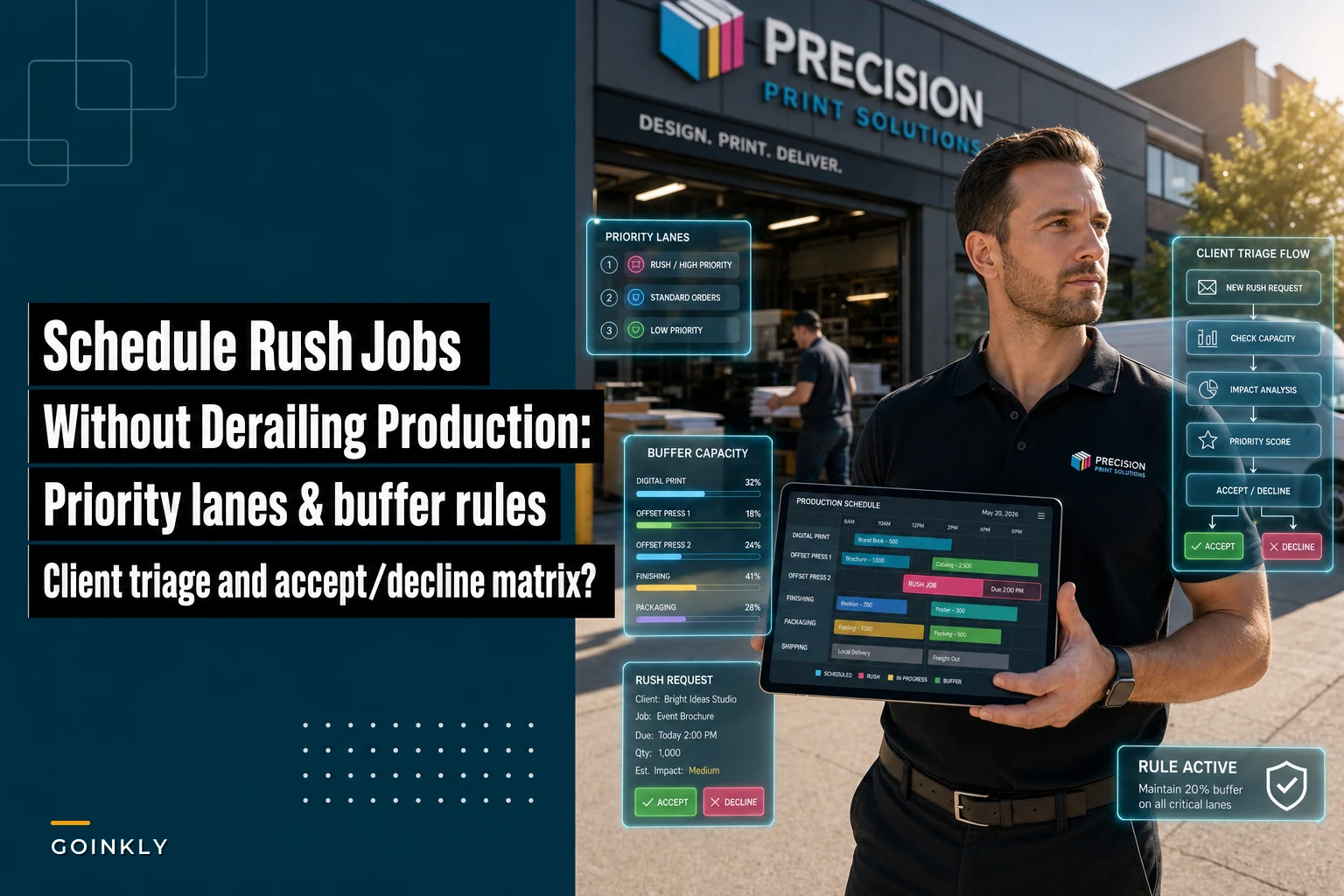

Three months ago I walked into a commercial print shop in Phoenix that was drowning. Not literally—though the owner looked like he wanted to be anywhere else. They had seventeen rush orders sitting in prepress, their regular clients were calling about delays, and their lead press operator had just threatened to quit if one more "urgent" job got bumped ahead of the 5,000-unit catalog run he'd been trying to finish for three days.
The breaking point came when their biggest client—a real estate firm that sends them $8k worth of business monthly—called to complain their standard marketing materials were now taking twelve days instead of the usual five. The shop had accepted so many rush jobs that nothing was actually rushing through anymore. Everything had become urgent, which meant nothing was.
This shop wasn't unique. Most print shops struggle with the same operational trap: you want to help clients with urgent needs, you need the rush order revenue (those sweet 50% upcharges), but without clear rules about what to accept and how to schedule it, rush jobs create chaos that costs you far more than you earn.
The hidden math behind why rush orders destroy print shop profits
Rush orders seem profitable on paper. Client needs 500 business cards by tomorrow? Sure, that's standard price plus 50% rush fee. Easy money, right?
But here's what actually happens when you squeeze that rush job into today's schedule:
Your press operator has to stop the current run. Even if they're 80% through a 2,000-piece job, they need to clean the press, swap plates, adjust color settings, run test prints. That's 45 minutes minimum. Then after the rush job, another 45 minutes to get back to where they were. You've just added 90 minutes of non-billable time to your day.
The real damage goes deeper though. That original 2,000-piece job is now late. The client who ordered it starts calling. Your customer service person spends twenty minutes explaining, apologizing, maybe offering a discount. The client gets annoyed. They might not say anything, but next time they need printing, they get quotes from three other shops.
Meanwhile, your prepress team is scrambling. They dropped everything to prep the rush job files. The two jobs that were supposed to go to press this afternoon? Still sitting in the queue. Tomorrow's schedule is already backing up.
One shop I worked with actually tracked this. They discovered each rush order created an average of 2.3 hours of disruption across their operation. At their shop rate of $75/hour, that's $172.50 in hidden costs. Their typical rush upcharge on a $200 job? An extra $100. They were losing $72.50 every time they said yes to a rush request.
Building priority lanes that actually work
The military doesn't treat every mission as equally urgent. Neither should your print shop. You need clear priority lanes with specific rules about what goes in each lane.
Eliminate order confusion and delays.
GoInkly helps you manage every print order efficiently from submission to delivery.
- Centralized order tracking
- Production workflow management
- Inventory and supply monitoring
No credit card required
Start with three lanes:
Express Lane (True Rush) This is for genuine emergencies only. Think event materials where the event is tomorrow, legal documents with court deadlines, or crisis communications. These jobs get immediate attention but come with a 75-100% rush charge. You should only be running 2-3 of these per week maximum.
Priority Lane (Expedited Production) These are important but not emergency jobs. Maybe a client needs materials for a presentation in four days instead of your standard seven. These get scheduled into specific priority slots you've already blocked in your production calendar. 25-35% upcharge, and you can handle 8-10 per week without disrupting standard production.
Standard Lane (Normal Production) This is where 75% of your work should flow. Predictable timelines, efficient batching, steady output.
You need predetermined slots for priority and express work. Every Monday, Wednesday, and Friday, you block two hours from 6-8 AM for priority jobs. Tuesday and Thursday mornings are reserved for any express jobs that came in. The rest of your schedule runs standard production.
A shop in Austin implemented exactly this system. Within six weeks, their on-time delivery rate went from 71% to 94%. They actually made more money from rush charges (because they could charge more for true express service) while handling fewer rush orders overall.
Your buffer capacity rules: the 20% that saves the other 80%
Never run your shop at 100% capacity. I don't care if you have orders lined up and equipment sitting idle for two hours every afternoon. That buffer is what allows you to handle rush orders without destroying everything else.
Keep 20% of your daily production capacity unscheduled. For a shop running 10 hours a day, that's 2 hours of buffer. This isn't downtime—it's surge capacity.
Block those 20% buffer hours on the schedule so they can't be reassigned to routine work at the last minute.
Think of it like a hospital emergency room. They don't schedule every bed and every doctor for routine appointments. They keep capacity available for actual emergencies. Your print shop needs the same operational philosophy.
The buffer serves three purposes:
First, it absorbs legitimate rush orders without disrupting scheduled work. A client needs 200 flyers for tomorrow's grand opening? That fits in today's buffer slot.
Second, it handles the inevitable problems. Press breaks down for an hour. Employee calls in sick. Client sends wrong file and you need to rerun a job. Without buffer capacity, these normal disruptions cascade into delays across every order.
Third, it creates space for opportunistic efficiency. Sometimes you can gang run similar jobs together. Sometimes a big order finishes faster than expected and you can pull tomorrow's job forward. Buffer capacity lets you optimize on the fly.
A digital print shop in Dallas was skeptical about this. They thought keeping 20% capacity unscheduled would mean 20% less revenue. What actually happened? Revenue went up 12% in four months. They could charge higher rush fees (because they could actually deliver), they lost fewer regular clients to delays, and their team stopped burning out from constant crisis mode.
Client triage scripts that filter out fake emergencies
Not every "urgent" request is actually urgent. But telling clients "no" or questioning their timeline feels risky. You need scripts that diplomatically determine real urgency while protecting your operation.
When a client calls with a rush request, your intake process should follow this triage flow:
Opening Question: "I understand you need this quickly. Can you tell me specifically what event or deadline is driving this timeline?"
If they say something vague like "we just need it soon" or "my boss wants it fast," that's not a real emergency. But if they say "we're presenting to investors Thursday morning" or "the trade show starts Friday," now you have concrete information.
Clarification Question: "What happens if the materials arrive [one day/two days] later?"
This reveals whether it's a true deadline or just a preference. Many times clients say, "Oh, well, I guess Monday would work too." Perfect—that's a standard order, not a rush.
Alternative Offer: "We can definitely produce this on our express timeline for [rush price], or I can get this to you by [standard timeline] at our regular rate. Which would work better for your needs?"
Giving them the price comparison often solves the problem. When faced with paying 75% more, many clients suddenly discover their deadline is flexible.
Documentation Requirement: "For express production, we need you to confirm in writing that you understand the rush charges and that files must be finalized by [specific time]. Any changes after that point will move you to standard production timeline."
This last step filters out clients who aren't really serious about the rush. If they won't commit in writing or can't provide final files immediately, they don't actually need express service.
One shop owner was worried these scripts would offend clients. Instead, clients appreciated the professionalism. Several actually said things like, "Oh, you're right, next Tuesday is fine. I didn't realize I was asking for rush production."
The accept/decline matrix that makes decisions automatic
You can't make rush order decisions based on gut feeling or whoever's loudest on the phone. You need a clear matrix that anyone on your team can follow.
For a job to qualify for express, it needs to hit ALL the "Accept Express" criteria. For priority, it needs at least 4 of 6 "Accept Priority" criteria. Anything else gets quoted standard timeline or declined.
| Factor | Accept Express | Accept Priority | Decline |
|---|---|---|---|
| Client History | Top 20% by revenue OR 3+ years loyal | Any established client | New client, payment issues |
| Order Value | Above $500 | $200-$500 | Below $200 |
| Production Fit | Uses current setup | Requires minor changes | Needs special materials/setup |
| Current Load | Under 80% capacity | Under 90% capacity | Over 90% capacity |
| File Status | Print-ready files in hand | Files need minor fixes | Files need major work |
| Payment | Paid upfront | 50% deposit paid | Wants terms |
This isn't about being rigid. It's about protecting your profitable regular business while still capturing high-margin rush work that makes sense operationally.
A commercial printer in Denver started using this exact matrix. First month, they declined 40% of rush requests. They were terrified they'd lose clients. Instead, something interesting happened: clients started planning better. Rush requests dropped 30% over three months because clients learned the shop had standards. The rush jobs they did accept were genuinely urgent and properly priced.
Converting these rules into scheduler logic
Manual decision-making doesn't scale. Every rush request shouldn't require a fifteen-minute management discussion. Your scheduling system—whether it's software or a physical board—needs these rules built in.
Start by creating visual lanes in your production schedule. This could be as simple as colored rows in a spreadsheet or magnetic strips on a whiteboard. Green rows are standard production. Yellow rows are priority slots. Red rows are express capacity.
Here's a simple visual to illustrate how the lanes and buffer interact.
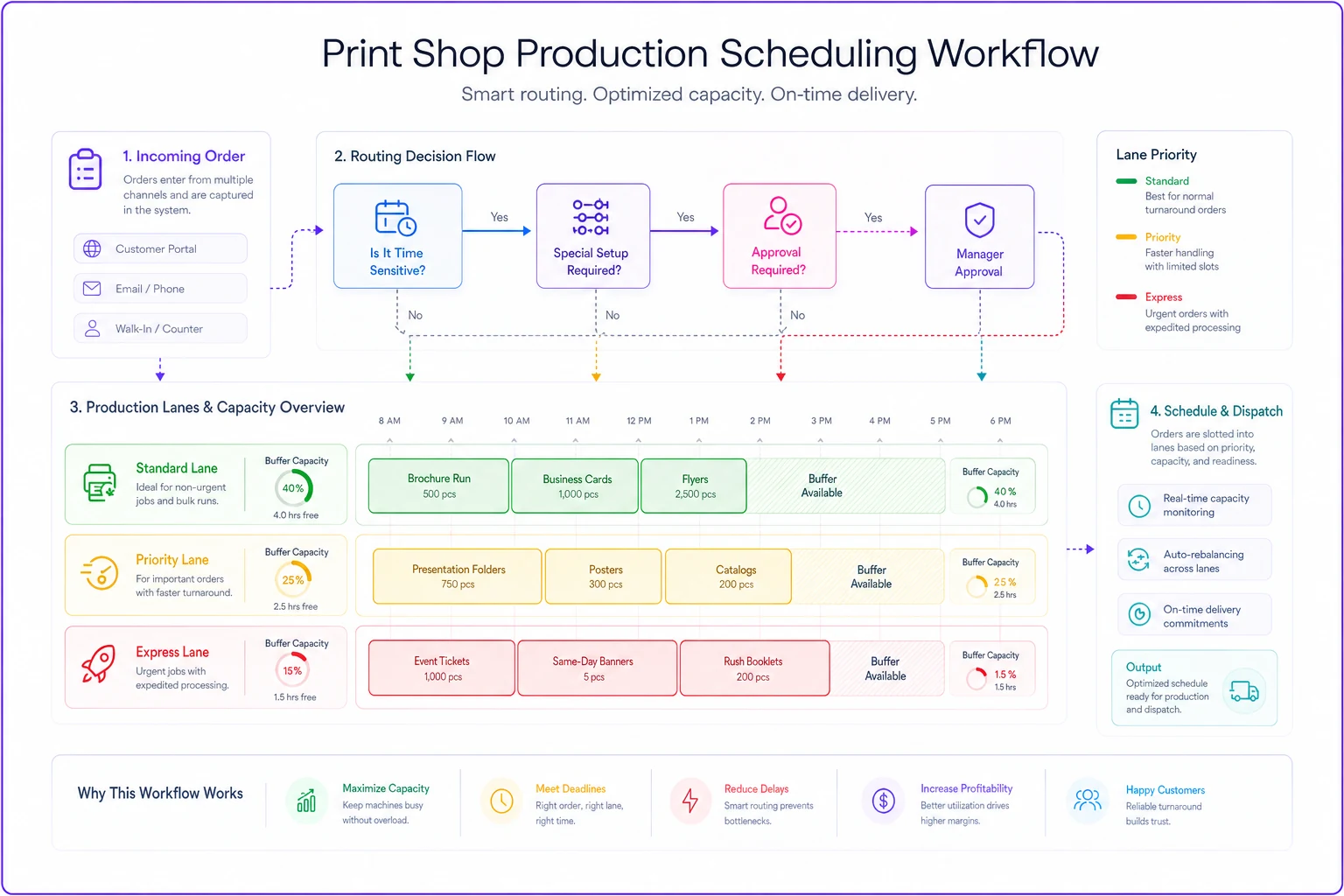
Each lane has different entry requirements. Standard jobs flow in automatically based on due date. Priority jobs only enter if they meet your matrix criteria and fit in predetermined slots. Express jobs require manager approval and must fit in the buffer capacity.
The schedule should show capacity limits clearly. If your press can produce 10,000 impressions per day, and you've already scheduled 8,000, everyone can see you have 2,000 impressions of buffer available. When someone wants to add a 3,000-impression rush job, the answer is obvious: it doesn't fit today.
Time blocks matter more than most shops realize. Don't just track daily capacity—track hourly blocks. A two-hour rush job might fit in Tuesday's schedule, but if your only open block is 4-6 PM and the client needs shipping by 3 PM, it's automatically declined.
Some shops take this further with automated rules. Their scheduling software automatically calculates whether a rush job fits based on current capacity, setup requirements, and shipping deadlines. If it doesn't fit, the system suggests the earliest available express slot or offers standard production.
The goal isn't to eliminate human judgment. It's to make 80% of decisions automatic so humans can focus on the 20% that actually require experience and nuance.
What this looks like in an actual print shop
A shop doing around $1.2M annually in mixed commercial printing shows how this plays out in practice.
Before implementing these systems, they were accepting roughly 15 rush orders per week. Sounds good for revenue, except their overall on-time delivery had dropped to 68%. They were bleeding regular clients—losing about $12k per month in repeat business.
First change: They created the three-lane system with dedicated buffer capacity. Monday/Wednesday/Friday mornings became priority blocks. They kept 20% daily capacity unscheduled.
Second change: They implemented the triage scripts. Their customer service team got a laminated card with the exact questions to ask. Within a week, "rush" requests dropped by 35% just from asking clarifying questions.
Third change: The accept/decline matrix became law. They actually posted it on the wall where everyone could see it. Sales couldn't override it without owner approval.
Fourth change: They adjusted their pricing. Express went from 50% to 85% rush charge. Priority went from 25% to 35%. They figured they'd lose some rush business. They were right—but in a good way.
-
Rush orders dropped from 15 to 6 per week
-
Rush revenue actually increased by $3,100/month (fewer orders but much higher margins)
-
On-time delivery hit 91%
-
Regular client retention improved dramatically
-
They won back two major accounts that had left
-
Press operators stopped threatening to quit
-
Overtime hours dropped 40%
The owner told me the biggest change wasn't financial—it was emotional. "We stopped running around with our hair on fire. Everything became predictable. We could actually plan."
Why most shops get this wrong (and stay stuck in chaos)
The biggest mistake shops make is thinking rush orders are a customer service issue. They're not. They're an operations issue.
Shops treat each rush request as a unique situation requiring case-by-case analysis. That's exhausting and inconsistent. Clients never know what to expect. Your team never knows what to do. Every day feels like crisis management.
Second mistake is having no real consequence for requesting rush service. When rush costs the same as standard (or just slightly more), why would clients plan ahead? You're training them to be disorganized.
Third mistake is not protecting standard production. When you constantly bump regular jobs for rush orders, you're essentially converting your entire operation to rush production without the rush pricing. You get all the stress and disruption with none of the financial benefit.
Most shops also underestimate switching costs. They think if a job only takes two hours to print, they can squeeze it anywhere. But between stopping the current job, setup, testing, production, cleanup, and switching back, that two-hour job creates four hours of disruption.
There's also the psychological cost everyone ignores. When your team knows any moment could bring a disruption that throws off their entire day, they can't get into a productive flow. They're always waiting for the next crisis. Quality suffers. Morale suffers. Eventually, your best people leave for shops that have their operations together.
The tools and systems that make this sustainable
Rules without systems are just suggestions. You need the infrastructure to make these decisions stick.
Your scheduling system is the foundation. Whether you're using PrintSmith, Prinect, or even a well-organized spreadsheet, it needs to show lanes, capacity, and buffer time clearly. Everyone from sales to production should see the same schedule in real-time.
Build the triage questions directly into your order intake process. If you use online ordering, add required fields that force clients to specify their event date and explain the urgency. Make rush pricing automatic based on the timeline they select.
Create visual management tools for the shop floor. A simple red/yellow/green board showing today's express, priority, and standard jobs keeps everyone aligned. When press operators can see that only one express job is scheduled for their shift, they know exactly when to handle it.
Documentation templates matter. Have a standard rush order confirmation form that includes the premium pricing, the exact delivery commitment, and the cutoff time for file changes. Get it signed. This prevents the "but you promised" conversations later.
Consider automation for the repetitive decisions. AI-powered operational software can now evaluate incoming orders against your rules, check current capacity, and suggest the appropriate production lane. These systems can even draft the client response explaining why a job does or doesn't qualify for rush service. This removes the emotional burden from your team while ensuring consistency.
The key is making the system visible and unchangeable by anyone except management. When sales can't override the matrix, when customer service can't promise impossible timelines, when production can't skip the buffer time—that's when the system actually works.
Making the transition without losing clients
You can't flip a switch from chaos to structure overnight. Clients who are used to calling Tuesday for Wednesday delivery will revolt if you suddenly demand five-day lead times.
Start by implementing the system for new clients only. Existing clients keep their current arrangements for 60 days while you send educational communications about the upcoming changes. Show them the benefit: more reliable delivery times, better quality control, the ability to truly expedite when really needed.
Phase in the pricing changes gradually. Month one, raise express charges by 25%. Month two, another 25%. By month three, you're at your target pricing. This gives clients time to adjust their behavior without feeling ambushed.
Pick your battles carefully. Your top three clients by revenue might get grandfathered into special arrangements. That's fine. The goal is to fix 80% of the chaos, not achieve perfection.
Communication is everything during this transition. Send a professional letter explaining that you're implementing new systems to serve them better. Focus on the benefits to them: guaranteed delivery times, better quality, the ability to reserve priority slots in advance.
Stick to the system even when it's uncomfortable. The first time you tell a good client "no" to a rush request that doesn't meet criteria, it feels terrible. But that's the moment that determines whether the system works or not. If you cave, everyone learns the rules don't really matter.
A shop in Portland nearly abandoned their new system in week three when a longtime client pushed back hard. The owner held firm, offered the client standard timeline or express pricing, and waited. The client complained, threatened to leave, then... placed the order with standard timing. They're still a client today, and they plan better.
From reactive scrambling to predictable profit
The difference between shops drowning in rush orders and shops profitably managing them isn't about working harder or faster. It's about having clear operational rules that everyone follows.
When you implement priority lanes, maintain buffer capacity, use triage scripts, and follow an accept/decline matrix, rush orders stop being disruptive firefights. They become predictable, profitable work that fits into predetermined slots.
Your team stops burning out because they know exactly when rush work will hit their station. Your regular clients stay happy because their jobs proceed on schedule. Your rush clients pay appropriately for the genuine value of expedited service.
Ready to simplify your print shop operations?
Join 500+ print shops using GoInkly to save time, reduce errors, and improve customer satisfaction.