


You know that sinking feeling when an online order comes through at 4:47 PM? The customer uploaded their design files somewhere in the order comments. The variable data spreadsheet is attached to an email from three days ago. Their shipping preferences are buried in a checkout note. And somehow you need to get all this into your production system before the night shift starts.
Most print shops lose between 45 to 90 minutes daily just translating ecommerce orders into production-ready jobs. That's not counting the mistakes—wrong file versions getting printed, VDP fields mapping incorrectly, rush orders sitting unnoticed in someone's inbox.
The real problem isn't the time spent. It's what happens when your best prepress operator calls in sick and nobody else knows their manual workarounds for getting WooCommerce orders into your RIP software.
Why field mapping breaks (and keeps breaking) in print production environments
Print shops face a unique integration challenge that other ecommerce businesses never encounter. When someone orders a t-shirt online, the product already exists. When someone orders 500 business cards with variable data personalization, you're manufacturing something custom using files, data, and specifications scattered across multiple systems.
Your ecommerce platform captures the order in a consumer-friendly format—maybe the customer uploads "BusinessCardsFinalv3.pdf" and attaches "employee_names.xlsx" for personalization. But your production software needs something completely different. It wants a hot folder with specifically named files, CSV data in a precise format, and job tickets with production parameters that don't even exist as fields in your online store.
The disconnect gets worse with specialty products. Take envelope printing with return address personalization. The customer enters their return address during checkout thinking it's for shipping. Your ecommerce system stores it as shippingaddressline1. But your digital press needs it mapped to VDPFieldReturnAddrL1 in a completely different data structure.
Three months later, you update your ecommerce platform. The field name changes from shippingaddressline1 to shipaddr_1. Nobody notices until 200 envelopes print with blank return addresses.
-
File upload paths change when you upgrade hosting
-
Custom checkout fields disappear after theme updates
-
API endpoints shift when platforms push updates
-
Data formats drift as different team members create manual workarounds
None of this shows up until something breaks spectacularly.
The real cost when orders don't flow automatically
Manual order entry burns through massive amounts of labor. Processing orders varies wildly—simple business cards might take 7 minutes to translate from web order to production job, while complex variable data projects can eat up 18 minutes or more. At 140 orders daily (pretty typical for a midsize shop), you're looking at 20+ hours of pure data entry.
Eliminate order confusion and delays.
GoInkly helps you manage every print order efficiently from submission to delivery.
- Centralized order tracking
- Production workflow management
- Inventory and supply monitoring
No credit card required
| Order Type | Processing Time |
|---|---|
| simple business cards | 7 minutes |
| complex variable data projects | 18 minutes or more |
Labor costs only tell part of the story. Error rates on manually entered orders typically run between 5-10%—usually small mistakes like transposed quantities or wrong paper stocks. Each error costs anywhere from $45 if you catch it early to $400+ for a full reprint after delivery.
The opportunity cost hurts worse. Prepress teams spending hours on order entry can't handle color correction and preflight work that actually requires expertise. Jobs back up. Customers complain about proofs taking too long. You lose accounts to competitors who turn proofs faster.
Scaling becomes impossible. Want to add evening fulfillment shifts? First you need to train more people on your maze of manual processes. Want to offer new products? Each one needs documentation for how to manually map its fields. Want to bring on a large corporate account? Better hire someone just to handle their order complexity.
Common order types that break standard integrations
Variable Data Print (VDP) Orders
These orders arrive as chaos. Design template might be in InDesign, variable data in Excel, mailing list in a separate CSV. Your customer uploads them through different interfaces—maybe the design through your upload portal, the data via email, and notes about data mapping in the order comments.
Standard ecommerce integrations completely fail here. They expect one file per order, not this multi-file orchestration. They can't parse which columns in the Excel sheet map to which text fields in the InDesign template. They definitely can't handle when customers use different column names than your templates expect.
Wide Format with Finishing Options
A customer orders three 4×8 foot banners with grommets every 18 inches and reinforced corners. Your ecommerce system captures this as item: banner, size: 4×8, quantity: 3, options: grommets, reinforcement.
But your wide format RIP needs cut marks positioned for your finishing equipment. Your production system needs to know whether these are printing on one roll or across multiple runs. The finishing department needs the grommet spacing converted into a punch pattern for their equipment.
Without proper field mapping, someone manually translates "grommets every 18 inches" into the twelve specific measurement fields your finishing equipment actually requires.
Ganged Run Products
Business cards ordered through your site need to gang with other orders for efficient production. The customer sees "500 business cards, next-day printing." Your production sees "add to tomorrow's 12-up sheet, position TBD, cut marks dependent on final gang layout."
Customer orders flow in continuously, but ganging decisions happen in batches. Fields like "position on sheet" don't exist until the gang is built. Color profiles depend on what else ends up on that sheet. The entire order structure shifts from individual to collective.
Platform-specific integration patterns that actually work
Shopify to Print MIS
Skip Shopify's standard variant system for print products—it wasn't built for your needs. Create product templates with metafields for every production parameter: paper weight, coating, fold type, perf location, everything.
On order creation, use Shopify Flow or a lightweight webhook to push orders to a staging database. Don't send them straight to production. In staging, run your field mapping logic—transform customer-friendly choices into production codes, validate file references, flag orders needing manual review.
In staging, run your field mapping logic—transform customer-friendly choices into production codes, validate file references, flag orders needing manual review.
For file handling, never store print files in Shopify. Use their order API to capture file URLs from your upload service, then move files to your production hot folders using scheduled scripts. This keeps large files off Shopify's CDN and puts them where your prepress software expects them.
WooCommerce to Direct-to-Garment
WooCommerce's flexibility becomes a liability without strict field standardization. Create a custom plugin that intercepts orders before they hit WooCommerce's standard fulfillment flow. This plugin should enforce your field structure, regardless of how products get added to the store.
For DTG orders specifically, map WooCommerce's product variations to your printer's color profiles at the plugin level. When someone orders a black shirt with white ink, your plugin translates this to the specific preset your Brother or Epson unit needs.
Use WooCommerce's REST API for order polling, but implement exponential backoff. Print shops often overload their WordPress hosting with aggressive polling. Check every 30 seconds during business hours, every 5 minutes overnight.
BigCommerce to Offset Workflow
BigCommerce's webhook system works well for print if you handle their event ordering correctly. Orders fire multiple webhooks—order created, payment processed, order updated. Build your integration to be idempotent. The same order might hit your system three times as it moves through checkout.
For offset printing, use BigCommerce's custom fields to capture press-specific requirements, but validate them in your middleware. BigCommerce won't stop someone from ordering spot UV on uncoated paper. Your integration layer needs to catch these impossibilities before they hit production.
Create a translation table between BigCommerce SKUs and your job ticket templates. When order 5847 comes through for "Premium Business Cards," your middleware knows to generate a job ticket for "BC-16PT-UV-CMYK-2SIDE" with all the associated prepress requirements.
Error handling recipes for print-specific failures
Missing File Scenarios
When an order arrives without required files, immediately flag it and start a recovery workflow. Send an automated email to the customer with a unique upload link tied to their order. But create a placeholder job in your production system marked as "waiting for files."
This prevents the most common error: files arriving later via email and nobody connecting them to the production job. The placeholder job contains all the order details except the actual files. When files arrive through any channel, your team knows exactly where they belong.
Set a timeout on file-waiting jobs. After 4 hours, escalate to a phone call. After 24 hours, either cancel or push the due date. Never let file-missing orders sit in limbo destroying your schedule.
VDP Field Mismatches
Build validation rules that run before data hits production. When a customer uploads a CSV for variable data business cards, parse it immediately. Check if required fields exist. Verify data types match—phone numbers that are actually formatted as numbers, ZIP codes that aren't dropping leading zeros.
When validation fails, generate a specific error report. Not "data error" but "Row 47: Phone number field contains letters" or "Missing required field: Employee_Email." Send this back through your ecommerce platform so customers can fix issues themselves.
Create fallback mappings for common variations. If your template expects "First_Name" but the customer's file has "FirstName" or "fname," map it automatically. Log these automatic mappings so your prepress team can verify them.
Platform API Failures
Ecommerce APIs fail constantly—rate limits, timeout errors, maintenance windows. Build your integration to handle this gracefully. Use a message queue that stores orders when APIs are down. When connectivity returns, process the backlog chronologically to maintain order sequence.
Implement circuit breakers for each integration point. If Shopify's API fails five times in two minutes, stop trying for 10 minutes instead of hammering their servers. This prevents your integration from getting permanently rate-limited.
For critical order data, maintain a local cache. When a customer calls about their order and your ecommerce platform is down, you can still see basic details. Cache order number, customer info, products, and status—enough to answer questions without accessing the source system.
Building your integration safety net
Every print shop needs three levels of integration protection: validation, monitoring, and recovery.
Validation happens at ingestion. Set up rules that check every field that touches production. Paper weight must be a number between 20 and 200. File extensions must be PDF, AI, or EPS. Quantity must be divisible by the minimum run size for that product. These rules catch problems before they corrupt your workflow.
Monitoring tracks the health of your integrations. Count orders flowing through each hour. Alert when the count drops unexpectedly—usually means something broke. Monitor field mapping success rates. If 100% of orders suddenly have "undefined" in the coating field, your mapping logic probably broke. Watch file transfer completion. Orders without files after 2 hours indicate upload problems.
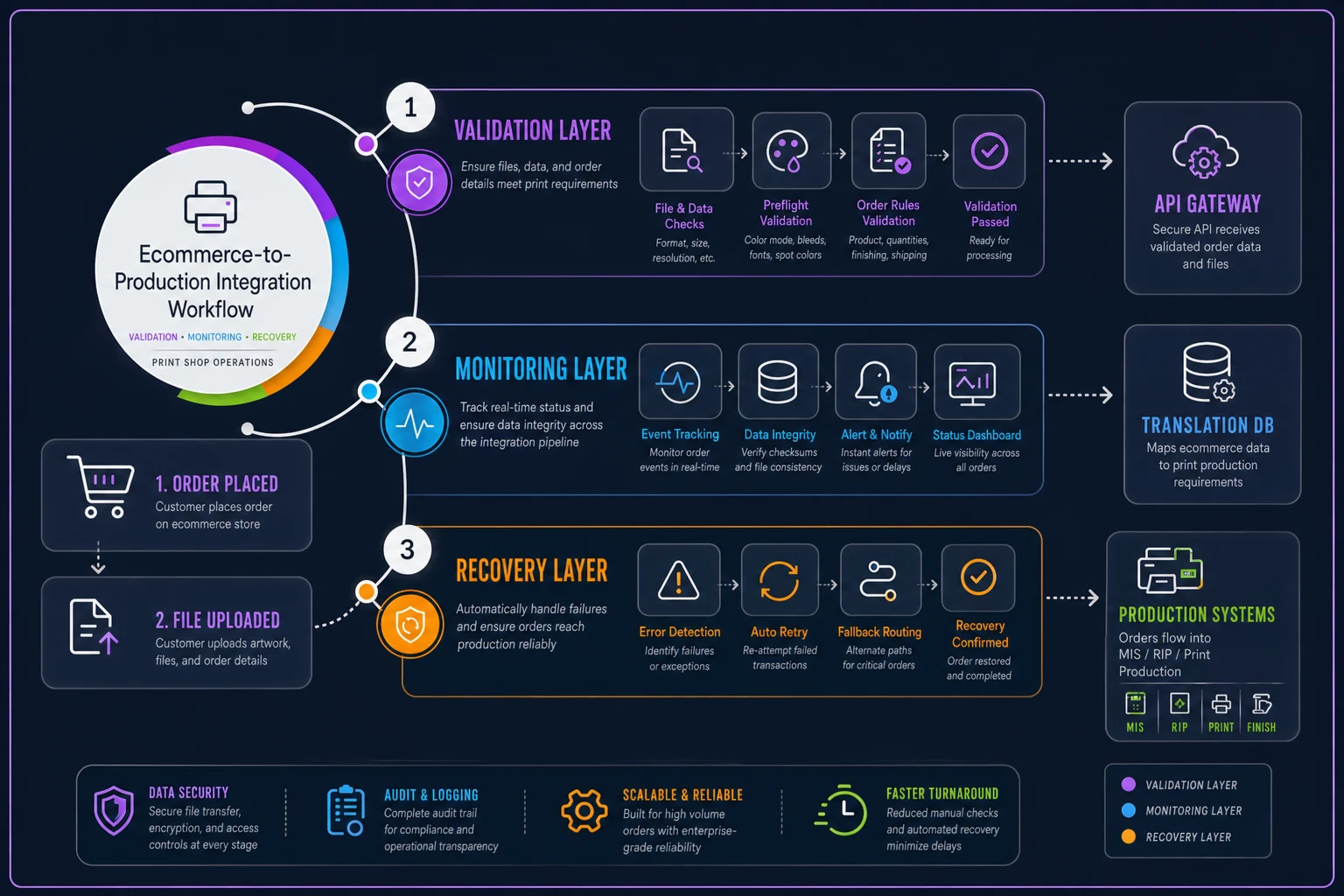
Recovery procedures bring you back online fast. Document every manual workaround your team uses when integrations fail. Store example API calls that successfully created orders. Keep CSV templates showing correct field formatting. When systems break on a Friday night, whoever's on call needs clear instructions, not institutional knowledge locked in someone's head.
The lightweight integration approach that scales
Instead of building complex real-time integrations, consider a batch processing approach. Every 15 minutes, pull new orders from your ecommerce platform. Process them through your field mapping logic. Load them into production systems. Batching provides natural breakpoints for error handling and manual review.
Start with the highest-volume, simplest products. If 60% of your orders are standard business cards, automate those first. Leave complex custom jobs manual while you prove the integration works. Each successful product type builds confidence and reveals patterns for the next automation.
Use a translation database between systems. Don't map fields directly from WooCommerce to PrintSmith. Instead, WooCommerce writes to your translation database using its field names. Your production system reads from the database using its field names. This abstraction layer means platform changes only break one connection, not your entire workflow.
Build manual override capabilities into every integration. Sometimes a customer puts special instructions in the wrong field. Sometimes your automation makes the wrong decision. Give your team a way to intercept and modify orders before they hit production. This safety valve prevents small edge cases from forcing you back to fully manual processes.
Making the business case for integration investment
Print shop owners often hesitate to invest in integration infrastructure. The upfront cost seems high compared to just handling orders manually.
A shop processing 100 orders daily at 8 minutes each burns 13 hours on manual entry. At $20/hour, that's nearly $70,000 annually. Add error recovery costs, and you're pushing $80,000 yearly on a problem that software could largely eliminate.
Integration investment typically pays back in under six months through labor savings alone. The real value comes from what you can do next—take on more complex work, offer faster turnaround, expand product lines without adding overhead.
Some shops have built their entire competitive advantage on superior integration. They quote instantly, proof automatically, and ship faster because orders flow seamlessly from website to warehouse. While competitors juggle spreadsheets, they're scaling revenue.
Moving from manual to automated: your next steps
Don't attempt to automate everything at once. Pick your most straightforward, highest-volume product and start there. Map every field from order to production. Document edge cases and how you handle them. Build the integration for just this one product.
Run both systems in parallel initially. Orders flow through automatically, but someone verifies them before production. This catches mapping errors without risking expensive mistakes. After a week of clean orders, remove the manual check for that product type.
Gradually expand to more complex products. Each integration teaches you patterns that speed up the next one. Your translation database grows more sophisticated. Your error handling becomes more nuanced.
Track metrics during rollout. Monitor order processing time, error rates, and customer complaints. You need data proving the integration works before removing manual failsafes.
Document everything. When your integration inevitably needs updates, clear documentation means anyone can maintain it, not just the person who built it.
Integration between ecommerce and production systems isn't optional anymore for print shops that want to scale. The question isn't whether to integrate, but how quickly you can afford to do it. Every day you wait, competitors get faster while you get further behind.
The patterns and approaches outlined here work. They've been proven across dozens of print shops handling everything from business cards to vehicle wraps. Start small, validate constantly, and build systems that bend but don't break when platforms change.
Your operational software should eliminate the mundane transfer of data between systems, letting your team focus on what actually requires human expertise—ensuring print quality, managing customer relationships, and growing your business. Modern AI-powered platforms can handle the field mapping complexity, maintain the integration logic, and adapt as your needs change.
The days of manually copying orders from website to production are ending. Make sure your shop isn't still doing it when they do.
Ready to simplify your print shop operations?
Join 500+ print shops using GoInkly to save time, reduce errors, and improve customer satisfaction.