


Walk into any small print shop during their busy season and you'll witness controlled chaos.
Most print shops struggle with workflow coordination, not individual department problems
Walk into any small print shop during their busy season and you'll witness controlled chaos. A prepress operator hunched over their screen fixing a client's files while the press operator stands idle, waiting. The finishing department has three jobs piled up from yesterday because nobody told them about the rush order that jumped the queue. Meanwhile, the owner bounces between departments trying to figure out why that wedding invitation order is running late.
This isn't poor management. It's what happens when print shops treat prepress, press, and finishing as three separate operations instead of one connected workflow. The disconnect costs them roughly 15-20% of their potential revenue through delays, rework, and capacity mismatches.
The handoff problem nobody talks about
Most print production workflows break at the handoffs. Not the actual printing. Not the design work. The mundane moment when one department needs to communicate what happens next.
Eliminate order confusion and delays.
GoInkly helps you manage every print order efficiently from submission to delivery.
- Centralized order tracking
- Production workflow management
- Inventory and supply monitoring
No credit card required
A typical 8-person print shop handles around 40-60 jobs per week. Each job moves through at least three departments. That's 120-180 handoffs weekly where information needs to transfer cleanly. Miss critical specs on just 5% of those handoffs and you're looking at 6-9 jobs per week with problems. At an average job value of $400-600, those miscommunications eat up $2,400-5,400 weekly in rework, delays, or unhappy customers who don't come back.
These handoff failures compound. When prepress doesn't flag that a file needs special color matching, press runs it standard. When press doesn't note they substituted paper stock, finishing cuts it wrong. When finishing doesn't update the job status, customer service promises delivery dates they can't hit.
The shops that run smoothest have figured out how to make these transitions automatic. They've built systems where the critical information travels with every job, and everyone knows exactly what they need to pass along to the next person.
Mapping the actual workflow (not the one you think you have)
Print shops usually map their workflow based on how they want things to work. Clean, linear, logical. But the actual workflow looks different.
Take a standard business card order. The ideal flow: intake → design approval → prepress → press → cutting → packaging → delivery. Simple enough.
The actual flow includes loops nobody accounts for. The client changes their mind after seeing the proof (back to design). The file has transparency issues (back to prepress). The press operator notices a typo during setup (full stop, back to beginning). The cutting reveals registration problems (possible reprint).
Decision points that create loops:
-
Client approval stages (proof, press check, finishing sample)
-
Quality checkpoints between departments
-
Stock availability confirmations
-
Equipment availability windows
-
Parallel processes (while design revises, prepress preps another job)
Information that must travel with each job:
-
Original specifications
-
Client preferences and history
-
Changes made at each stage
-
Problems encountered
-
Time invested per department
-
Materials used vs. estimated
Hidden dependencies:
-
Which jobs can gang run together
-
Drying time requirements
-
Special finishing tool availability
-
Operator expertise requirements
-
Client pickup schedules
A shop running 50 jobs weekly without mapping these elements operates partially blind. They know jobs are moving through, but not where slowdowns cluster or why certain job types always run late.
Once you map the real workflow instead of the imagined one, you can start building systems that account for reality instead of fighting it.
Here's a simple workflow visualization showing loops and handoffs.
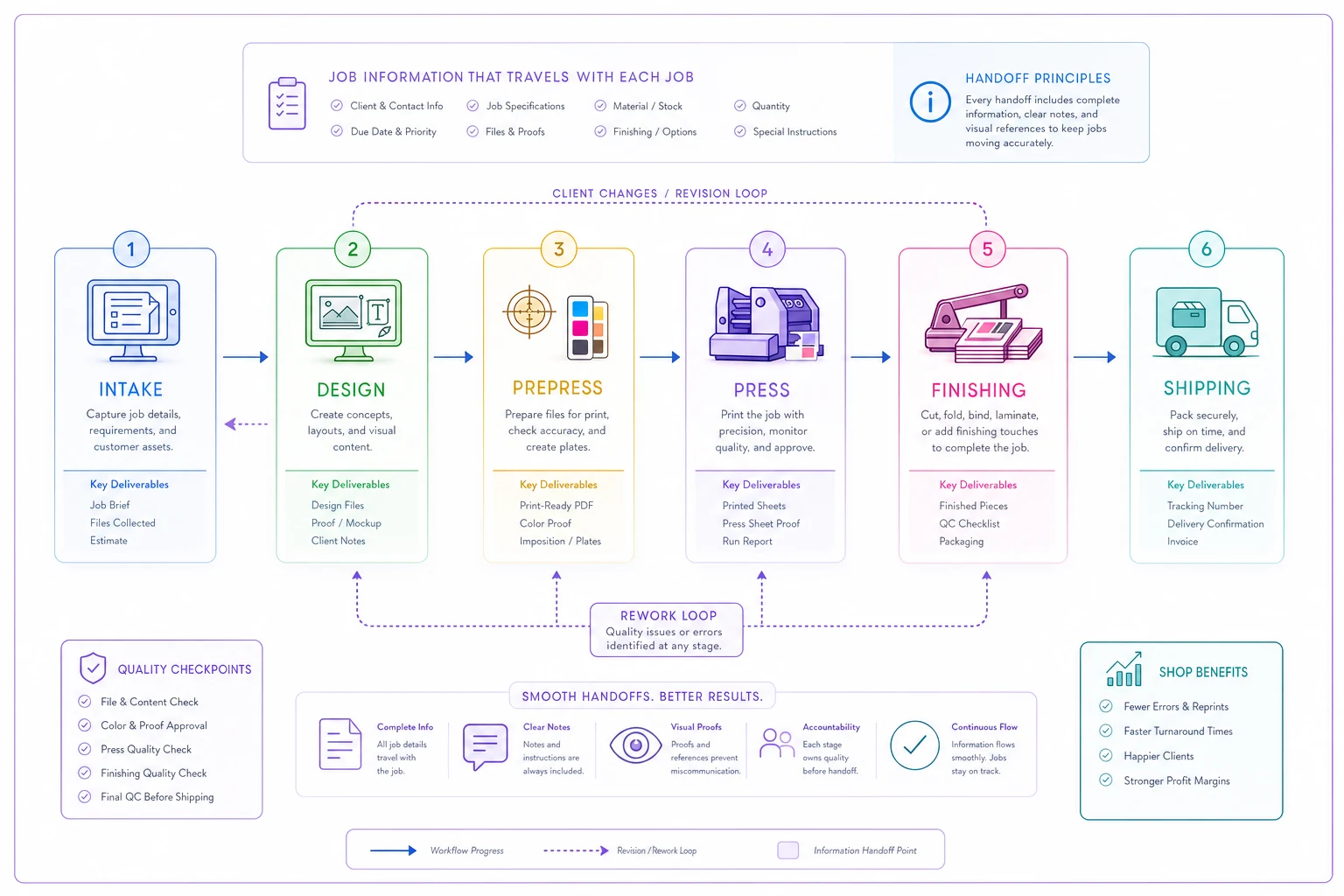
Once you map the real workflow instead of the imagined one, you can start building systems that account for reality instead of fighting it.
Building SLAs that actually work in print production
Service Level Agreements between departments sound corporate, but they solve a fundamental problem in print shops: nobody knows what "normal" turnaround should be.
Without internal SLAs, every job becomes urgent. The sales rep promises the client 48 hours without checking press capacity. Prepress spends six hours perfecting files for a low-margin job while high-value orders wait. Press operators make their own priorities based on ease of setup rather than delivery dates.
Effective internal SLAs for print production look like:
| Department Handoff | Standard Job | Rush Job | Complex Job |
|---|---|---|---|
| Sales → Prepress | 2 hours | 30 minutes | 4 hours |
| Prepress → Press | 4 hours | 1 hour | 8 hours |
| Press → Finishing | Same day | 2 hours | Next day |
| Finishing → Shipping | 2 hours | 1 hour | 4 hours |
What makes these SLAs actually work: they include conditions and exceptions.
Standard business cards get the standard timeline. But business cards with spot UV, embossing, or special die cuts automatically shift to complex job timing. Rush isn't just "faster" - it triggers specific protocols like dedicated operator assignment and priority machine access.
The SLAs also define what information must accompany each handoff. Prepress doesn't just send files to press. They include:
-
Color profiles used
-
Bleed specifications
-
Imposition layout
-
Stock requirements
-
Special instructions
-
Known client preferences
This eliminates the back-and-forth that kills productivity. Press operators stop walking back to prepress asking questions. Finishing knows exactly what they're receiving and when.
Finding and fixing the real bottlenecks
Every print shop owner thinks they know their bottleneck. Usually they're wrong. They see the backup at the cutting station and assume that's the problem. But the backup exists because upstream issues cascade downward.
Real bottleneck diagnosis requires tracking job flow patterns over time. Not just counting how long each stage takes, but understanding why delays happen.
Common hidden bottlenecks in small print shops:
-
Information bottlenecks The job sits physically ready but nobody knows what to do next. File names don't match job tickets. Instructions are verbal and the person who heard them is off today. The client approval came via text to the sales rep who forgot to update the system.
-
Decision bottlenecks Jobs pile up waiting for someone to decide. Which paper substitution is acceptable? Should we run this slightly off-color or reprint? Can we combine these two jobs on one sheet? The operator level staff won't make the call, and management is busy elsewhere.
-
Transition bottlenecks The physical movement between departments takes longer than the work itself. Prepress is upstairs, press is in the main floor, finishing is in the back building. Jobs sit in "transition zones" for hours because nobody's specifically responsible for moving them.
-
Knowledge bottlenecks Only one person knows how to run the special finishing equipment. Only the owner can approve color matches. Only the senior prepress tech can fix complex transparency issues. When that person is sick, on vacation, or busy, everything backing up behind their unique knowledge.
A print shop doing $800K annually typically has 2-3 major bottlenecks costing them 20-30% of potential throughput. Fix the information flow and decision authority issues first - they're cheaper to solve than equipment constraints and often have bigger impact.
The SOP templates that actually get used
Standard Operating Procedures fail in print shops because they're written like technical manuals instead of working documents. A 40-page SOP for running the digital press helps nobody when problems happen fast.
Effective print shop SOPs are single-page references that answer immediate questions. They live at workstations, not in binders. They get updated when things change, not annually. They're written by operators, not consultants.
What actually works:
Prepress Preflight Checklist
-
Font status
embedded or outlined?
-
Bleeds
0.125" minimum confirmed?
-
Color mode
CMYK converted?
-
Resolution
300dpi at print size?
-
Overprint settings
checked?
-
Transparency
flattened if needed?
-
File naming
matches job ticket?
Press Setup Standard
-
Previous job cleaned/purged
-
Stock matches ticket (weight, size, grain)
-
Color profiles loaded for stock type
-
Registration marks aligned
-
Density readings within range
-
First sheet approval documented
-
Run count entered in system
Finishing Quality Gates
-
Cut size matches specification (±1/32")
-
Score placement correct
-
Fold direction confirmed
-
Binding alignment checked
-
Packaging matches delivery method
-
Count verified (±2% acceptable)
-
Job ticket updated with actual quantities
These aren't comprehensive guides. They're memory aids that prevent common mistakes. The full procedures exist, but operators need quick references during production.
Laminate the single-page SOPs and post them at each workstation for quick reference.
These aren't comprehensive guides. They're memory aids that prevent common mistakes. The full procedures exist, but operators need quick references during production.
Building handoff protocols that eliminate confusion
The handoff moment determines whether a job flows smoothly or stalls. Most shops rely on verbal communication or sticky notes. This works until it doesn't - usually at the worst possible moment.
Structured handoff protocols seem like overhead until you calculate the cost of confusion. A single reprinted job due to miscommunication typically costs $300-500 in materials and labor. Prevent two of those monthly and you've saved $600-1000.
Effective handoff protocols specify:
-
What physically moves The job materials, samples, and documentation
-
What information transfers Specifications, changes, issues encountered, next steps required
-
Who confirms receipt Not just "finishing department" but "Tom in finishing"
-
When escalation triggers If handoff doesn't happen within SLA, who gets notified?
-
How verification happens Receiving department confirms they have everything needed before accepting
The protocol isn't complex, but it must be consistent. Every handoff follows the same pattern. This builds muscle memory and reduces cognitive load during busy periods.
What changes as volume grows
A shop running 30 jobs weekly operates differently than one running 80 jobs weekly. Most shops try to scale their original workflows instead of evolving them.
At 30 jobs weekly, everyone knows every job. The owner can track status in their head. Communication happens naturally because everyone's within earshot. Quality issues get caught because someone remembers the client's preferences.
At 50 jobs weekly, cracks appear. Some jobs get forgotten until the client calls. Operators make assumptions because they can't track down answers fast enough. The owner spends more time answering questions than managing the business.
At 80 jobs weekly, the informal system collapses. Without structured workflows, jobs get lost, deadlines get missed, and quality becomes inconsistent. The shop either evolves its systems or hits a ceiling where taking more work just creates more problems.
The evolution typically follows this pattern:
Phase 1 (under 40 jobs/week):
-
Verbal communication works
-
Owner involved in most decisions
-
Quality depends on individual memory
-
Problems solved ad-hoc
Phase 2 (40-60 jobs/week):
-
Need written job tickets
-
Department heads make routine decisions
-
Checkpoint systems prevent major errors
-
Some standardization of common jobs
Phase 3 (60+ jobs/week):
-
Full workflow documentation required
-
Clear escalation paths
-
Automated status tracking
-
Standardized everything with exception protocols
Shops that recognize which phase they're in and build appropriate systems can grow smoothly. Those that don't hit operational walls where more business just means more chaos.
Digital tracking vs paper tickets (and why you need both)
The paper ticket versus digital tracking debate misses the point. In real print shop operations, you need both because they serve different purposes at different moments.
Digital systems excel at:
-
Real-time status updates
-
Historical data tracking
-
Automated notifications
-
Multi-location visibility
-
Reporting and analytics
Paper tickets excel at:
-
Physical job accompaniment
-
Quick operator notes
-
Power outage continuity
-
No login required access
-
Visual queue management
The shops that run smoothest use digital systems for management and coordination while maintaining paper tickets for production floor reality. The job ticket travels with physical materials. The digital system tracks overall status and metrics.
This dual system prevents common failure points. When the network goes down, production continues with paper tickets. When tickets get lost or damaged, the digital system has the backup. When management needs to see bottlenecks, they check the digital dashboard. When operators need job specs, they grab the ticket.
There's no reason to force an either-or decision. Use digital for what it does best, paper for what it does best, and build bridges between them that keep information synchronized.
Creating accountability without micromanagement
Print shop workflow accountability fails when it becomes surveillance. Nobody performs well feeling watched constantly. But without accountability, handoffs fail and quality drops.
The balance comes from measuring outcomes, not activities. Instead of tracking every minute of operator time, measure department-level performance against SLAs. Instead of watching every job movement, track weekly completion rates and error frequencies.
Effective accountability metrics:
-
Department level - Jobs completed within SLA: target 85% - Rework rate: target under 3% - Handoff completeness: target 95% - Capacity utilization: target 75-80%
-
Individual level - Quality score (errors per 100 jobs) - Cross-training progress - Process improvement suggestions - Customer satisfaction mentions
These metrics create visibility without suffocation. Operators know what's measured but aren't paralyzed by constant oversight. Managers can spot trends without hovering.
Make metrics visible to everyone. Post department performance weekly. Celebrate improvements. Address problems as system issues, not personal failures. When finishing's handoff completeness drops, look at what information they're not receiving from press, not who's slacking off.
The compound effect of small improvements
Print shops often wait for the big fix - the new press, the perfect employee, the game-changing client. But operational excellence comes from compound small improvements.
Consider a typical business card job flowing through the shop. Shaving 10 minutes off prepress, 15 minutes off press setup, and 5 minutes off finishing seems minor. But across 20 business card jobs monthly, that's 10 hours saved. At shop rate of $125/hour, that's $1,250 monthly or $15,000 annually from one product type improvement.
Apply similar improvements across all job types. The impact compounds. Better handoffs save 5 minutes per job. Clearer SOPs prevent one rework weekly. Proper SLAs eliminate rush charges from unnecessary expediting. Suddenly the shop runs 20% more volume with the same resources.
These improvements also compound behaviorally. When prepress knows press will receive complete information, they spend less time following up. When press trusts prepress caught the errors, they spend less time double-checking. When finishing gets consistent handoffs, they batch similar jobs more efficiently.
The hardest part is measuring small improvements consistently enough to see the pattern. But shops that commit to this approach often see dramatic changes within 6-8 months.
Software automation that makes sense (and what doesn't)
The promise of workflow automation in print shops often exceeds reality. Not because the technology doesn't work, but because shops automate the wrong things or automate before their processes are stable.
Automation that actually helps small print shops:
-
Job status tracking Instead of calling around asking "where's job 3847?", everyone sees real-time status. This alone saves 2-3 hours daily in shops running 50+ jobs weekly.
-
Specification capture Online ordering systems that force customers to provide complete specifications upfront. No more chasing down "what paper did you want?" after taking the order.
-
Proof routing Automated proof delivery and approval tracking. When clients approve, production knows immediately. When they request changes, design gets notified automatically.
-
Inventory alerts When stock drops below reorder points, purchasing gets notified. When special materials arrive, relevant jobs get flagged as ready to run.
Automation that typically fails:
-
Automatic scheduling Print production has too many variables for pure automation. Machine breakdowns, rush orders, and material availability constantly shuffle priorities.
-
Quality inspection Despite advances, human eyes catch issues software misses. Automated inspection supplements but doesn't replace operator vigilance.
-
Complex imposition While software can handle standard layouts, complex jobs need human optimization for waste reduction and production efficiency.
Automate information flow and communication, but keep humans in charge of decisions and quality. This approach typically reduces operational overhead by 20-30% without the frustration of fighting with overly rigid systems.
AI-powered operational software particularly helps with the coordination challenges. Instead of operators memorizing complex routing rules, the system knows this client always wants press checks, that product requires special packaging, these jobs can gang together. The software handles the complexity while operators focus on execution.
The key is starting with manual processes that work, then gradually automating the predictable parts while maintaining human oversight of the variable elements.
Making it stick: Implementation that works
Print shops are littered with failed improvement initiatives. New procedures that lasted two weeks. Software that never got fully adopted. SOPs gathering dust in drawers. The difference between successful implementation and expensive failure comes down to approach.
Start with one workflow, not everything. Pick your highest volume, most standardized product - usually business cards or postcards. Build the complete workflow for just that product. Create the SOPs, establish the SLAs, implement the handoff protocols. Run it for a month. Fix what breaks. Then expand.
This contained approach lets you:
-
Map current state (one week)
-
Design improved workflow (one week)
-
Train team on new approach (one week)
-
Run parallel with old system (two weeks)
-
Cut over to new system (one day)
-
Refine based on reality (ongoing)
The parallel run period is crucial. Operators need to experience the new system without the pressure of abandoned safety nets. When problems surface - and they will - you can fall back to old methods while fixing issues.
Don't underestimate the cultural change required. Even good operational improvements require people to change habits they've built over years. Expect resistance, not because people are difficult, but because change is inherently uncomfortable even when it's beneficial
Don't underestimate the cultural change required. Even good operational improvements require people to change habits they've built over years. Expect resistance, not because people are difficult, but because change is inherently uncomfortable even when it's beneficial
Ready to simplify your print shop operations?
Join 500+ print shops using GoInkly to save time, reduce errors, and improve customer satisfaction.