

Most print shops don't need another tool. They need the five tools they already have to stop living in separate silos. The quote lives in one system, the job ticket in another, inventory in a spreadsheet, and shipping labels in whatever carrier portal happens to be open. That's where the real cost hides — not in software fees, but in the double entry, the lost deposits, and the "wait, did we already order that paper?" conversations.
This guide narrows the field to six print shop operations platforms that genuinely handle order-to-production as one connected flow, with real costing, inventory visibility, and shipping that doesn't require retyping an address. No ranking games — just what each one is actually good at, who it fits, and where it falls short.
What "end-to-end" should actually mean (buyer checklist)
Before looking at any vendor, get clear on the non-negotiables. A platform can be beautiful and still leave you stitching things together manually. Here's the shortlist of capabilities that separate a true operations platform from a glorified quoting tool:
-
Quote-to-job conversion without re-entry — the accepted quote becomes the production ticket, carrying specs, costs, and customer data forward
-
Per-order costing that reflects reality — material, labor, press time, and finishing allocated to the specific job, not an averaged guess
-
Live inventory tied to jobs — stock decrements when a job consumes it, with reorder visibility for paper, ink, and specialty substrates
-
Shipping integration with rate retrieval — labels, tracking, and live rates from carriers or an aggregator, pushed back to the order
-
An ecommerce or storefront connection — web orders flowing in as production-ready jobs, not emails someone has to re-key
-
Accounting or ERP sync — invoices, payments, and COGS landing where your bookkeeper expects them
-
Status visibility across the shop floor — one place to see where every job sits
Miss two or more of these and you'll end up patching the gap manually. That patch is usually where errors creep in.
How these were vetted
Nothing here is based on a vendor's marketing page alone. Each platform was evaluated against four things:
Eliminate order confusion and delays.
GoInkly helps you manage every print order efficiently from submission to delivery.
- Centralized order tracking
- Production workflow management
- Inventory and supply monitoring
No credit card required
-
Feature verification — confirming the order-to-production chain exists as described, not just as a roadmap item
-
Integration documentation — checking published connector lists and API docs for the carts, carriers, and accounting tools shops actually use
-
Vendor pricing pages and quotes — comparing published bands and, where pricing is "contact us," typical deal sizes reported by shops
-
User reviews across shop sizes — weighting feedback from shops that match the fit profile, since a 2-press shop and a 30-press plant have very different complaints
Pricing bands below are approximate and move around — treat them as planning ranges, not quotes.
Quick comparison matrix
Shops that skip this kind of side-by-side overview almost always end up evaluating tools that don't fit their size or workflow, then wonder why the demos felt misleading. The table below is a starting filter, not a final answer.
| Platform | Pricing model | Typical band | Best shop-size fit | Standout integration strength |
|---|---|---|---|---|
| Printavo | Subscription | ~$200–$500/mo | 1–10 person screen/apparel & small commercial | Simple storefront + QuickBooks |
| PrintVis | Subscription (per-user, ERP-based) | ~$150–$250/user/mo + implementation | 15–75+ commercial & packaging | Full Microsoft Dynamics ERP backbone |
| Ordant | Subscription | ~$150–$400/mo | 3–20 sign, wide-format & commercial | Pricing engine + shipping + QuickBooks |
| Pressero / PrintIQ | Subscription + per-order (storefront) | ~$300–$900/mo tier-dependent | 5–50 web-to-print commercial | Deep W2P storefronts + MIS linkage |
| OnPrint / PrintIQ (MIS) | Subscription | Quote-based, ~mid-four-figures/mo | 10–50 multi-press commercial | Estimating depth + carrier integration |
| ShopVOX | Subscription | ~$100–$350/mo | 1–15 sign, custom & small commercial | Visual workflow + ShipStation + accounting |
Use it to rule out tools that clearly don't fit, then go deeper on the two or three that do.
The six platforms, in detail
1. Printavo — the small-shop workhorse
Printavo earned its following in the apparel and screen-print world, but it works fine for small commercial and promo shops too. The appeal is speed: quotes, invoices, approvals, and a production calendar you can actually read at a glance.
-
Pricing model Flat monthly subscription, tiered by features and user count.
-
Typical band Roughly $200–$500/month depending on tier.
-
Standout integrations Simple online storefronts, QuickBooks, and payment capture (deposits built in). Shipping is lighter than the commercial-focused tools.
-
Shop-size fit A 1–10 person shop running digital, apparel, or light commercial work.
-
Pros Fast to learn, strong approval and messaging flow, fair price.
-
Cons Costing and inventory are basic — fine for simple jobs, thin for mixed-material commercial work.
The honest limit: once you're allocating paper, plates, and finishing across mixed batches, Printavo's costing starts feeling like a rounding exercise rather than true job cost.
2. PrintVis — ERP-grade for commercial plants
PrintVis is built on Microsoft Dynamics Business Central, which tells you most of what you need to know. This isn't a scheduling app with invoicing bolted on — it's a full ERP with print-specific estimating, scheduling, inventory, and costing layered in.
-
Pricing model Per-user subscription plus a real implementation project.
-
Typical band Roughly $150–$250/user/month, with implementation often running well into five figures.
-
Standout integrations The entire Dynamics ecosystem — accounting, inventory, purchasing — all native. Connects to JDF/JMF workflows and major carriers via Dynamics connectors.
-
Shop-size fit A 15–75+ person commercial or packaging operation.
-
Pros True costing and inventory depth; one system of record for the whole business.
-
Cons Overkill and over-budget for small shops; implementation is a project, not a weekend.
If you're running multiple presses and a bindery and currently reconciling COGS by hand at month-end, this is the tier that eliminates that work. Below about 15 people, the overhead rarely pays off.
3. Ordant — the costing-first middle ground
Ordant tends to show up on shortlists for sign, wide-format, and small-to-mid commercial shops that outgrew spreadsheets but aren't ready for ERP. Its pricing engine is the standout — it handles substrate and finishing combinations without you building a separate calculator.
-
Pricing model Monthly subscription, tiered by users and features.
-
Typical band Roughly $150–$400/month.
-
Standout integrations QuickBooks and Xero, shipping (including rate retrieval), and ecommerce/storefront connections.
-
Shop-size fit A 3–20 person wide-format or commercial shop.
-
Pros Strong per-order costing, live inventory, clean shipping flow.
-
Cons Reporting depth trails the full ERP tools; some advanced automation sits behind higher tiers.
4. Pressero — web-to-print storefronts done well
If a big share of your orders come through branded customer portals — corporate clients reordering business cards, franchises pulling from approved templates — Pressero (from Aleyant, often paired with its tFLOW and Pressero ecosystem) is purpose-built for that. The storefront experience is the product.
-
Pricing model Subscription, sometimes with per-storefront or per-order components.
-
Typical band Roughly $300–$900/month depending on storefront count and modules.
-
Standout integrations Deep web-to-print, automated preflight workflows, and MIS/accounting linkage.
-
Shop-size fit A 5–50 person web-to-print-heavy commercial shop.
-
Pros Best-in-class customer-facing ordering; strong for repeat B2B reorders.
-
Cons You'll likely pair it with a separate MIS for deep costing; cost scales with storefronts.
Worth knowing before you buy: shops adopt Pressero for the storefront, love it, then realize the production and costing side still needs a second system. Budget for the pair, not just the portal.
5. PrintIQ — estimating and workflow for multi-press shops
PrintIQ sits squarely in the commercial MIS space with genuinely strong estimating logic and a workflow engine that handles complex jobs. Shops that quote a lot of varied, specced work tend to rate its estimating highest.
-
Pricing model Subscription, quote-based.
-
Typical band Quote-dependent — plan for the mid-four-figures-per-month range at scale.
-
Standout integrations Carrier integrations, accounting packages, and ecommerce/W2P connectors.
-
Shop-size fit A 10–50 person multi-press commercial shop.
-
Pros Deep, reliable estimating; solid end-to-end workflow.
-
Cons Pricing opacity makes budgeting harder; learning curve for the full feature set.
6. ShopVOX — visual workflow for custom shops
ShopVOX is a favorite in sign and custom shops because the workflow is visual and intuitive — you can see jobs move across stages without decoding a spreadsheet.
It covers quoting, production, invoicing, and shipping without demanding an implementation team.
-
Pricing model Monthly subscription, tiered.
-
Typical band Roughly $100–$350/month.
-
Standout integrations ShipStation for shipping, QuickBooks/Xero for accounting, and online proofing/payment.
-
Shop-size fit A 1–15 person sign, custom, or small commercial shop.
-
Pros Approachable, good value, clear production visibility.
-
Cons Inventory and deep costing are lighter than the ERP-class tools.
ShopVOX remains a solid pick when you want good production visibility without an implementation project.
A real scenario: picking the right tier instead of the biggest one
A wide-format shop — about seven people, two large-format printers, a laminator, and growing B2B reorder volume — was weighing an ERP-class platform after a frustrating month of manual COGS reconciliation. On paper, the big system solved everything.
The problem: the implementation quote landed somewhere north of $40k before monthly fees, and the shop was quoting maybe 120–150 jobs a month. The ERP's costing depth was real, but they weren't running the kind of volume or bindery complexity that justified it.
They went with a mid-tier option (Ordant-class) at a few hundred a month instead. Order entry that used to eat roughly 6–8 hours a week across staff dropped to something closer to an hour or two, mostly because web orders stopped getting re-keyed and shipping labels pulled addresses straight from the order. True job costing finally showed that one "profitable" recurring banner job was running on a thin margin once laminate waste was allocated properly. Nothing dramatic happened overnight — but within a couple of quarters the quoting got tighter and the month-end close stopped being a dreaded afternoon.
The lesson isn't "buy small." Match the tool to your actual job complexity and volume, not to the demo that impressed you most.
When each tier actually makes sense
Go with a light subscription tool (Printavo, ShopVOX) when you're under roughly 10 people, your jobs are relatively consistent, and your biggest pain is coordination and status visibility — not deep costing.
Go with a costing-first mid-tier (Ordant, PrintIQ at the lower end) when mixed-material jobs are making your margins fuzzy and you need real per-order costing plus inventory, but an ERP project would swamp you.
Go with a storefront-led platform (Pressero) when customer self-service ordering is a growth lever — and plan to pair it with production/MIS depth.
Go with ERP-class (PrintVis, PrintIQ at scale) when you're running multiple presses plus finishing, reconciling COGS by hand, and the hidden cost of fragmented systems already exceeds an implementation budget.
Match the tool to your job complexity and volume before committing to an ERP.
Who should NOT rush this: a two-person shop with 30 clean jobs a month. You don't need a platform migration — you need tight spreadsheets and discipline. The ROI isn't there yet, and a premature migration just adds overhead.
Shipping & rate-sync note
> This guide is evergreen — the platforms, fit profiles, and checklist above hold up over time. Shipping rates, however, do not. Carrier pricing, DIM thresholds, and surcharge structures change on their own schedule, and those changes ripple straight into your quotes and order workflows.
> If you're evaluating a platform's shipping integration, confirm it can re-sync live rates and update quoted shipping when carriers adjust pricing. For a concrete example of why this matters, see What the July 2026 USPS Rate Increase Means for Print Shops — it walks through the kind of event-driven rate change that can quietly erode margin if your platform is quoting stale numbers.
A quick way to run the decision
If you want a repeatable process instead of a gut call, work it in this order:
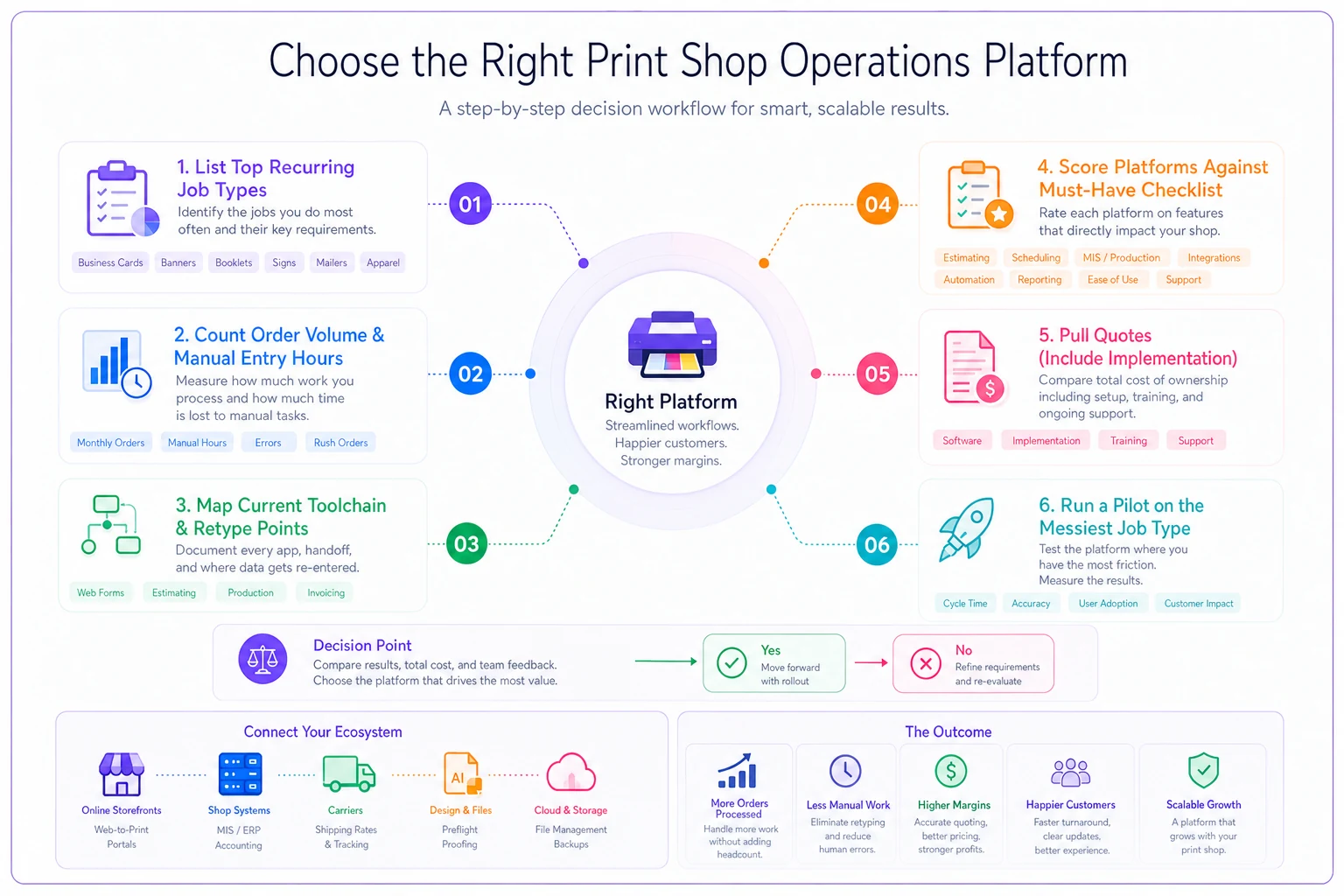
Here's a simple, repeatable set of steps you can follow.
-
List your top 5 recurring job types and note which ones have fuzzy margins today.
-
Count monthly order volume and entry hours — how many jobs, how much manual re-keying.
-
Map your current tool chain and mark every spot where data gets retyped.
-
Score the six platforms against your checklist — only the must-haves, ignore the shiny extras.
-
Pull real quotes, including implementation , and compare total year-one cost, not just monthly fees.
-
Run a pilot on your messiest job type, not your cleanest — that's where a platform either proves itself or exposes a gap.
Shops that regret their choice almost always skipped step six. They demoed with a simple job, bought, then hit a wall when a real mixed-material rush order needed to flow through.
Final thought
The right print shop operations platform isn't the one with the longest feature list — it's the one that eliminates your specific manual steps without forcing overhead you can't justify yet. Map your real job complexity and volume first, then match the tier. A shop quoting 120 jobs a month and a plant running three shifts are solving different problems, and the best tool for one is genuinely the wrong tool for the other. Pilot before you commit, test with your ugliest order, and watch where data has to be retyped — that's always where the truth lives.
Ready to simplify your print shop operations?
Join 500+ print shops using GoInkly to save time, reduce errors, and improve customer satisfaction.