

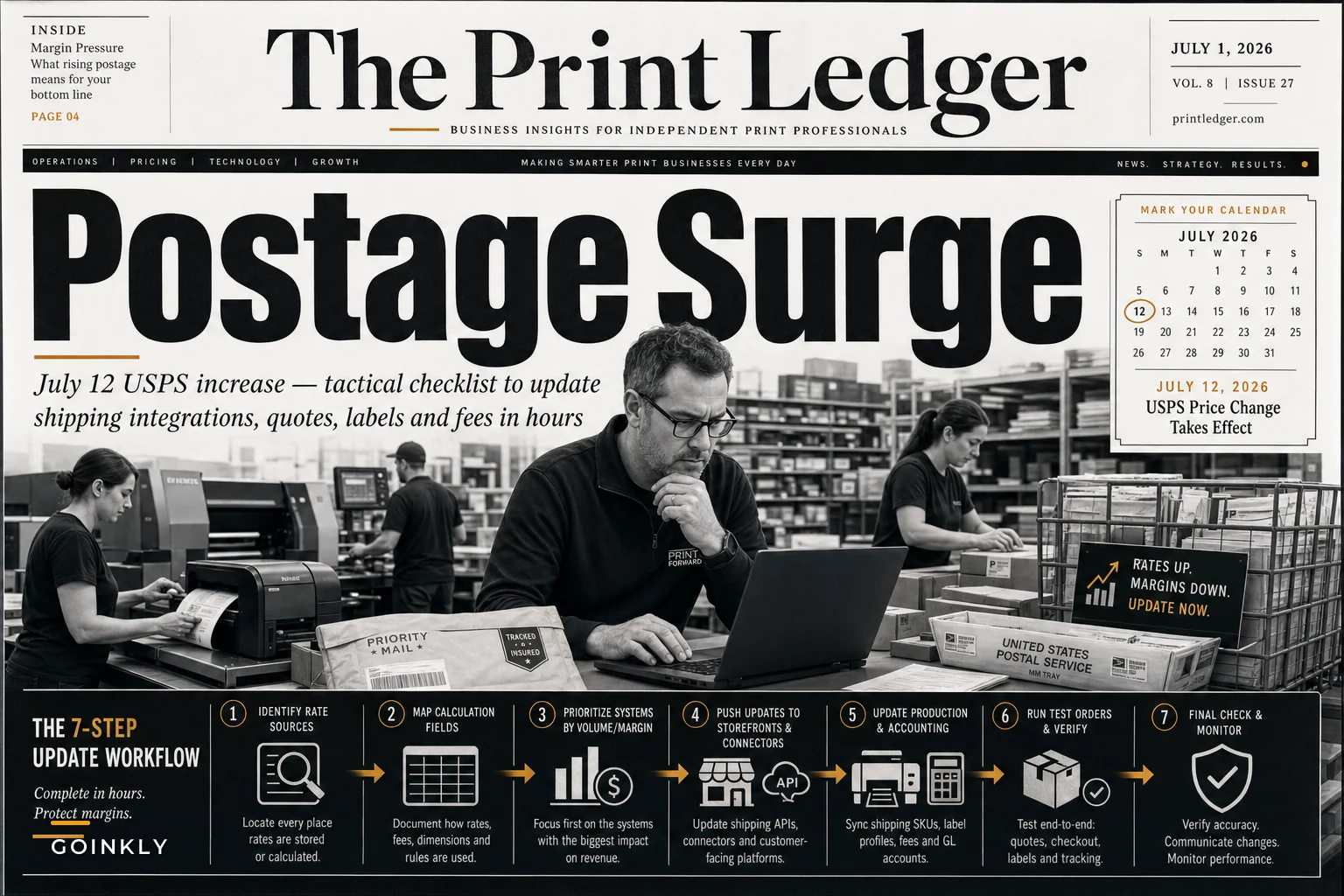

The USPS July 2026 rate change hits on July 12, and print shops running e-commerce operations have roughly two weeks to get their systems updated. We're looking at a roughly 4.8% average increase across mailing services, with some categories jumping higher. For a shop shipping 200 orders weekly, that's easily $400–600 more per month if you're absorbing shipping costs—or lost customers if they're suddenly seeing higher rates at checkout.
What makes this particularly messy for print shops: unlike a straight e-commerce business that can update a single shipping plugin, you're probably juggling rates across multiple touchpoints. Your online storefront, internal quoting system, production management software, and customer portal might all calculate shipping differently. Miss one, and orders start going out where you're eating the difference.
The immediate scramble most shops are facing right now
Every July rate increase creates the same operational chaos. Customer service gets flooded with questions about why shipping jumped. Sales reps quote jobs using old rates because nobody sent them an update. Accounting discovers three weeks later that margins dropped because the shop absorbed increases on fixed-price contracts.
The pattern keeps repeating: shops treat USPS rate changes like a simple price update when it's actually an integration audit. Your Shopify store might pull rates dynamically from USPS, but what about the custom quote calculator your sales team uses? Or the shipping estimate formula baked into your production management system five years ago?
One shop I worked with found their biggest problem wasn't updating rates—it was finding everywhere rates lived. They had shipping costs hardcoded in:
-
Excel templates for quotes
-
A custom order form on their website
-
Their invoicing software's shipping module
-
PDF price sheets sent to corporate clients
-
An old Access database still used for mail merge jobs
Each system calculated shipping slightly differently. After the rate change, customers started getting three different shipping quotes depending on who they talked to.
Where print shops leak money during rate transitions
The real damage happens in the gaps between systems. Print shops typically quote jobs days or weeks before production. If you quoted a 5,000-piece direct mail campaign on June 28 but don't mail until July 15, who eats that shipping increase? Your contract probably doesn't specify, and asking the customer for more money after the fact rarely goes well.
Eliminate order confusion and delays.
GoInkly helps you manage every print order efficiently from submission to delivery.
- Centralized order tracking
- Production workflow management
- Inventory and supply monitoring
No credit card required
Then there's the bulk mail problem. Many print shops offer discounted shipping for large orders by qualifying for USPS commercial rates or presorting. But these discount structures change too, often in ways that shift your breakeven points. A mail merge job that was profitable at 2,500 pieces might now need 3,000 to hit the same margin.
Package shipping creates another headache. Print shops shipping posters, banners, or large format prints often deal with dimensional weight pricing. The July 2026 changes adjust these calculations, meaning that 24x36 poster tube that used to cost $12.50 to ship might jump to $14.20. For shops that built free shipping into prices for orders over $100, those margins just got thinner.
The systematic approach to updating shipping across your operation
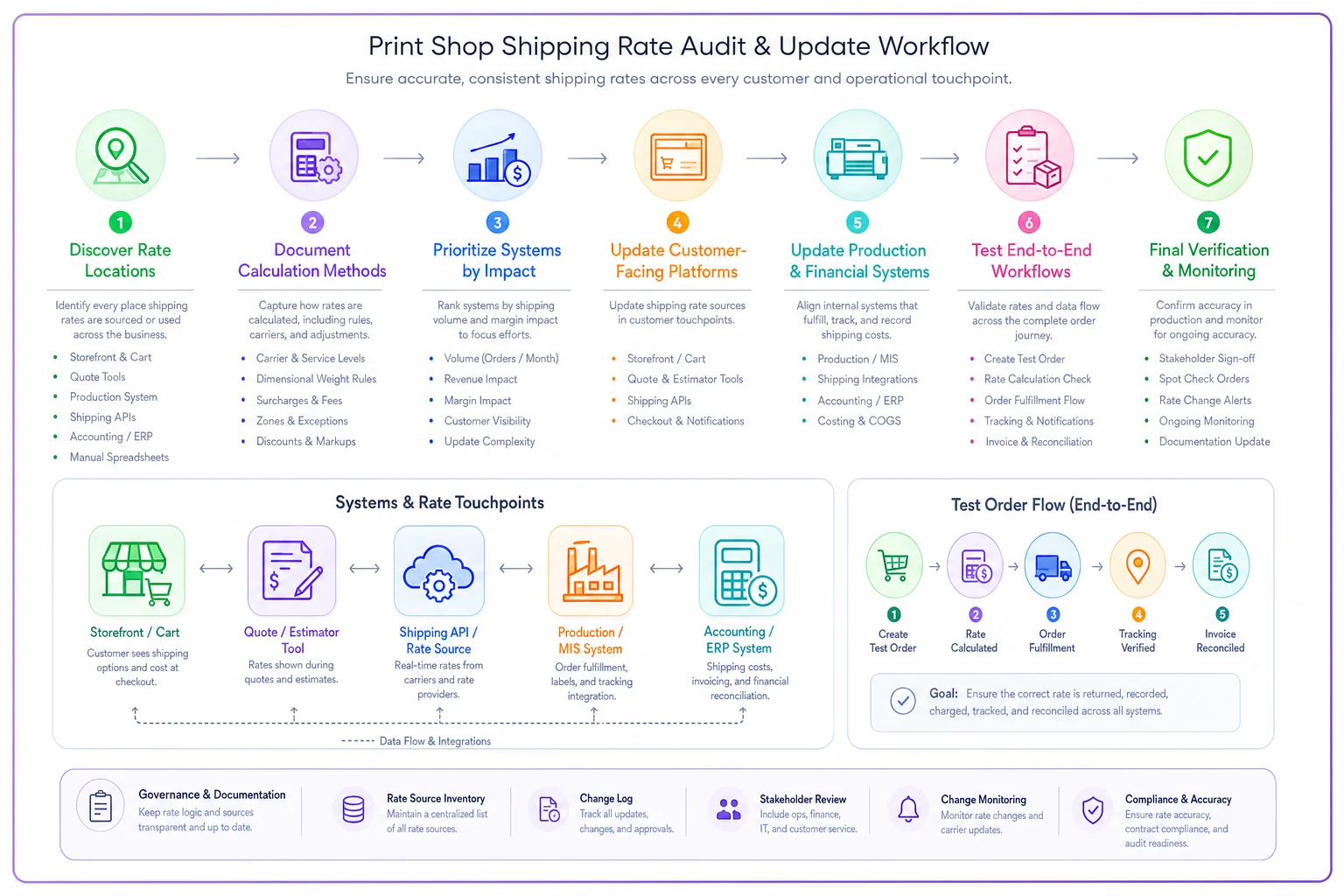
Start with an audit of every place shipping costs appear. This isn't just about finding rate tables—it's about understanding the calculation logic. Some systems pull live rates, others use zone-based lookups, and some use simplified flat rates that approximate actual costs.
For each system, document:
-
How it calculates shipping (API, table, formula)
-
When it calculates shipping (quote, order, invoice)
-
Who can update the rates
-
What happens if rates are wrong
Once you've mapped it out, prioritize updates based on volume and margin impact. Your e-commerce platform handling 60% of orders needs immediate attention. That specialty calculator for rare international shipments can wait.
Update sequence that minimizes customer disruption:
-
Update customer-facing systems first (website, portals, quote tools)
-
Update internal production systems (job tracking, shipping software)
-
Update financial systems (invoicing, accounting)
-
Update documentation (price sheets, contracts, FAQs)
-
Update templates and saved quotes
For shops with integrated systems, test the full workflow after updates. Place a test order online, run it through production, generate shipping labels, and create the invoice. Verify shipping costs flow correctly at each step.
Renegotiating contracts and managing customer expectations
Fixed-price contracts get complicated during rate increases. If you promised a nonprofit client $8 shipping on their monthly newsletter for the next year, you're now losing money on every shipment. The conversation about adjusting those rates needs to happen before July 12, not after.
For contracts with shipping pass-through clauses, send notifications now with specific rate changes. Include old vs. new costs for their typical orders. One approach that works well: offer to honor current rates for orders placed and paid before July 12, even if they ship later. It creates urgency while showing some flexibility.
Corporate accounts with negotiated shipping rates based on volume need recalculation too. A client getting 15% off shipping based on $5,000 monthly volume might no longer qualify once the new rate structure shifts where their spend lands.
Technical integration updates that prevent future scrambles
Manual rate updates every July waste time and introduce errors. Shops running modern e-commerce integration workflows can automate rate updates, but the setup needs to be right from the start.
For shops using shipping APIs, verify your integration pulls current rates—not cached values. Some plugins cache rates for performance and need manual cache clearing after rate changes. Others need subscription updates to access new rate tables.
Some plugins cache rates for performance and need manual cache clearing after rate changes.
Consider implementing rate markup rules that adjust automatically. Instead of hardcoding "$12.50 Priority Mail," set up "USPS Priority Mail base rate + 15% handling." When USPS rates change, your markup stays consistent without anyone touching it manually.
If you're still using rate tables, build them with effective dates. Don't overwrite old rates—add new ones with July 12 start dates. This preserves historical data for reconciliation and lets you pre-load rates for testing before go-live.
AI-powered operational software handles a lot of this automatically—syncing rate tables, flagging stale cached values, and alerting you when shipping calculations fall outside expected ranges. Not every shop needs that level of infrastructure, but if you're processing hundreds of orders weekly, the manual alternative is genuinely unsustainable.
Building buffer zones into your shipping strategy
Smart shops build cushion into their shipping charges to absorb minor rate fluctuations. Not overcharging—just structuring shipping to maintain margins despite changes.
Methods that work:
-
Zone simplification
Instead of calculating exact postage for all zones, charge averaged rates for zones 1–4 and zones 5–8. This smooths out variations and makes updates simpler.
-
Threshold-based free shipping
Offer free shipping at order values where your margin can absorb the cost. Adjust thresholds with rate changes rather than shipping prices.
-
Bundled pricing
Build shipping into product prices for standard orders. "100 Business Cards - $39 shipped" is easier to manage than "$32 + shipping."
-
Handling fees
Add a consistent handling fee that covers labor, materials, and rate fluctuation buffer. Customers accept "shipping and handling" more readily than a pure shipping increase.
These aren't tricks—they're just cleaner ways to price shipping that happen to make your operation more resilient when USPS does its thing every six months.
Testing your updates before go-live
Create test scenarios covering your common order types:
-
Small local order (postcards, zone 1)
-
Medium regional order (brochures, zone 4)
-
Large national order (catalogs, zone 7)
-
Bulk mail job (5,000 pieces, presorted)
-
Rush overnight order
-
International shipment
Run each through your systems with old and new rates. Document the cost difference and verify it matches USPS published changes. Any variance points to a calculation error.
Pay attention to edge cases. Oversized items, rural surcharges, and Saturday delivery often have different rate change percentages. That banner stand shipping to Alaska might increase 8% while standard packages increase 4%.
Proactive customer communication that prevents backlash
Draft clear communications explaining the rate change and your response. Skip vague language like "shipping costs may increase." Be specific: "USPS shipping rates increase 4.8% on average effective July 12. Your typical order shipping cost will increase from approximately $12 to $12.60."
Push notifications through multiple channels:
-
Email to active customers
-
Website banner for visitors
-
Invoice messages for pending orders
-
Portal notifications for account holders
Give customers options to manage the increase—honor current rates for prepaid orders, suggest order consolidation to reduce per-unit shipping costs, or promote local pickup for nearby customers.
Real scenario: How one shop turned rate chaos into competitive advantage
A commercial print shop in Ohio used the January 2024 USPS increase as a trigger to finally fix their operations. They'd been manually updating rates across six different systems, spending nearly a week each time.
Before the increase, they averaged around 180 online orders weekly with roughly $14 average shipping. Their manual quote system handled another 40 large jobs monthly, each with complex shipping calculations.
When they mapped every shipping touchpoint, they found their BigCommerce site, PrintSmith production system, QuickBooks invoicing, and custom Excel calculators all used different rate tables. Customer service spent hours daily reconciling shipping charge disputes.
Instead of another manual update, they implemented automated rate syncing through their shipping software. All systems now pull from a central rate table that updates automatically. They added a 12% handling fee buffer and simplified zones from nine to four.
Six months later, shipping dispute tickets dropped from around 25 weekly to 3–4. Their operations manager recovered 15 hours a month previously spent on rate updates. Shipping margin improved from negative 2%—they were unknowingly undercharging—to positive 8%.
Moving beyond reactive rate management
USPS rate increases happen on a predictable schedule—usually twice yearly, January and July. Yet most print shops treat each one like a surprise. Building systematic rate management into your operations eliminates the scramble.
Set calendar reminders 30 days before typical increase dates. Keep a documented list of all rate dependencies. Create template communications for customers. Build rate update testing into your routine.
| Task | Timing | Owner |
|---|---|---|
| Audit all shipping touchpoints | 30 days before | Operations |
| Draft customer communications | 21 days before | Marketing/Sales |
| Update customer-facing systems | 14 days before | IT/Web |
| Test full order workflow | 7 days before | Operations |
| Update internal and financial systems | 5 days before | IT/Finance |
| Send customer notifications | 3–5 days before | Marketing |
| Final verification and go-live | Rate change date | Operations |
The print shops that handle shipping well don't just avoid margin leakage—they build trust through transparency. When a customer sees you proactively communicate rate changes with specific numbers and real options, that kind of operational clarity does more for long-term retention than most marketing campaigns.
The July 12 rate increase is one more thing that prepared shops will move through cleanly while others are still hunting for their rate tables. Your competitors are probably hoping customers won't notice until after they've placed orders. You can be the shop that sends clear, professional communications with updated rates, multiple shipping options, and a system that quotes accurately every time. That's not a small thing—it's the kind of operational discipline that compounds into a real competitive edge over time.
Ready to simplify your print shop operations?
Join 500+ print shops using GoInkly to save time, reduce errors, and improve customer satisfaction.