

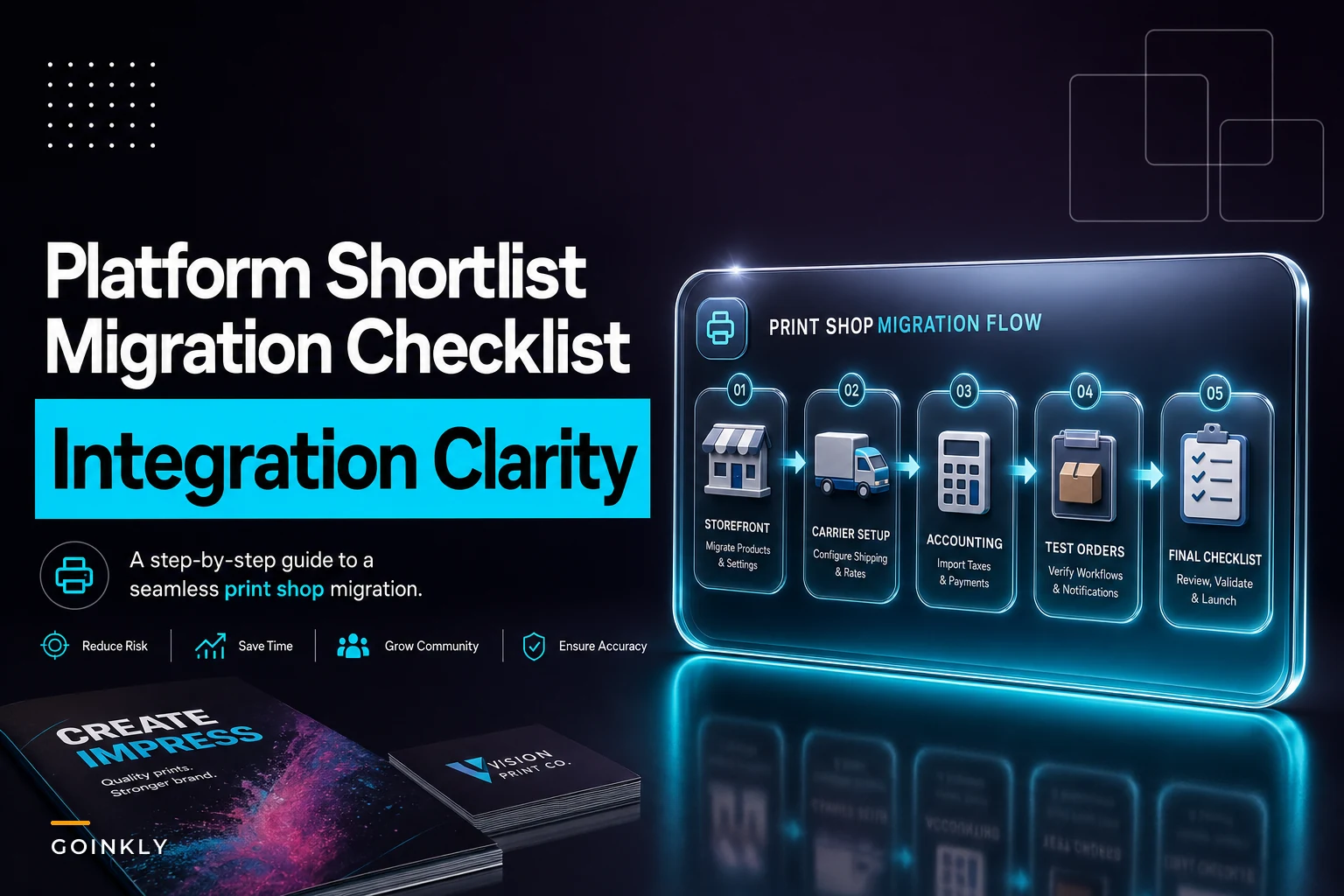

Most print shops don't shop for software because they're bored. They shop because something broke. A customer got charged last year's shipping rate. A reprint went out the door uninvoiced. A storefront order sat in an inbox for two days because nobody checked that inbox on Fridays. The platform question usually shows up after one of those small disasters, which is exactly the wrong time to be comparing vendors in a hurry.
This is meant to sit on your desk before that happens. It's a tight, vendor-by-vendor look at six print-shop operations platforms, evaluated on the three things that actually determine fit: how they charge you, what they connect to, and which shop sizes they realistically serve well. No feature-dump. No "all-in-one revolutionizes your workflow" nonsense.
One note before diving in: if you're evaluating platforms right now, do it with the July 2026 USPS rate change in mind. The shops that get burned during rate updates are almost always the ones running shipping logic in two places at once — a platform quote on one side, a carrier account on the other, slowly drifting apart. Integration quality matters more than usual this year.
How to actually read a print-shop platform comparison
Feature lists lie. Every platform claims quoting, order management, shipping, and "integrations." The real differences live in three places.
Pricing model fit is the first thing to pin down. A per-order fee is great until your volume climbs, then it quietly becomes your second-largest software line item. A flat subscription is predictable but can be brutal for a seasonal shop doing 60 orders in January and 900 in October.
Integration depth matters more than integration count. "Integrates with QuickBooks" can mean a clean two-way sync or a nightly CSV export you have to babysit. Those are not the same product, even when the marketing says the same thing.
Where the platform was born is the third one, and people underestimate it. Software built for sign shops handles wide-format and installs well but treats ecommerce as an afterthought. Software built for web-to-print handles storefronts beautifully and falls apart on complex MIS job routing. The origin story usually predicts where it eventually breaks.
Keep those three in mind as you read. The "shop-size fit" column below is really shorthand for where the pricing and integration model stops making sense.
The six platforms at a glance
Below is a compact comparison to get you started. Prices and integrations shift constantly, so treat this as a shortlist to verify, not gospel.
Eliminate order confusion and delays.
GoInkly helps you manage every print order efficiently from submission to delivery.
- Centralized order tracking
- Production workflow management
- Inventory and supply monitoring
No credit card required
| Platform | Pricing model | Standout integrations | Shop-size fit |
|---|---|---|---|
| Printavo | Subscription (tiered by users/features) | QuickBooks, Shopify, Stripe, basic shipping | Small → Medium |
| Shopmonkey-style MIS (e.g., PrintSmith Vision) | Subscription + module licensing | Full MIS/RIP handoff, accounting export, EFI ecosystem | Medium → Large |
| OnPrintShop | Subscription (web-to-print focus) | Storefronts, ShipStation, QuickBooks, payment gateways | Small → Large (storefront-heavy) |
| Ordant | Subscription (per-user) | ShipStation, QuickBooks, Xero, shipping carriers | Small → Medium |
| PrintVis (Microsoft Business Central) | License + implementation (ERP-grade) | Full ERP, accounting native, MIS, EDI | Large |
| Pressero / DirectSmile (Aleyant) | Subscription + per-storefront/module | Storefronts, MIS bridges, shipping, automation tools | Medium → Large |
Prices and integrations shift constantly, so treat this as a shortlist to verify, not gospel. The carrier connections and accounting sync fields go stale fastest — we re-check this table quarterly for that reason.
Printavo — the straightforward pick for small screen/apparel shops
Printavo built its reputation in screen-printing and apparel, and it shows. The quoting, approvals, and production calendar feel like they were designed by someone who's actually stood at a press.
Pricing model. Flat monthly subscription, tiered by features and user count. No per-order fee, which makes it predictable for shops with lumpy volume. The jump between tiers is where people grumble — a feature you need (certain automations, API access) often lives one tier up.
Integrations worth noting. QuickBooks Online for accounting, Shopify for a storefront, Stripe for payments, and shipping that's functional rather than deep. If you're mailing a few hundred packages a month, it's fine. If shipping is your business, you'll feel the ceiling pretty quickly.
Where it fits. Small to medium shops, especially apparel and promo, where the owner still touches most orders. Where it stops fitting: once you're running serious wide-format MIS logic or need a true two-way accounting sync for complex job costing.
A common pattern with Printavo: shops outgrow it not on order volume but on accounting complexity. The moment mixed-batch job costing matters more than quick quoting, the conversation changes.
PrintSmith Vision (EFI) — the MIS backbone for established commercial shops
This is a different animal. PrintSmith Vision is a proper print MIS, not an order-management layer bolted onto a storefront. If your pain is estimating accuracy, job tracking through departments, and clean handoff to RIP, this is the category you're actually shopping in.
Pricing model. Subscription with module licensing, plus implementation. It's not a sign-up-tonight product. Budget for setup and a real learning curve — and budget for a staff champion who owns it day-to-day, because without one, it tends to get used at about 40% of its actual capability.
Integrations worth noting. Deep MIS/RIP handoff within the EFI ecosystem, accounting export (two-way is worth verifying current state directly with the vendor), and job-costing granularity that smaller tools tend to fake.
Where it fits. Medium to large commercial shops with real departmental workflow — prepress, press, bindery, shipping as distinct stages. Where it's the wrong call: a three-person shop that just wants to stop losing orders. You'll pay for power you never use.
OnPrintShop — when the storefront is the center of gravity
If a meaningful slice of your revenue flows through web-to-print portals — corporate clients ordering business cards, branded templates, reorders on autopilot — OnPrintShop is purpose-built for that model.
Pricing model. Subscription scaled around web-to-print capability. You're paying primarily for storefront power, so the value math depends entirely on how much online ordering you actually drive. Shops with minimal online volume tend to feel like they're renting a kitchen they rarely cook in.
Integrations worth noting. Multiple storefront and template engines, ShipStation for shipping, QuickBooks, and a range of payment gateways. The ShipStation connection is a real advantage — it keeps carrier rate logic in one disciplined place rather than scattered across the platform and your carrier account separately.
Where it fits. Small through large, as long as storefronts drive your order flow. Where it disappoints: shops with almost no online ordering who'd be paying for an engine room they never use.
Ordant — the modern middle-ground for growing shops
Ordant tends to show up on shortlists for shops that have outgrown spreadsheets and a basic quoting tool but aren't ready for ERP-grade weight. It's cloud-native, reasonably quick to deploy, and covers quoting, order management, inventory, and shipping without demanding a six-month rollout.
Pricing model. Per-user subscription. Clean to forecast when headcount is stable. Worth watching if you add seasonal staff who each need logins — that's where the math gets lumpy.
Integrations worth noting. ShipStation and direct carrier connections, QuickBooks and Xero for accounting. The Xero inclusion is a quiet plus — a surprising number of platforms just assume you're on QuickBooks, and if you're not, you're usually doing some kind of workaround.
Where it fits. Small to medium shops in growth mode, mixed-product environments. Where it strains: very high-volume operations with deep MIS/RIP requirements will eventually want something heavier.
PrintVis — ERP-grade control for large operations
PrintVis is built on Microsoft Dynamics 365 Business Central, which tells you most of what you need to know. Accounting isn't an integration here — it's the foundation everything sits on.
Pricing model. Licensing plus a real implementation project. This is a capital decision, not a subscription signup. Shops that choose it are usually consolidating several disconnected systems and need one genuine source of truth across finance and production.
Integrations worth noting. Native accounting (it's Business Central underneath), full MIS, EDI for large recurring customers, and the kind of breadth you'd expect from an ERP. The main upside is that order, production, and finance actually share one database — the drift between quote, ship, and invoice largely disappears. The main downside is getting there takes time and money.
Where it fits. Large shops, multi-site operations, anyone where finance and production currently live in separate worlds. For a small shop, this is buying a freight train to run a produce stand.
Aleyant (Pressero / tFLOW / DirectSmile) — storefronts plus workflow automation
Aleyant's stack is modular, and shops usually adopt it in pieces: Pressero for storefronts, tFLOW for approval and preflight automation, DirectSmile for variable-data and personalization. Stitched together, it covers the online-order-to-prepress stretch very well.
Pricing model. Subscription with per-storefront and per-module pricing. Flexible, but the per-storefront logic means your cost scales with how many branded portals you run — great if each one earns, expensive if you spin up portals that underperform.
Integrations worth noting. Strong storefront engine, MIS bridges, shipping, and automation that handles preflight and approvals without someone clicking through every file manually. The prepress automation is the standout differentiator here compared to the rest of this list.
Where it fits. Medium to large shops with meaningful web-to-print volume and variable-data work. Where it gets awkward: a shop wanting one tidy all-in-one, since you're assembling modules rather than buying a single box.
The integration matrix — where deals quietly succeed or fail
Features sell the demo. Integrations run the shop. The four connections below cause the most real-world pain, and the honest picture looks like this:
| Platform | Shipping (carriers / ShipStation) | Accounting (sync depth) | MIS / RIP handoff | Storefronts |
|---|---|---|---|---|
| Printavo | Basic / functional | QBO (verify 2-way) | Light | Shopify |
| PrintSmith Vision | Good | Export → verify 2-way | Deep (EFI) | Via ecosystem |
| OnPrintShop | ShipStation (strong) | QuickBooks | Moderate | Excellent |
| Ordant | ShipStation + carriers | QuickBooks + Xero | Moderate | Good |
| PrintVis | Carrier/EDI | Native (Business Central) | Deep | Add-on |
| Aleyant | Shipping + automation | Bridged | Bridges | Excellent |
The shipping column matters more than any other right now. During a rate change, shops that keep carrier rate logic in one integration — a dedicated layer like ShipStation — update once. Shops with shipping logic duplicated inside the platform and a separate carrier account update twice and inevitably miss one. That mismatch is how a customer gets quoted a stale rate three weeks after USPS moved prices.
Worth being direct about this: most platform demos won't show you the edge cases. You have to test them yourself with live-ish orders before committing.
Migration checklist — avoid the rate-update and fulfillment errors that burn new switchers
Switching platforms is where good shops lose money for 30–60 days if they rush it. The failures are boringly predictable, which means they're preventable.
The failures are boringly predictable, which means they're preventable.
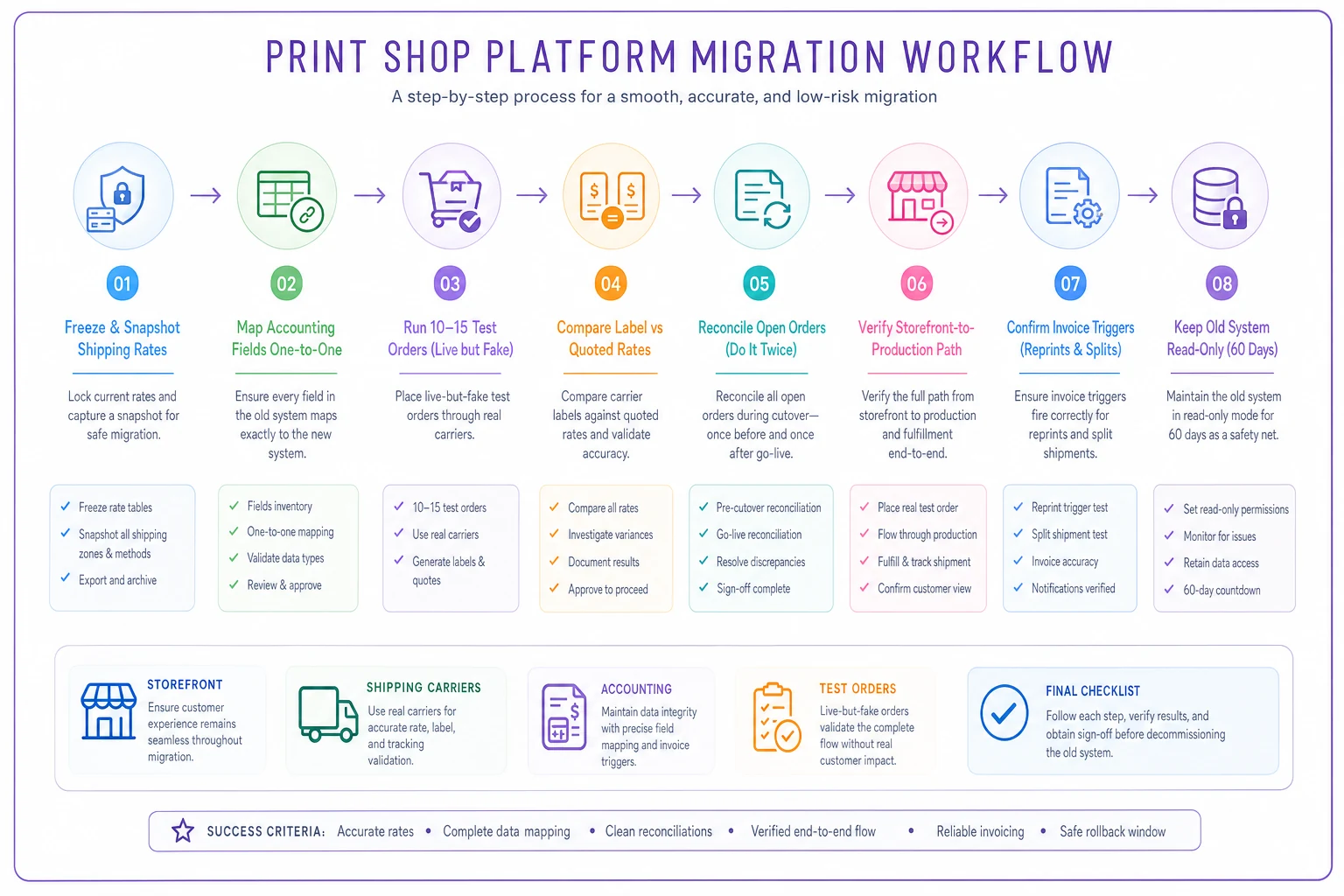
Here's a practical migration workflow to follow:
-
Freeze and snapshot current shipping rates. Export every active rate, surcharge, and zone rule from your current setup before migrating, so you have a reference to reconcile against.
-
Map accounting fields one-to-one. Confirm how tax codes, item categories, and payment types translate into the new system. Mismatched tax codes are the quietest, most expensive error.
-
Test shipping on live-but-fake orders. Push 10–15 test orders across your real carriers and zones. Compare the label rate to what the platform quoted. If they disagree, stop and fix it before going live.
-
Reconcile open orders twice. Every in-flight order should exist in both systems during cutover. Reconcile the day before go-live and again the morning of.
-
Verify the storefront-to-production path end to end. Place a real order through each active storefront and watch it land in production. Don't assume the connector works because the demo worked.
-
Confirm invoice triggers. Make sure a reprint or split shipment still generates an invoice. Uninvoiced reprints are a classic post-migration leak.
-
Keep the old system read-only for 60 days. Cheaper than reconstructing a disputed order from memory.
For the rate-logic side specifically, the USPS July 2026 rate-change guide walks through updating shipping integrations and quotes without breaking live orders.
A short real scenario
A mid-sized commercial shop — roughly 15 staff, mix of wide-format and web-to-print corporate reorders — was running quoting in one tool and accounting in a separate QuickBooks file nobody reconciled daily. Shipping rates lived in two places.
Over a single quarter, they tracked somewhere around $2k–$3k in reprints that went out uninvoiced, plus a handful of orders quoted at outdated shipping rates after a carrier adjustment. They moved to a platform with a proper ShipStation connection and a verified two-way accounting sync. Not because it had the most features, but because it put shipping logic and invoicing each in one place. The uninvoiced-reprint problem mostly disappeared within two billing cycles, and rate updates became a single change instead of a scavenger hunt. Nothing dramatic — just fewer small leaks, which in a print shop is exactly where the margin hides.
When each pricing model actually makes sense
Flat subscription makes sense when your volume is lumpy or seasonal. You don't want a strong October punishing you with per-order fees. It's also easier to defend to whoever controls the budget — one predictable number every month.
Per-order or per-storefront pricing makes sense when each order or portal is clearly profitable and you want cost to scale with revenue rather than ahead of it. The trap is accepting low-margin work where the per-unit fee quietly eats what's left of the margin.
ERP-style licensing makes sense only when you're consolidating multiple systems and the cost of disagreement between finance and production is already hurting you more than the license will. For a small shop, that math never works.
Who should NOT switch platforms right now
Shops in peak season. Migrate in your slow stretch, not during the crunch.
-
Shops without a single person who'll own the rollout. Software without an owner becomes shelfware with a monthly bill.
-
Shops whose real problem is process, not tooling. If orders get lost because nobody checks the inbox on Fridays, a new platform won't fix the Friday habit — it'll just lose orders more expensively.
Migrate in your slow stretch, not during the crunch.
FAQ
Can I run my current MIS and just add a storefront platform? Often yes, and for many shops it's smarter than ripping out a working MIS. The catch is the bridge between them — confirm orders flow into production and invoicing without manual re-entry, or you've just added a copy-paste job.
How often do pricing and integrations actually change? Enough that any comparison older than a quarter should be re-verified. Carrier connections and accounting-sync depth are the fields that shift most. We re-check this list quarterly for that reason.
Is per-order pricing always worse at scale? Not always — if margins per order are healthy and stable, it keeps cost aligned to revenue. It bites when you take on high-volume, low-margin work where the fee is a meaningful slice of the margin.
What's the one integration I shouldn't compromise on? Shipping, for most shops. It's where rate changes, customer quotes, and real carrier costs collide. Get that into a single disciplined connection and a large category of errors simply stops happening.
The best print-shop operations platform isn't the one with the longest feature list — it's the one where your order, your shipping label, and your accounting entry can't quietly disagree with each other. Pick for pricing fit and integration depth, verify the shipping and accounting connections with live tests before you commit, and migrate in your slow season. Do that, and the platform becomes invisible in the good way: orders move, invoices fire, rates stay current, and you stop finding small leaks three weeks after the fact.
This guide is kept current with quarterly verification of pricing and integrations. If a vendor's pricing model or carrier connection has changed since you're reading this, trust the test order over the table.
Ready to simplify your print shop operations?
Join 500+ print shops using GoInkly to save time, reduce errors, and improve customer satisfaction.