



Variable-data jobs fail differently than static ones. A static job fails once, loudly, and usually before plates. A VDP job fails quietly — record 1,847 has a blank last name, record 3,102 pulled the wrong image path, and the barcode column got interpreted as text so the leading zeros vanished. You don't find these on a proof of record 1. You find them after the cutter, when someone flips through the stack and spots "Dear ," staring back at them.
The reason variable-data printing punishes shops harder is that the error isn't in the template — the template looks perfect on the first record. The error lives in the interaction between the data file and the template, and it hides in the middle and tail of the run. That's where prepress automation for variable data printing actually earns its keep: not by making pretty proofs, but by validating the data against the template rules before anything gets imposed.
This post maps the specific ways VDP jobs break and pairs each failure mode with a concrete automation recipe — validation rules, sample-record checks, field-mapping guards, and lightweight rollback so a bad merge doesn't become 4,000 wasted pieces.
The five failure modes that actually cause reprints
Most VDP disasters trace back to one of these, and each has a different fix. Shops keep "checking harder" and still miss errors because you can't eyeball your way out of a data-shape problem.
| Failure mode | What it looks like on press | Root cause | Automation recipe |
|---|---|---|---|
| Empty/null fields | "Dear ," or blank address line | No required-field validation on import | Template validation rules |
| Type coercion | Leading zeros dropped from ZIP or account # | CSV column read as number | Field-mapping + type rules |
| Encoding/character breaks | é becomes é, names truncate | UTF-8 vs Latin-1 mismatch | Sample-record checks |
| Overflow / overset text | Long names blow past text box | No length constraint per field | Template validation + max-length |
| Wrong asset linkage | Personalized image points to missing/wrong file | Broken image-path mapping | Field-mapping rules + asset existence check |
The pattern worth noticing: none of these are catchable on record 1 alone. A ZIP starting with a non-zero digit prints fine. The one starting with 0 is the landmine, and it might be record 900. This is why sample-record selection matters more than sample-record count.
Recipe 1: Template validation rules that run before imposition
Template validation is your first gate, and it's the one most shops skip because they assume the data provider "already cleaned it." They didn't — or they cleaned it for their system, not your template.
Eliminate order confusion and delays.
GoInkly helps you manage every print order efficiently from submission to delivery.
- Centralized order tracking
- Production workflow management
- Inventory and supply monitoring
No credit card required
-
Required fields present — every record must have first name (or a fallback), address line 1, city, state, ZIP. Reject or flag any record missing a required field.
-
ZIP format — 5 digits or 5+4 with a hyphen, always string type, leading zeros preserved.
-
Field length caps — first name ≤ 18 chars for the salutation box, address line ≤ 40. Anything longer gets flagged for a shorter fallback or manual review.
-
State validity — must match a 2-letter USPS state code. "Calif" or "CA " with a trailing space both fail.
-
Allowed value sets — if a field drives a variable image (say, "Gold/Silver/Bronze" tiers), the value must match one of the exact strings your template expects. A stray "gold " with a trailing space breaks the lookup.
The insight most shops miss: validation should produce a rejects file, not just a pass/fail. When 40 of 5,000 records fail, you don't want to hold the whole job — you want to print the 4,960 clean ones and route the 40 to correction. A rule that halts everything on one bad record trains people to disable the rule. A rule that quarantines just the bad records survives contact with a busy prepress desk.
Recipe 2: Sample-record checks that actually catch tail errors
Proofing record 1 and calling it done is the single biggest cause of VDP reprints. The fix isn't proofing more records blindly — it's proofing the right records.
-
The longest values — max-length first name, longest address, longest company name. Overflow shows up here.
-
The shortest / emptiest — records with blank optional fields, single-character names.
-
Special characters — any record containing accents, apostrophes (O'Brien), hyphens, ampersands, or non-Latin characters. Encoding breaks live here.
-
The edge ZIPs and IDs — anything starting with 0, anything with unusual formatting.
-
Random middle-of-file picks — pull records at roughly 25%, 50%, 75%, and 90% through the file. Coercion and mapping drift often show up in a specific block, not spread evenly.
Automate the boundary-record pull with a script so the right samples are selected consistently.
A practical sample size for a 5,000-record run is around 15–20 targeted records, not 3 sequential ones. Fifteen chosen records will catch more real defects than 200 random ones, because you're selecting for the conditions that actually fail.
Shops that switch from "proof record 1" to a boundary-based sample set cut their VDP reprint rate substantially without adding meaningful proofing time — mainly because a script pulls the boundary records automatically instead of someone hunting through a spreadsheet.
Recipe 3: Field-mapping rules — the quiet killer
Field mapping is where jobs die when a client "just sends the usual file" but their CRM added a column, reordered them, or renamed FNAME to First_Name. If your merge is positional (column 3 = city) instead of named (column labeled "City"), one added column shifts everything and you print cities in the address slot.
-
Map by header name, never by position. If the header your template expects isn't found, stop — don't guess.
-
Assert column count. If last month's file had 12 columns and today's has 14, that's a flag, not a proceed.
-
Type enforcement per field. ZIP, phone, account number, and anything with leading zeros = string. Enforce it at import so the CSV parser can't "help."
-
Asset-path existence checks. If a field points to a personalized image (
/images/{customer_id}.jpg), verify every referenced file actually exists before the run. A missing asset should list which records reference it. -
Value normalization. Trim trailing spaces, standardize case on lookup fields, so "Gold " matches "Gold."
The mistake is treating field mapping as a one-time setup. It's a per-file check. A mapping that worked last month tells you nothing about the file that landed this morning. Shops that build this into a repeatable end-to-end production workflow stop treating every VDP job as a one-off gamble on the incoming data.
Recipe 4: Lightweight rollback and QA so a bad merge is recoverable
Rollback in a print context isn't fancy — it's making sure you can back out of a bad merge without redoing prep from scratch. When validation catches something after you've already started, you should lose minutes, not the whole setup.
-
Version the merged output, not just the template. Keep the exact data file, the mapping config, and the merged PDF together, timestamped. When something's wrong, you can see whether the data changed or the template did.
-
Quarantine, don't delete. Rejected records go to a holding file with the reason attached. Correct them, re-run just that batch, append.
-
Batch by data source or tranche. For big runs, split into blocks. If block 3 has a problem, you reprint block 3, not the whole 20,000.
-
Keep a pre-flight snapshot count. Record count in = record count merged = record count imposed. If those three numbers don't match, something silently dropped records and you catch it before plates.
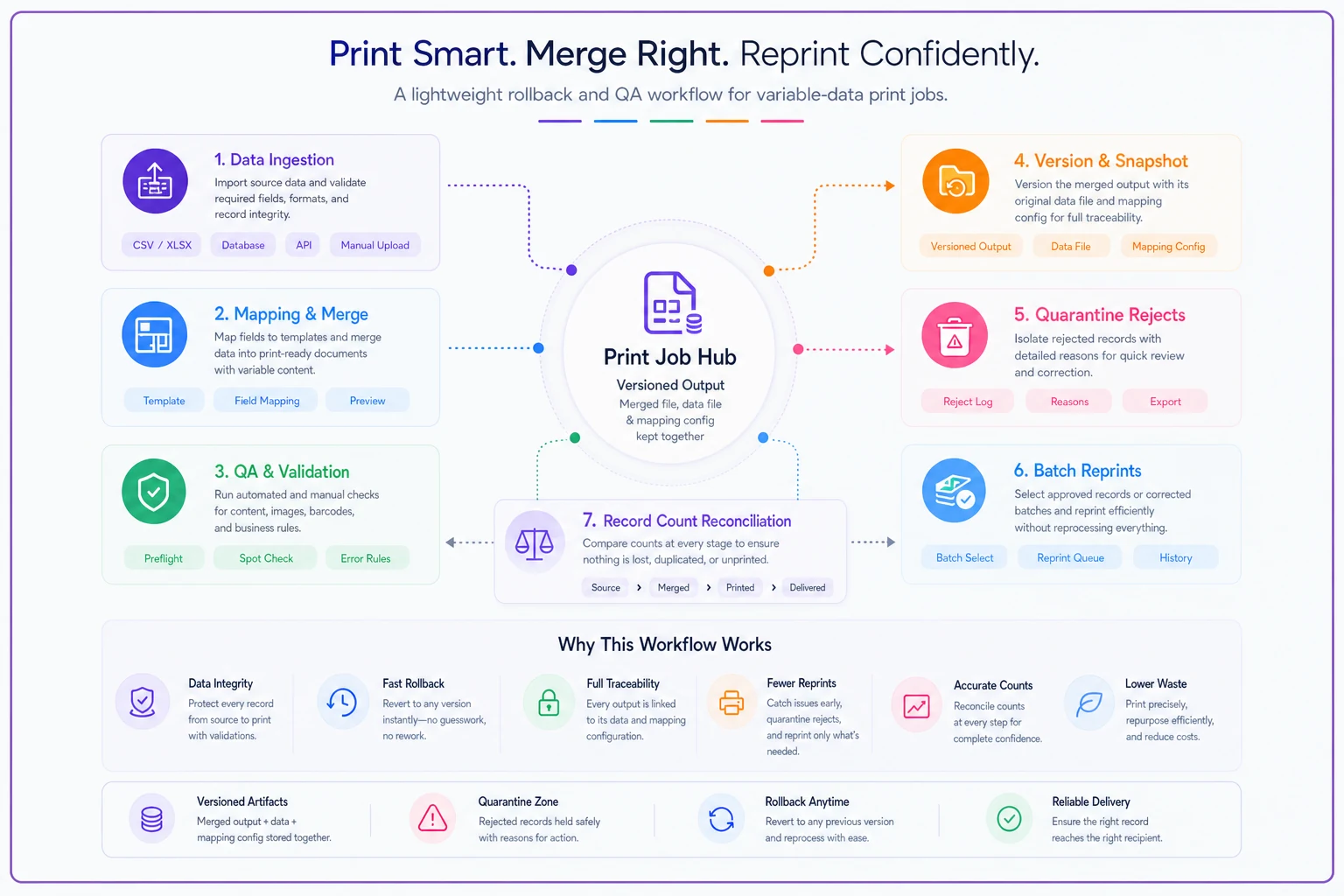
Here's a simple workflow diagram you can use as a reference.
That last check — count reconciliation — is embarrassingly simple and catches a surprising number of dropped-record errors that otherwise sail straight to press. It takes about thirty seconds to verify, and it's caught bad merges that would've been a full rerun.
Real scenario: a 6-station mail shop that kept eating reprints
A regional shop running personalized appointment reminders and loyalty postcards was averaging a few costly reprints a month on VDP work — usually blank fields or dropped leading zeros on member IDs. Each reprint ran roughly $400–$900 in stock, click charges, and rerun time, plus a client made nervous.
They didn't buy new equipment. They built three checks into their intake: a required-field validation with a rejects file, a boundary-based sample-record pull (longest name, special characters, records with leading-zero IDs), and a per-file column-count assertion.
The first month, the column-count check caught a client file that had silently added two columns — exactly the kind of file that would've printed garbage in the address block while record 1 looked totally fine. Over the following quarter, VDP reprints dropped to roughly one per month, and that one was a genuine content error, not a data-shape failure. Prep time added per job was minimal because the boundary records got pulled by script instead of by hand.
When heavy automation makes sense — and when it doesn't
Not every shop needs to build this out fully. It depends on volume and how often the same clients send recurring files.
When it's worth building out:
-
You run recurring VDP jobs from the same clients — mail houses, membership programs, statements. The rules pay for themselves across repeat files.
-
Your runs are large enough that a tail error means real waste — a few hundred pieces or more.
-
Multiple people touch prepress and you can't rely on one person eyeballing every file.
When it's overkill:
-
Occasional small VDP jobs under a few hundred records where a careful person can genuinely proof a solid sample by hand.
-
One-off creative pieces where the "data" is really just a handful of variations.
Who should NOT start here: shops that haven't cleaned up their file intake at all. If client files still arrive by email attachment with no naming standard and no format spec, fix intake first — validation rules are far more effective when they run against a predictable pipeline. The same discipline that fixes manual order entry and ecommerce-to-production handoffs applies to how data files enter the shop.
A short checklist to put on the prepress wall
These aren't exhaustive — they're the checks that actually prevent the reprints that cost real money.
-
[ ] Required fields validated, rejects routed to a holding file (not a full-job halt)
-
[ ] ZIP, phone, IDs, account numbers forced to string type at import
-
[ ] Field mapping by header name, with column-count assertion per file
-
[ ] Boundary sample set
longest, shortest, special-character, leading-zero, and 4–5 mid-file records
-
[ ] Personalized asset paths checked for existence before run
-
[ ] Record count reconciled
in = merged = imposed
-
[ ] Merged output versioned with its data file and mapping config
-
[ ] Big runs split into batches so rollback is partial, not total
The list looks simple because the fixes are simple. The problem was never that the checks were too hard to run — it's that nobody had written them down and made them mandatory.
Shops that stop losing money on variable-data jobs aren't the ones proofing harder. They're the ones who accept that VDP errors hide in the tail and in the data-to-template handoff, then put checks exactly there. Template validation catches the empties and overflows. Sample-record checks catch what record 1 can never show you. Field-mapping guards catch the file that quietly changed shape. Lightweight rollback means the mistakes that slip through cost you a batch, not a run.
None of this requires a big system. It requires deciding that "the data provider probably cleaned it" is not a QA strategy, and building the two or three checks that match how your jobs actually fail.
Ready to simplify your print shop operations?
Join 500+ print shops using GoInkly to save time, reduce errors, and improve customer satisfaction.