

Most print shops don't fail at integration because the technology is hard. They fail because every connection is built as a one-off. Your web-to-print storefront talks directly to your MIS. Your MIS talks directly to your shipping platform. Your prepress tool exports a CSV that somebody re-imports by hand. Each of these is a brittle little bridge, and the moment one vendor changes a field name or deprecates an endpoint, something downstream quietly breaks.
The shops that stay sane as they grow do something different. They stop building point-to-point connections and start building a middleware layer — a translation hub that every system talks to, instead of talking to each other. That's the core of a durable print shop API integration strategy, and it's less about fancy tech than about discipline: canonical data shapes, webhook-first adapters, and POC scripts you can actually re-run.
This article walks through how to design that topology, how to test it before you trust it, and how to pull the plug cleanly when a pilot goes sideways.
Why point-to-point integration quietly eats your margin
A shop starts with two systems and one integration. Fine. Then they add an ecommerce channel — now three systems, three connections. Add a second storefront, a shipping aggregator, an accounting sync, and a proofing tool, and suddenly you've got six or seven systems and somewhere north of a dozen direct connections, each one maintained by whoever happened to build it.
The math gets ugly fast. With N systems connected directly, the number of possible connections grows roughly as N², not N. Every new tool you adopt multiplies the surface area of things that can break. And in a print environment, "break" rarely means a loud error. It means a job that should've gone to the wide-format queue got routed to digital, or a shipping address truncated at 35 characters, or a quantity field that came in as "500" from one channel and "500 ea" from another.
What makes this worse for print specifically is that your data objects are weird. An "order" in a generic ecommerce platform is a line item with a SKU and a quantity. An order in a print shop is a job with stock, finish, imposition, bleed, proof approval status, due date tied to a press schedule, and sometimes a dozen variable-data attributes. When you wire two systems directly, you're forcing each one to understand the other's quirks. Multiply that across every pair of systems and you've built a maintenance nightmare nobody wants to own.
If you haven't already nailed down what your core objects actually are, that work comes first. A clean single-source data model for orders, inventory and customers is the foundation everything else in this article sits on. You can't define a canonical API layer if you haven't decided what an "order" or a "customer" means in plain terms.
The three-layer topology that actually holds up
A composable integration strategy has three parts. None of them are exotic, but the combination is what makes it resilient.
Eliminate order confusion and delays.
GoInkly helps you manage every print order efficiently from submission to delivery.
- Centralized order tracking
- Production workflow management
- Inventory and supply monitoring
No credit card required
1. A canonical API layer. Your internal definition of what a job, customer, quote, proof, and shipment look like — expressed once, in your terms, not any vendor's. Everything inside your shop speaks this language. The storefront doesn't need to know how the MIS stores finishing operations; it just sends a job that matches your canonical shape.
2. Webhook-first adapters. For each external system, you build a small adapter whose only job is translating between that system's format and your canonical format. "Webhook-first" means you prefer event-driven pushes over polling wherever the vendor supports it. When a proof gets approved, the proofing tool fires a webhook, your adapter catches it, translates it, and updates the canonical order. No cron job hammering an API every 90 seconds hoping something changed.
3. Middleware translation. The hub that routes canonical events to the systems that care about them. An approved proof needs to release the job to production and trigger a deposit invoice and maybe notify the customer. Middleware is where that fan-out logic lives — in one place, versioned, testable — instead of scattered across five different scripts.
Here's the practical difference laid out:
| Dimension | Point-to-point | Middleware-first (composable) |
|---|---|---|
| Connections to maintain | Grows ~N² | Grows ~N (one adapter per system) |
| Vendor swap effort | Rebuild every affected link | Rewrite one adapter |
| Where business logic lives | Scattered across scripts | Centralized in middleware |
| Debugging a bad order | Trace every pairwise link | Inspect canonical event log |
| Testability | Hard — depends on live systems | POC scripts hit the canonical layer |
| Adding a new channel | Touches every downstream system | Add one adapter, done |
When a shipping vendor changes their API — and they will — you rewrite one adapter instead of hunting through four integrations. When you add a third storefront, you write one adapter and it inherits everything downstream for free.
This is the structural upgrade behind a lot of the ecommerce-to-production integration patterns that eliminate manual order entry. Manual entry doesn't go away because someone works faster — it goes away because the canonical layer accepts orders from any channel in a shape production already understands.
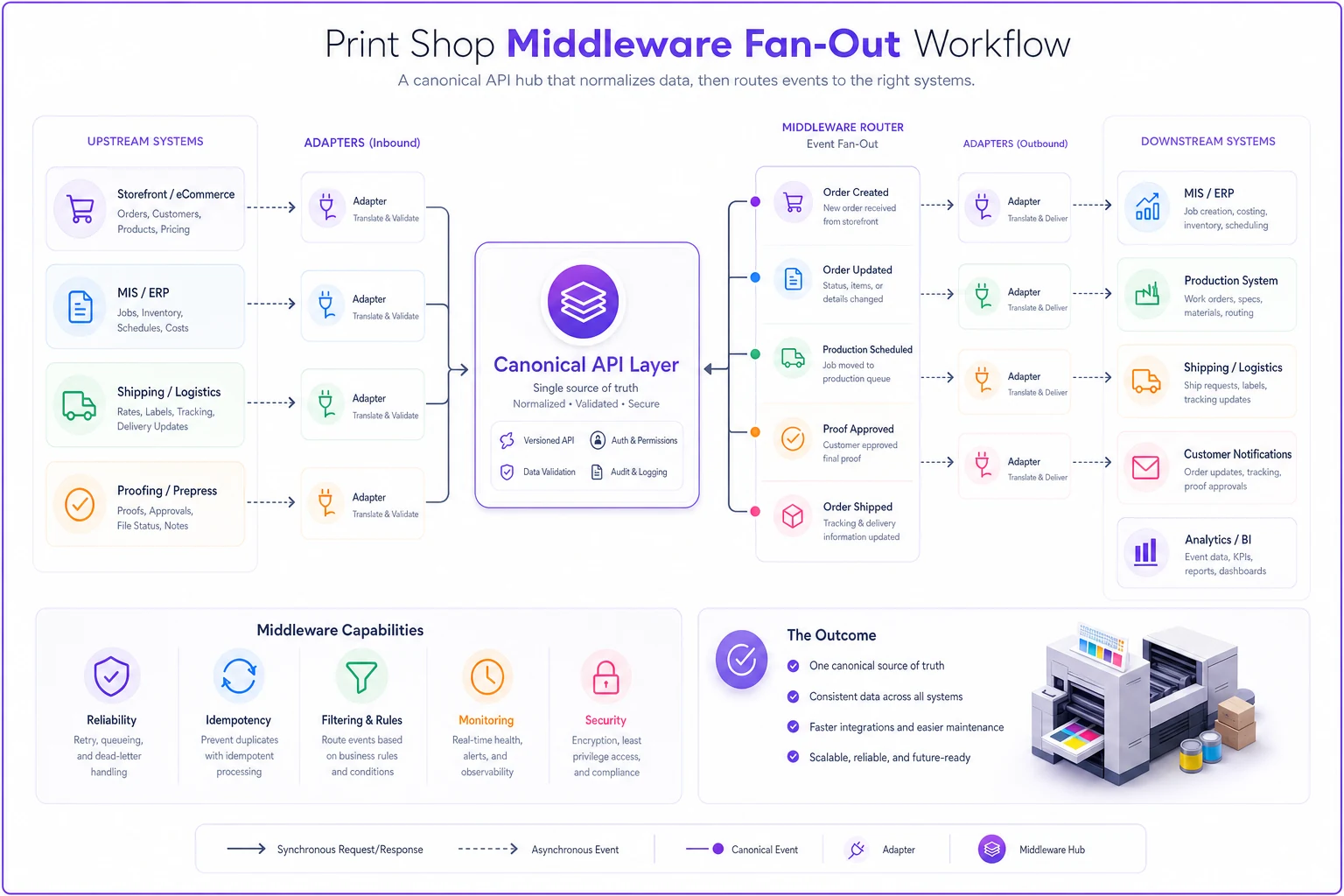
A simple diagram of the middleware fan-out.
Field-mapping templates for common print objects
The hardest part of building adapters isn't code — it's agreeing on what each field means and what it maps to. This is where shops waste weeks. You want templates you reuse for every integration, so you're never starting the mapping conversation from scratch.
-
job_id— your internal ID, generated by middleware, never the vendor's -
customer_ref— maps to canonical customer, not raw storefront account -
producttype— normalized enum (businesscard, booklet, banner, label, etc.) -
quantity— integer, always; strip units at the adapter -
stock— normalized stock code, not free text -
finish_ops[]— array of normalized finishing operations -
variabledataref— pointer to the VDP record set, if any -
proof_status— enumnone / pending / approved / rejected
-
due_date— ISO date, timezone-normalized -
source_channel— which adapter it came from -
sourcepayloadhash— for reconciliation and dedupe
The rule that saves you the most pain: normalization happens at the adapter, never in the middleware. If a storefront sends "Qty: 500 pcs" and another sends 500, both adapters are responsible for turning that into the integer 500 before it ever reaches your canonical layer. The middleware should never see a messy value. If it does, that's a bug in an adapter, and you know exactly where to look.
The rule that saves you the most pain: normalization happens at the adapter, never in the middleware.
A common mistake is letting free-text fields leak through. Stock, finish, and product type should all map to controlled vocabularies. The first time a storefront sends "100# gloss cover" and your MIS expects "GLS-C-100," and nobody wrote a mapping, that job routes wrong. Build the lookup tables up front, even if they start small.
A repeatable POC script you can actually re-run
What separates a real integration strategy from hope is that you can test it on demand. Not once, during setup — every time anything changes. A POC script for a print integration should be runnable in a sandbox, produce the same result every time, and tell you clearly whether the connection still behaves.
-
Seed a known test record. Create a canonical job with fixed, known values — a "golden" test order. Same stock, same quantity, same finishing every time.
-
Push it through the adapter outbound. Send the golden job to the external system (storefront, MIS, shipping) and capture the raw response.
-
Assert the translation. Compare what the external system received against what it should have received. Quantity stayed an integer? Stock code mapped correctly? Due date in the right timezone?
-
Trigger the inbound event. Simulate the webhook the external system would fire — proof approved, label generated, status changed.
-
Assert the canonical update. Confirm the middleware updated the canonical job correctly and fired the right downstream events.
-
Check idempotency. Fire the same webhook twice. The second one should change nothing — no duplicate invoice, no second production release.
-
Tear down. Delete the test record so your sandbox stays clean for the next run.
Step 6 is the one people skip and regret. Webhooks get delivered more than once all the time — that's just normal network behavior. If your POC doesn't prove the adapter is idempotent, you'll eventually double-invoice a customer or send two jobs to the press from one order. A test harness that fires every event twice by default catches this before it ever touches a real job.
A staging checklist before you touch live orders
Never promote an integration to production because it "worked when I tried it." Work through a real checklist in staging first. Here's a shop-ready version:
-
[ ] Golden test order passes the full POC script end-to-end
-
[ ] All field mappings documented and matched to controlled vocabularies
-
[ ] Idempotency verified — duplicate webhooks produce no duplicate effects
-
[ ] Timezone handling confirmed for due dates and timestamps
-
[ ] Failure path tested — what happens when the external system returns a 500 or times out?
-
[ ] Partial-data handling — order arrives missing a required field; does it reject cleanly or corrupt the canonical record?
-
[ ] Rate limits identified and respected (especially for shipping and payment APIs)
-
[ ] Reconciliation query runs clean (see validation queries below)
-
[ ] Rollback path documented and tested, not just written down
-
[ ] One named person owns this adapter
That last point matters more than any technical item. An integration with no owner rots. The moment the vendor changes something, nobody notices until a job ships to the wrong address.
Validation queries managers can run during a pilot
You don't need to be an engineer to sanity-check a pilot integration. A few simple queries — run daily during the pilot window — catch most problems before customers do. These are the kinds of checks a manager can own:
Orphan check — canonical jobs with no source payload:
> "Show me every job created in the last 24 hours where source_channel is empty." (Any result means something created a job outside your adapters — a hand-entry or a misfiring integration.)
Duplicate check — same source payload, multiple jobs:
> "Show me any sourcepayloadhash that appears on more than one job_id." (Non-zero results mean your idempotency is leaking.)
Mapping gap check — unmapped values:
> "Show me any job where stock, finishops, or producttype contains a value not in the controlled vocabulary." (Catches the "100# gloss cover" problem before it routes a job wrong.)
Status stall check — stuck jobs:
> "Show me jobs where proof_status = pending for more than 48 hours with no inbound event." (Catches a webhook that silently stopped arriving.)
Reconciliation check — counts match the source:
> "Compare the count of jobs the storefront says it sent today against the count your canonical layer accepted." (A mismatch means orders are being dropped or rejected silently.)
Run these for the full pilot period. If all five stay clean for a couple weeks of real volume, you've earned the confidence to expand the integration.
Rollback criteria: knowing when to pull the plug
A pilot needs pre-agreed rollback triggers, decided before you start, when nobody's emotionally invested in keeping it alive. Otherwise you'll keep a broken integration limping along because unwinding it feels like admitting failure.
-
Any duplicate production release or duplicate invoice reaches a real customer
-
More than a small handful of jobs route to the wrong production queue
-
Reconciliation mismatch exceeds a threshold you set (say, more than 2% of orders dropped or altered)
-
A mapping gap causes a job to go to press with wrong specs
-
The external vendor changes their API mid-pilot and the adapter can't be fixed within your SLA window
Rollback should be cheap and clean, which is exactly what the middleware topology buys you. Because external systems only ever talked to the adapter — never directly to each other — disabling an adapter cleanly disconnects that integration without leaving half-finished wiring across four other systems. You flip the adapter off, fall back to the previous process, and the rest of your stack doesn't notice.
That's the quiet superpower of composable integration: it's not just easier to build, it's easier to un-build.
A real scenario: a mid-size shop untangling four storefronts
A commercial shop running roughly 300–400 jobs a week had grown by bolting on channels: a legacy web-to-print portal, a Shopify store, a wholesale EDI feed, and a franchise ordering site. Each one had a direct connection into the MIS, built by three different contractors over about five years.
The symptoms were familiar. A couple of jobs a week routed to the wrong queue. Quantities occasionally came in with units attached and got entered wrong. When Shopify deprecated an endpoint, two of their integrations broke at once and nobody could tell which contractor's code was responsible. They were burning six to eight hours a week just reconciling orders by hand across channels.
They didn't rip everything out. They built a canonical Job layer, then rewrote each channel as an adapter feeding that layer — one at a time, each with its own POC script and staging checklist. The franchise site went first because it had the most consistent data. The validation queries ran daily for two weeks; the duplicate and orphan checks stayed clean, so they expanded to the next channel.
By the time all four were migrated, manual reconciliation dropped to under an hour a week, and misroutes became rare enough to be notable. The bigger win was less visible: when Shopify next changed an endpoint, it was a one-afternoon fix to a single adapter instead of a multi-day scramble through tangled integrations.
When this makes sense — and when it doesn't
When a middleware-first strategy is worth it: You've got three or more systems exchanging order, inventory, or shipping data. You're adding channels or tools regularly. You've been burned by a vendor API change breaking something downstream. You can't trace where a bad order came from without checking multiple systems.
When it's overkill: You're running one storefront into one MIS and have no plans to add more. Two systems, one connection — building a canonical layer and middleware for that is genuine over-engineering. A single clean adapter is fine until you add a third system.
Who should hold off: Shops that haven't defined their core data objects yet. If there's no agreement on what a "job" or a "customer" actually is, building a canonical API layer on top of that confusion just formalizes the chaos. Nail the data model first, then build the integration layer on top.
This is also where operational platforms built around a shared data model earn their keep — not because the software is magic, but because the canonical layer and adapter pattern are already baked in instead of something you hand-build and hand-maintain. AI-assisted routing and validation in a solid operations platform can handle normalization and reconciliation checks automatically, which is exactly the kind of repetitive, error-prone work that eats a manager's week. But the principles here hold regardless of what tooling you use — the discipline of canonical objects, testable adapters, and pre-agreed rollback criteria is what actually keeps integrations from rotting.
The takeaway
Integration problems in print shops almost never come from a single bad connection. They come from an accumulation of one-off bridges that nobody designed as a system. The fix isn't more connections built faster — it's fewer connections, routed through a layer you control, tested with scripts you can re-run, and backed by rollback criteria you agreed to before the pressure hit.
Build the canonical layer once. Write one adapter per system. Test every change against a golden order. Run your validation queries during the pilot. Keep the ability to cleanly pull any single integration without disturbing the rest. Do that, and adding your next channel stops being a project and starts being a Tuesday.
Ready to simplify your print shop operations?
Join 500+ print shops using GoInkly to save time, reduce errors, and improve customer satisfaction.