



Most print shops don't have a data problem. They have a data sprawl problem. The estimate lives in one system, the actual job specs in another, inventory counts in a third — usually somebody's memory plus a whiteboard — and customer details scattered across the invoicing software, the shipping account, and three email threads. Everything technically works. Until it doesn't.
Once a shop grows past a couple of employees, the cracks show up in weird places. A reprint gets billed at the wrong price because the estimate system never got updated. A job ships to an old address because the CRM and the shipping tool disagree on which record is current. Inventory says you have 12 rolls of specialty vinyl, the floor has 3, and nobody can tell you when it drifted. None of these are dramatic failures. They're small, constant leaks — and they all trace back to the same root cause: no single source of truth for the data that runs the shop.
This is what operational data architecture actually solves. Not "big data," not dashboards for the sake of dashboards. Just a clear, boring answer to the question: which system owns which piece of information, and how do we keep them from disagreeing?
The four core entities every print shop actually runs on
Before you touch a migration or pick a tool, you need to agree on the shapes of your data. Across print shops of nearly every size — from a two-person screen-printing garage to a 40-person commercial operation — the same four core entities keep showing up:
-
Order (the job
what the customer asked for, specs, status, price)
-
Inventory (consumables and stock
paper, ink, plates, substrates, blanks)
-
Asset (equipment, and sometimes customer-owned property like supplied garments or screens)
-
Customer (the account, contacts, addresses, terms, history)
The mistake most shops make is treating these as screens in software rather than records with an owner. When an order is just "a row in the invoicing app," you lose track of the fact that the same order also exists — in fragments — inside the production schedule, the shipping label, the proof approval email, and the job ticket taped to the substrate. Five copies. No agreement on which one is right.
A canonical data model just says: there is one authoritative version of each entity, and every other system either reads from it or syncs back to it. That's the whole idea. The hard part isn't the concept — it's deciding who owns what.
Ownership rules: the part everyone skips
Data conflicts are almost always ownership conflicts in disguise. When two systems disagree about a customer's shipping address, it's not a sync bug — it's that nobody ever decided which system is allowed to change that field.
Eliminate order confusion and delays.
GoInkly helps you manage every print order efficiently from submission to delivery.
- Centralized order tracking
- Production workflow management
- Inventory and supply monitoring
No credit card required
| Entity | Master system (typical) | Owns these fields | Reads / syncs from master |
|---|---|---|---|
| Customer | CRM or order-management platform | Legal name, billing terms, primary contact, tax status | Shipping tool, invoicing, email marketing |
| Order | Order/job-management system | Job specs, status, quoted price, due date | Production schedule, shipping, accounting |
| Inventory | Inventory module (or dedicated system) | On-hand count, reorder point, unit cost, location | Job costing, purchasing, quoting |
| Asset | Equipment/maintenance log | Machine ID, service history, capacity, downtime | Scheduling, capacity planning |
The critical rule: a field has exactly one owner. If the shipping tool can edit an address and the CRM can edit an address, you will eventually get two different addresses and no way to know which is right. Pick one. The other system displays it, maybe flags a suggested change, but doesn't overwrite.
A common failure looks like this: a customer calls to update their billing address, the front-desk person updates it in the invoicing software because that's the screen they had open, but the CRM — which everyone treats as the customer master — never gets the change. Two weeks later a statement goes to the old address. The fix isn't "be more careful." It's deciding that the CRM owns addresses, and the invoicing tool reads them.
Field-level examples that trip up real print shops
Ownership sounds clean in a table. It gets messy at the field level, because print shops have fields that don't exist in generic business software. A few that reliably cause trouble:
Quoted price vs. actual price. The estimate system produces a quoted price. But the actual price often changes — a rush fee gets added, the customer bumps quantity, a substrate substitution changes cost. If the order master doesn't have a distinct actualprice field separate from quotedprice, your job costing gets polluted. Shops that only store one price field can't answer "how often do we quote low?" — which is one of the more expensive blind spots in the business.
Inventory unit vs. consumption unit. You buy vinyl by the roll, consume it by the square foot. You buy ink by the gallon, use it by the milliliter. If your inventory record only tracks purchase units, job costing has to guess at consumption and reorder points drift. The canonical model needs both a purchaseunit and a consumptionunit with a conversion factor — otherwise every downstream calculation inherits the ambiguity.
Order status. This is the field most likely to have five different definitions across five systems. "Approved" in the CRM might mean the customer approved the proof. "Approved" in production might mean it's cleared for the floor. "Approved" in accounting might mean payment cleared. Define a single canonical status list and a single owner. Everyone else maps to it.
Customer-supplied assets. If a customer drops off 500 blank garments for printing, that's inventory you don't own but must track. Shops that lump this into general inventory lose it, over-count, or bill for stock they didn't supply. It needs an owner flag on the inventory record — internal vs. customer-supplied — tied to the order.
If you're staring at spreadsheets full of these ambiguous fields right now, the mapping work deserves its own careful pass. There's a full breakdown of how to do that migration safely in this stepwise data-mapping and validation plan — worth reading before you move a single record.
Reconciliation: how you keep the model honest over time
A single-source model doesn't stay single-source on its own. Data drifts. Someone edits a field in a downstream system in a hurry. A sync fails silently. Reconciliation routines are the maintenance layer that catches drift before it becomes a billing dispute.
Think of reconciliation in three cadences:
-
Daily — order and status reconciliation. Compare order status across systems. Flag any order where the production system says "shipped" but shipping has no tracking number, or where accounting shows unpaid on a job marked "delivered." These mismatches are usually a five-minute fix on the day they happen and a customer complaint a week later if you miss them.
-
Weekly — inventory cycle counts against the ledger. Not a full count — a rotating count of a subset of SKUs, especially high-value or high-turn ones. Compare physical to system. When the two disagree, log why before you correct it: was it unrecorded consumption, a receiving error, or shrinkage? The reason matters more than the correction, because the pattern tells you which part of the process is leaking.
-
Monthly — customer and financial reconciliation. Match customer records across CRM, invoicing, and shipping. Look for duplicate customers (the same account entered twice with slight spelling differences is astonishingly common), stale addresses, and orders attributed to the wrong account.
A simple visual of the reconciliation cadence follows.
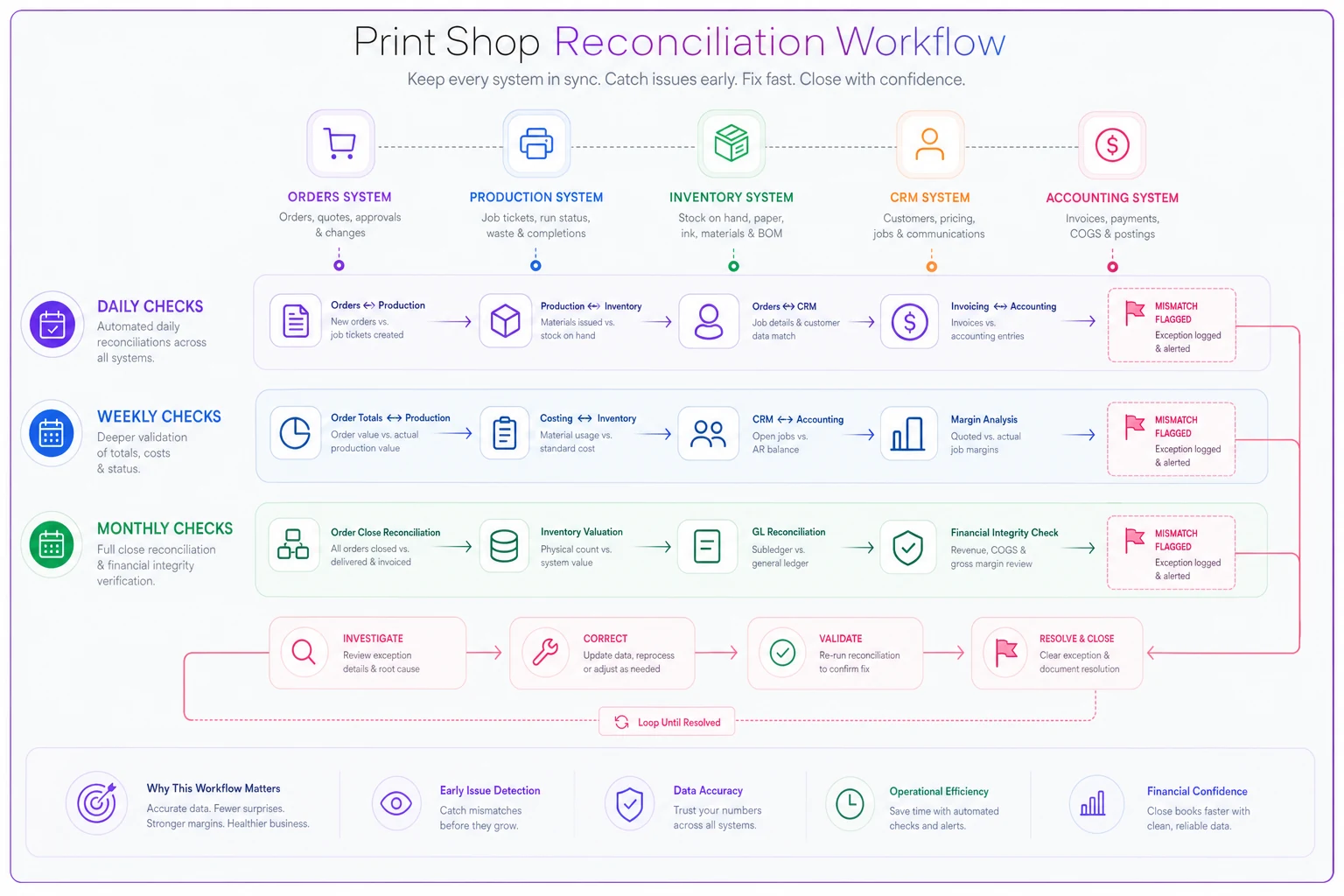
A useful discipline: every reconciliation mismatch gets a one-line note on its cause. Over a few months those notes become a map of exactly where your data model is weakest. Maybe 70% of your inventory discrepancies trace back to one substrate that gets consumed off-book for setup and test prints. That's not a counting problem — that's a missing consumption category in your model.
Reconciliation only works if you already know what "correct" looks like, which is why a defined set of operational KPIs matters. If you don't have those baselines yet, this breakdown of the KPIs and capacity model every print shop should track is a good place to anchor what you're reconciling toward.
What breaks at each stage of growth
The data model that works fine at two people fails predictably as you scale. Knowing where the breaks happen lets you build ahead of them instead of firefighting.
Solo / two-person shop. Everything lives in one or two tools plus tribal knowledge. This actually works, because the "single source of truth" is a person. The owner knows every job, every count, every customer. The failure mode is that it doesn't survive a vacation, a sick day, or a second location.
Five to ten people. This is where most shops hit the wall. There are now enough people editing data that no one person holds the full picture, but the systems still assume someone does. This is where you get the "which address is right" and "why does the estimate not match the invoice" problems on a near-daily basis. Ownership rules become non-optional here.
Ten to twenty-plus, or multi-location. Now the problem isn't just conflicting edits — it's that different sites or shifts develop their own local truth. The night shift records inventory differently than the day shift. One location's definition of a "rush" doesn't match another's. Without a canonical model enforced across sites, you effectively run two shops that can't share reporting.
The cost of not having a data architecture is invisible until it isn't, and then it shows up all at once — usually as a rough month where reprints, mis-ships, and stockouts all spike and nobody can explain why. They're all symptoms of the same untracked drift.
A prioritized migration roadmap
You don't migrate everything at once. That's how shops end up with a half-migrated mess and staff working around the new system. Sequence it by risk and dependency:
-
Freeze and document current ownership (Week 1). Before touching anything, write down which system actually owns each field today — not what should own it, what does. You'll find surprises.
-
Deduplicate and clean customers first (Weeks 2–3). Customer is the entity everything else references. Merge duplicates, standardize addresses, fix terms. A clean customer master makes every later step easier because orders hang off it.
-
Establish the order model (Weeks 3–5). Define canonical status, split quoted vs. actual price, and pick the order master. This is the highest-value entity because it touches production, billing, and shipping simultaneously.
-
Bring inventory in with dual units (Weeks 5–7). Set up purchase and consumption units, reorder points, and the customer-supplied flag. Do a full physical count as your baseline, then start weekly cycle counts immediately.
-
Assets last (Weeks 7–8). Equipment and machine records change slowly and touch fewer daily workflows, so they can wait — but don't skip them, because capacity planning depends on them.
-
Turn on reconciliation routines (ongoing). Only after the masters are defined. Reconciliation against a shifting model just generates noise.
When a canonical model actually makes sense
This work pays off when you have multiple people editing data, more than one system holding customer or order info, or plans to add a location or shift. If any of those are true, the disagreements are already costing you — you just haven't quantified them yet.
When it's a bad idea
If you're a genuine one-person shop with all the data in your head and no growth plans, building a formal data architecture is over-engineering. Spend the time on customers instead. Come back to this when you hire your second or third person — that's the real trigger, not revenue.
A short real scenario
A mid-sized commercial shop — around 14 staff, roughly $2M in annual work — kept hitting the same recurring problem: reprints and reships were eating somewhere in the range of 3–4% of monthly revenue, and job costing never matched reality. The root cause turned out to be exactly the ownership problem described above: three systems could all edit customer addresses, and the estimate system stored only one price field, so any change after quoting vanished from costing.
They didn't buy anything new at first. They just assigned ownership — CRM owns addresses, order system owns price with separate quoted and actual fields — and started daily order-status reconciliation. Within about two months, mis-ships dropped noticeably. Not to zero, but clearly down. And for the first time they could see that a specific product line was being quoted low nearly half the time. That single insight, which the old data model literally could not surface, was worth more than the reship savings.
The point isn't the specific numbers. It's that none of these were new problems — they'd been there for years, buried under systems that quietly disagreed with each other.
Where software fits, honestly
You can run a canonical data model on spreadsheets and discipline if you're small enough. Past ten people though, the reconciliation load and the sync-between-systems problem gets heavy. That's where an operational platform keeping orders, inventory, assets, and customers in one place — with defined ownership and automatic drift-checking built in — stops being a luxury and starts saving real hours. AI-assisted reconciliation can flag mismatches on the day they happen rather than the week they turn into a complaint, which is mostly what makes it useful at the operational level.
But the tool is secondary. A messy data model inside good software is still a messy data model. Get the ownership rules and entity definitions right first. The software should enforce a decision you've already made — not make the decision for you.
Stop thinking of your systems as separate screens you type into and start thinking of them as one model with one owner per field. Do that, and most of the small daily leaks — the wrong price, the old address, the phantom inventory — quietly stop happening.
Ready to simplify your print shop operations?
Join 500+ print shops using GoInkly to save time, reduce errors, and improve customer satisfaction.