

Most print shops track rejected jobs but miss the deeper operational damage. A single botched proof approval doesn't just mean reprinting 500 business cards. It means your prepress operator stops mid-workflow to handle the dispute. Your customer service person burns 45 minutes on damage control calls. The production schedule shifts, affecting three other jobs sitting behind it. And that's before accounting gets involved with the refund paperwork.
Why broken approval loops cost more than just reprints
These failures compound fast. A shop processing 200 orders monthly with a 12% proof dispute rate loses roughly 24 production slots to rework. Add the administrative overhead and you're looking at 40-60 labor hours monthly just managing approval failures — essentially a part-time employee doing nothing but cleaning up preventable mistakes.
Most print shops track rejected jobs but miss the deeper operational damage. A single botched proof approval doesn't just mean reprinting 500 business cards. It means your prepress operator stops mid-workflow to handle the dispute. Your customer service person burns 45 minutes on damage control calls. The production schedule shifts, affecting three other jobs sitting behind it. And that's before accounting gets involved with the refund paperwork.
Proof systems break at predictable volume thresholds
Small print shops usually handle proof approvals fine until they cross certain operational thresholds. Around 80-100 orders monthly, email-based approvals start creating backlogs. The owner can no longer personally review every proof before sending. Different team members start using their own templates. Customers get confused by inconsistent messaging.
Eliminate order confusion and delays.
GoInkly helps you manage every print order efficiently from submission to delivery.
- Centralized order tracking
- Production workflow management
- Inventory and supply monitoring
No credit card required
The breaking point typically hits somewhere around 150+ monthly orders across multiple product lines. Business cards need different approval rules than wedding invitations. Trade show banners require technical specs that promotional flyers don't. Digital prints have different color variance tolerances than offset runs.
Without structured proof variant rules, every order becomes a custom negotiation. Some operators accept verbal approvals over the phone. Others demand written confirmation. Meanwhile, customers experience wildly different service depending on who picks up their order that day.
Rush orders make this worse. A customer paying premium for 24-hour turnaround expects immediate proof review, but your standard approval window is 48 hours. Without clear SLA tiers mapped to order types, your team is constantly scrambling to figure out what takes priority.
Building intake validation that catches problems before they become disputes
The most effective print shop order SLA proofing systems start at order entry, not proof generation. Almost every dispute traces back to unclear specifications or mismatched expectations set during intake.
Consider what happens when a customer uploads a low-resolution logo for vehicle wrap printing. Without proper intake validation, that file makes it all the way to prepress. The operator either stops production to request a better file — creating delays — or attempts to upscale it — creating quality issues. Either path leads to a dispute.
A proper intake validation framework checks files against product-specific requirements:
Business Cards & Stationery:
-
Minimum 300 DPI at final size
-
Bleed requirements
0.125" standard
-
Color mode verification (CMYK vs RGB)
-
Font embedding status
-
Safe zone margins
Large Format & Banners:
-
Resolution scaling rules (150 DPI acceptable at 50% scale)
-
Maximum file size limits
-
Vector format preferences
-
Grommet and hem allowances
-
Wind-load specifications for outdoor installations
Packaging & Labels:
-
Die line separation requirements
-
Spot color callouts
-
Varnish and coating layers
-
Barcode verification zones
-
Regulatory text minimums
The validation rules need to trigger automated responses. When a customer uploads a 72 DPI image for business cards, the system flags it immediately and provides specific correction instructions. No waiting for prepress review. No back-and-forth emails. The customer knows within seconds what needs fixing.
Automate DPI and color-mode checks at upload to eliminate the most common intake mistakes before human review is needed.
The validation rules need to trigger automated responses. When a customer uploads a 72 DPI image for business cards, the system flags it immediately and provides specific correction instructions. No waiting for prepress review. No back-and-forth emails. The customer knows within seconds what needs fixing.
Proof variant rules that match production reality
Generic proof templates create more problems than they solve. A digital proof for offset printing needs different annotations than a soft proof for digital printing. Wide-format proofs require dimension callouts that business card proofs don't need.
Here's how proof variants map to common print products:
| Product Category | Proof Type | Required Elements | Approval Window | Revision Limits |
|---|---|---|---|---|
| Business Cards | Digital PDF | Color bars, crop marks, actual size reference | 24 hours standard, 4 hours rush | 2 rounds included |
| Offset Brochures | Hard proof | Press sheet layout, fold marks, color targets | 48 hours standard, 24 hours rush | 1 round included |
| Vehicle Graphics | Scaled mockup | Installation template, trimming guides, overlap zones | 72 hours standard, 48 hours rush | 3 rounds included |
| Trade Show Displays | 3D rendering | Assembly diagram, connection points, case layout | 72 hours standard | 2 rounds included |
| Promotional Products | Virtual mockup | Imprint area boundaries, size warnings | 48 hours standard | 1 round included |
Each variant needs specific annotation standards. Business card proofs show trim lines but not fold marks. Brochure proofs indicate fold direction and panel numbers. Banner proofs mark grommet positions and reinforcement zones.
The proof generation system should automatically select the right variant based on order specs. Manual selection introduces errors — an operator sending a business card proof with vehicle wrap annotations confuses customers and triggers unnecessary questions.
SLA windows and acceptance rules that prevent deadline disasters
Standard approval windows work until they don't. A repeatable production workflow breaks down when proof delays start cascading through the schedule.
Most shops default to blanket 48-hour approval windows without accounting for actual production constraints. A 500-piece offset run needs different lead times than 50 digital prints. The approval window should reflect:
-
Setup complexity
-
Production run time
-
Finishing requirements
-
Shipping method
-
Material availability
Dynamic SLA calculation prevents impossible promises. If a customer places an offset order Tuesday requesting Friday delivery, the system works backward from the shipping cutoff. With 2-day production and 1-day finishing, the proof must be approved by Wednesday noon — the approval window becomes 18 hours, not the standard 48.
Acceptance trigger rules need the same precision. Email confirmations work for simple products but create real ambiguity for complex orders. A customer replying "looks good but can you make the logo bigger?" hasn't approved anything. Your team wastes time interpreting vague responses.
Structured acceptance means explicit confirmation:
-
Approval checkbox or button click
-
Timestamp recording
-
IP address logging
-
Conditional acceptance options ("approved with changes")
-
Rejection with specific reasons
For orders above certain thresholds — typically around $500 — require secondary confirmation. The approver acknowledges that approved artwork goes directly to production. This prevents the "I didn't realize that was the final version" dispute, which is more common than most shops want to admit.
Chargeback rules that protect margins while maintaining relationships
Print shops lose somewhere between 3-7% of revenue to poorly managed disputes and unnecessary refunds. Without clear chargeback rules, every unhappy customer becomes a negotiation. Your team makes inconsistent concessions. Profitable jobs turn into losses.
Full refund triggers:
-
Print quality below industry standards (measured by densitometer)
-
Incorrect quantity delivered (shortage over 2%)
-
Wrong product produced
-
Missed deadline due to shop error
Partial credit situations:
-
Color variance within industry tolerance but customer dissatisfied (10-15% credit)
-
Minor trimming variations under 1/16" (5-10% credit)
-
Finishing imperfections on less than 5% of pieces (proportional credit)
No credit scenarios:
-
Customer-approved proofs produced correctly
-
Changes requested after approval
-
Color matching issues without Pantone reference
-
Subjective design preferences
The framework needs documentation requirements. For color complaints, ask the customer to return samples for measurement. For quantity disputes, request photos of the received materials. This prevents fraudulent claims while also showing professionalism — most customers respond well when they see a structured process rather than someone just trying to dodge accountability.
Timing matters too. Claims submitted more than 7 days after delivery face higher evidence requirements. After 30 days, only accept claims for hidden defects not visible at delivery.
The escalation matrix that stops small issues from becoming major disputes
Every print shop dispute follows a predictable escalation pattern. A customer emails about a color issue. No response within a few hours, they call. Still no resolution, they post a negative review. By the time management gets involved, a $50 reprint has become a reputation problem.
An escalation matrix maps specific issues to response protocols:
Level 1: Automated acknowledgment (immediate)
-
Order confirmation issues
-
Proof delivery questions
-
General timeline inquiries
-
File upload problems
Level 2: Customer service response (within 2 hours)
-
Proof clarification requests
-
Minor quality concerns
-
Shipping updates
-
Pricing questions
Level 3: Production supervisor involvement (within 4 hours)
-
Quality disputes requiring technical evaluation
-
Rush order negotiations
-
Material substitution approvals
-
Complex proof revisions
Level 4: Management escalation (same business day)
-
Refund requests over $200
-
Repeated quality complaints
-
Threats of legal action
-
Social media complaints
The matrix needs to connect to order status fields. When a customer emails about a proof and the system finds it was sent 48+ hours ago without a response, it triggers an immediate production hold and supervisor notification. This prevents printing unapproved jobs while keeping schedules intact.
Status-based routing reduces response times considerably. Quality complaints on completed orders route directly to production supervisors who can evaluate technical issues. Billing disputes go to accounting. Design questions reach prepress operators.
Template standardization across the entire approval chain
Inconsistent communication creates more disputes than actual quality problems. When different team members describe the same policies with different language, customers get confused — and confused customers escalate faster.
Every customer touchpoint needs standardized templates:
Proof delivery templates:
-
Clear approval instructions
-
Deadline warnings
-
Revision limitations
-
Color variance disclaimers
-
Link to approval portal
Approval confirmation templates:
-
Production start notification
-
Estimated completion date
-
Change restriction warnings
-
Final opportunity for modifications
Dispute response templates:
-
Issue acknowledgment
-
Investigation timeline
-
Documentation requirements
-
Resolution options
-
Escalation pathways
Templates should be dynamic, pulling order-specific information automatically. A proof email for rush orders emphasizes the shortened approval window. High-value orders include additional confirmation requirements. Reprint orders reference previous job numbers.
The language should feel human, not robotic. Instead of "Your proof requires approval within the specified timeframe," write "Please approve your proof by [specific date/time] to maintain your delivery date." Specific deadlines remove ambiguity.
System integration that connects approvals to production
Manual proof tracking creates dangerous gaps. The customer approves via email, but production doesn't get notified for hours. Or production proceeds on a verbal approval that the customer later disputes.
Ecommerce to production integration needs to include approval workflows. When a customer clicks approve, the system should:
-
Lock the artwork files
-
Update order status to "In Production"
-
Notify relevant production staff
-
Generate job tickets with specifications
-
Start production timeline tracking
The approval timestamp becomes the legal reference point for disputes. All subsequent changes require formal change orders with additional fees. This protects against customers claiming they approved something different from what was produced.
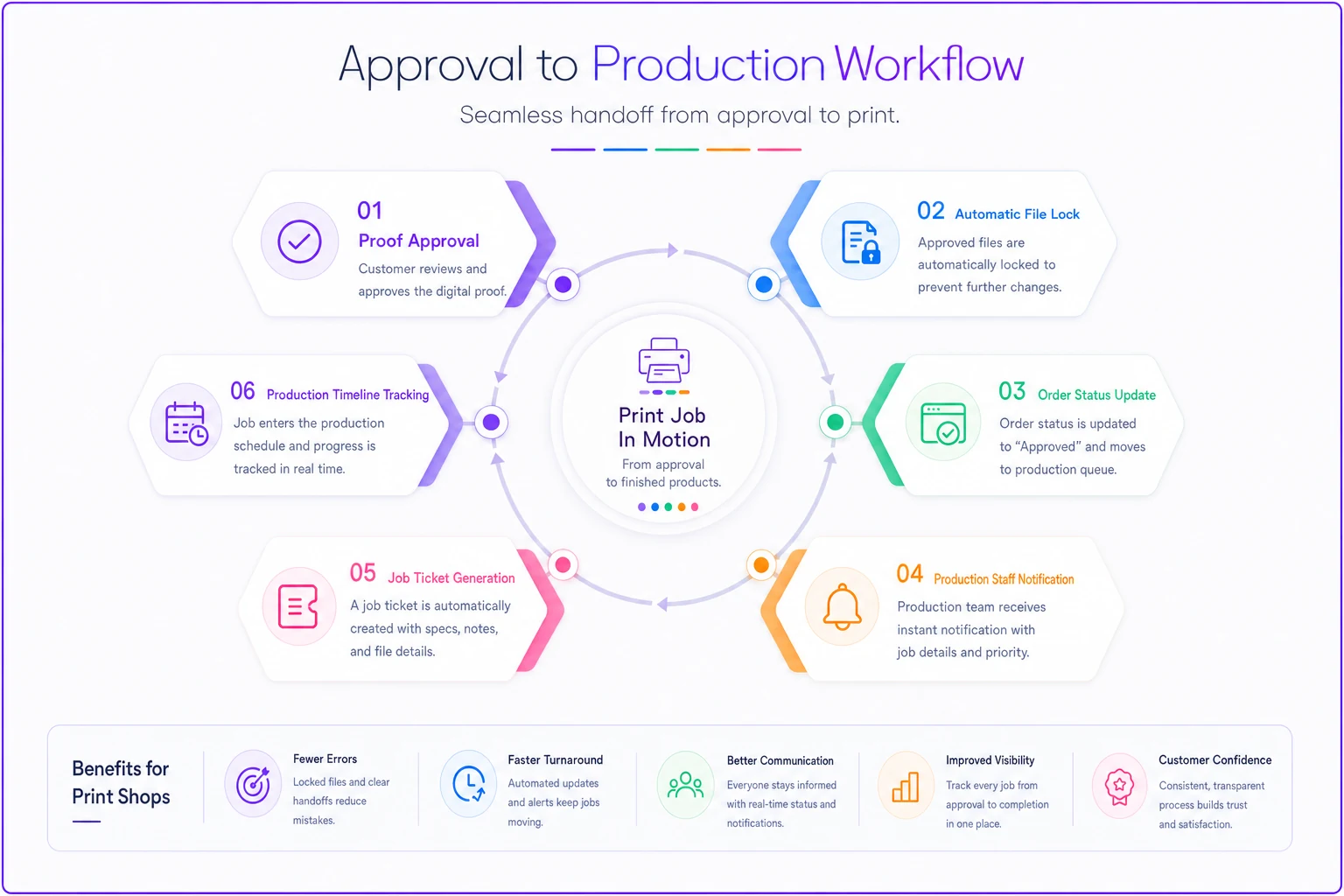
This diagram shows the approval-to-production handoff and where automated triggers occur.
For complex products requiring multiple approvals — design, color, materials — the system tracks each confirmation separately. A trade show booth might need creative approval from marketing, technical approval from facilities, and budget approval from accounting. Missing any one of them blocks production.
Integration extends to accounting systems too. Approved orders trigger deposit captures or payment processing. Disputed orders freeze invoicing until resolution. Refunds process based on the chargeback rules already established.
Measuring and improving approval performance
Most print shops measure obvious metrics like on-time delivery but miss the approval indicators that actually predict future problems. A declining first-proof approval rate is an early warning sign of communication breakdowns that will eventually surface as disputes.
Track these approval-specific metrics monthly:
-
First-proof approval rate (target
above 85%)
-
Average approval turnaround time by product type
-
Revision rounds per order
-
Dispute rate by approval method
-
Escalation frequency by customer segment
The patterns reveal systemic issues. If business card first-proof approvals drop below 80%, dig into whether intake validation is actually catching specification errors. When revision rounds consistently exceed limits, examine whether proof variants match what customers are actually expecting to see.
Customer segment analysis often surprises shops. New customers can have significantly higher dispute rates than returning customers, which usually points to onboarding problems rather than quality issues. Corporate accounts often need different SLA windows than retail customers. Trade printer relationships require technical proofs that end consumers don't understand.
Use the data to refine rules progressively. If vehicle wrap proofs consistently require three or more revisions, add more detailed mockups to the first proof. If rush orders have disproportionately higher dispute rates, either extend the approval window slightly or price the risk into the rush fee.
Building approval systems that scale with growth
The approval framework that works at 100 orders monthly breaks at 300. Email-based approvals become unmanageable. Tracking sheets corrupt or get ignored. Team members develop workarounds that create new problems down the line.
Scalable approval systems share certain characteristics:
-
Automated proof generation
Prepress operators shouldn't manually create proof PDFs. The system generates them automatically with appropriate annotations, watermarks, and approval links.
-
Customer portal access
Customers need self-service access to proof history, approval status, and revision tracking. This cuts support calls and provides audit trails when disputes do happen.
-
Multi-channel notifications
Email alone isn't reliable enough. Add SMS alerts for rush orders. Send dashboard notifications for corporate accounts. Use whatever channel actually gets a timely response.
-
Role-based permissions
Sales can view but not approve proofs. Production can flag issues but not modify artwork. Customers can approve but not download production files.
-
Workflow branching
Different products follow different approval paths. Digital prints might skip hard proofs. Offset runs might require press checks. The system routes accordingly without manual intervention.
AI-powered operational software helps by identifying patterns that are easy to miss at volume. When certain file types consistently require revisions, the system flags them for extra review before they reach prepress. When specific customers repeatedly dispute color, it can automatically recommend hard proofs for their next order. Over time, if certain proof types consistently fail to represent the final product accurately, the platform adjusts proof generation parameters based on past dispute outcomes.
From reactive dispute management to proactive approval excellence
The difference between profitable print shops and those drowning in rework isn't equipment quality or pricing strategy. It's systematic management of customer approvals from intake through delivery.
A properly designed print shop order SLA proofing system turns approvals from a bottleneck into a genuine competitive advantage. Customers get consistent, professional service regardless of order complexity. Your team spends time on production, not dispute resolution. Margins improve as rework decreases.
The framework outlined here — intake validation, proof variants, SLA windows, chargeback rules, escalation matrices, standardized templates — provides the structure needed to handle growth without sacrificing quality or customer relationships. Each component reinforces the others.
Start with the highest-impact improvements. If disputes cluster around specific products, develop targeted proof variants first. If approval delays keep disrupting production, implement dynamic SLA calculations. Build incrementally and measure results at each stage.
Some disputes are inevitable — no system eliminates them entirely. But with clear rules, consistent communication, and systematic tracking, most shops can reduce disputes significantly while actually improving how customers feel about working with them. That's the kind of operational improvement that shows up directly on the bottom line.
The difference between profitable print shops and those drowning in rework isn't equipment quality or pricing strategy. It's systematic management of customer approvals from intake through delivery.
A properly designed print shop order SLA proofing system turns approvals from a bottleneck into a genuine competitive advantage. Customers get consistent, professional service regardless of order complexity. Your team spends time on production, not dispute resolution. Margins improve as rework decreases.
Some disputes are inevitable — no system eliminates them entirely. But with clear rules, consistent communication, and systematic tracking, most shops can reduce disputes significantly while actually improving how customers feel about working with them. That's the kind of operational improvement that shows up directly on the bottom line.
Ready to simplify your print shop operations?
Join 500+ print shops using GoInkly to save time, reduce errors, and improve customer satisfaction.