


Most equipment decisions in print shops happen one of two ways. Either the shop waits until the old press is limping and rush jobs are stacking up, then panic-buys whatever the salesperson pitches hardest. Or someone sees a piece of kit at a trade show, gets excited, and works backward to justify it.
Both approaches skip the part that actually matters: connecting the decision to real utilization data and a modeled cost picture over the machine's life. A press isn't just a purchase — it's a multi-year commitment to a fixed cost that either gets absorbed by throughput or quietly eats your margin every month it sits underused.
This is a framework for making that call repeatable. Not a one-time spreadsheet exercise, but a set of triggers and thresholds you can apply again and again — for a digital press, a wide-format machine, a folder, a laminator, whatever comes next.
Why print shops keep getting equipment decisions wrong
The core issue is that most shops don't have a number that tells them when to buy. They have vibes. "We're really slammed lately." "That machine's getting old." "We turned down a couple jobs last month."
None of those are decision signals. They're feelings dressed up as reasons.
What you see across a lot of small shops is that the equipment that gets bought and the equipment that actually needed replacing are frequently two different machines. The squeaky wheel — the press everyone complains about — grabs attention, while the real bottleneck sits in finishing or bindery, quietly capping the whole operation's output.
The other failure is timing. A shop buys a $180k press at 40% projected utilization because they "expect growth." Growth doesn't show up on schedule. Now there's a fixed monthly obligation of roughly $3,200–$3,800 (lease plus service) running against a machine earning maybe half what it needs to. That gap doesn't announce itself in one bad month. It bleeds slowly across two years until the shop wonders why it feels broke despite being busy.
Equipment decisions break shops not because the machines are bad, but because the decision process has no anchor in actual capacity numbers.
The anchor: utilization trigger bands
Before you model anything, you need honest utilization data per machine class. Not "how busy does it feel" — actual productive run hours against available capacity hours.
Eliminate order confusion and delays.
GoInkly helps you manage every print order efficiently from submission to delivery.
- Centralized order tracking
- Production workflow management
- Inventory and supply monitoring
No credit card required
If you're not already tracking this, that has to come first. The whole framework assumes you know your real numbers, which is why building a proper capacity model is the prerequisite step covered in Stop flying blind: KPIs and a capacity model every profitable print shop should track. Without that baseline, everything below is guesswork with extra steps.
Once you have it, you set trigger bands — utilization ranges that tell you what action to consider. Not automatically take, but seriously evaluate.
| Utilization (rolling 90-day) | What it signals | Action to evaluate |
|---|---|---|
| Under 45% | Overcapacity or wrong machine | Consider outsourcing, selling, or repurposing |
| 45%–65% | Healthy, room to grow | Hold. Push sales before buying anything |
| 66%–80% | Getting tight | Model options now, don't wait |
| 81%–90% | Real constraint forming | Decision window open — buy/lease/outsource |
| Over 90% | Already turning away work | You're late. Bridge with outsourcing while you decide |
Track rolling 90-day utilization per machine class in a consistent calendar window to avoid seasonal skew.
The reason for bands rather than a single trigger point is that the action changes depending on how deep into the pressure you are. A machine at 68% gives you months to plan. A machine at 92% means you're already losing jobs and need a bridge solution while the permanent one gets sorted.
One pattern worth naming: shops tend to react at 90%+ and buy in a hurry, which is the worst possible time to negotiate. The 66%–80% band is where good decisions actually live — you still have leverage and lead time.
Modeling true cost per press type
Sticker price is the least interesting number in an equipment decision. What matters is total cost of ownership across the machine's realistic working life, divided by the throughput it actually produces.
Here's a modeled comparison across three common acquisition scenarios for a mid-volume digital production press. Numbers are illustrative but built to reflect realistic ranges — plug in your own.
| Cost component | Buy (cash/loan) | Lease (60-mo) | Outsource equivalent |
|---|---|---|---|
| Upfront / deposit | ~$165k | ~$8k | $0 |
| Monthly payment | ~$3,050 (loan) | ~$3,400 | Per-job markup |
| Service/maintenance/yr | ~$14k | Often bundled | N/A |
| Consumables/click cost | Yours to manage | Yours to manage | Built into partner price |
| Est. 5-yr TCO | ~$255k–$275k | ~$212k–$225k | Variable, volume-driven |
| Residual value | You keep it | $0 (or buyout) | N/A |
The trap most people fall into is comparing monthly payments. Buy looks cheaper monthly on the loan, lease looks lighter upfront, and outsourcing looks free because there's no line item. But per-unit economics tell a different story.
If that press runs at 75% utilization, the buy option produces the lowest cost per impression by year three because you own the asset and only pay clicks and service. If it runs at 40%, both the lease and outsource options outperform ownership — you're not stuck carrying a fixed cost against thin volume.
That's the whole point of tying TCO to utilization. The right answer changes entirely based on the throughput number, which is why you can't model equipment in isolation from capacity data.
A fairly typical scenario: a shop with around 12 employees, doing decent commercial and short-run work, was weighing a wide-format purchase at about $52k. Their signage volume ran at maybe 35% of what the machine could handle. On paper the buy "paid for itself in three years." In practice, at 35% utilization, outsourcing large-format to a trade partner cost them roughly $1,900–$2,400 a month against a machine payment plus space and maintenance closer to $1,600 — but only if the machine stayed busy. At their actual volume, ownership was the more expensive path for at least the first two years. They leased instead, kept the buyout option, and revisited when volume climbed.
Buy vs. lease vs. outsource: the threshold logic
Once you've modeled TCO against utilization, the decision usually sorts itself into a fairly clean set of thresholds.
Buy makes sense when:
-
Projected utilization is comfortably above 65% and stable
-
The capability is core to your business, not occasional
-
You have cash or financing that doesn't strangle working capital
-
The technology isn't about to shift under you in 18 months
Lease makes sense when:
-
Utilization is uncertain or projected in the 45%–65% range
-
The technology moves fast (digital presses especially)
-
You want to preserve cash for other bottlenecks
-
You value the option to walk away or upgrade
Outsource makes sense when:
-
Utilization would sit below 45%
-
The work is occasional, spiky, or a customer accommodation
-
You don't want to own a capability you can't keep busy
-
You'd rather protect focus and floor space than chase every job in-house
When buying is actually a bad idea
The most expensive mistakes come from buying to "not turn away work" without checking how much of that work actually exists. Turning away three signage jobs a month does not justify a $50k machine. If those three jobs net $600 combined, that's $7,200 a year of margin against a machine that costs far more to own and maintain. Outsource them, keep the customer happy, move on.
Buying is also a bad idea when the projected volume is really just one big client's request. If 80% of expected volume comes from a single account, you're not buying a press — you're making a bet on that relationship. Machines outlast contracts more often than people expect.
The partner SLA checklist for outsourcing
Outsourcing only works if the partner is reliable enough that your customers never feel the handoff. A cheap trade printer that misses dates will cost you more in blown SLAs and reputation damage than owning the machine ever would.
-
Turnaround commitment in writing, with standard and rush tiers
-
On-time delivery rate — ask for their actual number, not a promise
-
Quality tolerance and reprint policy — who eats a bad run, and how fast is it fixed
-
Color matching standards — will their output match your proofs
-
Capacity guarantees during peak — can they handle your December, not just your March
-
Communication protocol — how you get status updates, who you call when something slips
-
Pricing lock duration — how often rates change and with what notice
-
Confidentiality — especially if they could touch your client relationships directly
The mistake is treating a trade partner like a vendor when they're really an extension of your production floor. If a job fails at their shop, your customer blames you. Vet accordingly.
A repeatable decision process you can run every time
Here's the sequence that ties it together. Run it whenever a machine crosses into the 66%+ band or a capability gap keeps costing you jobs.
-
Pull 90-day utilization for the machine class in question. If you don't have clean data, stop and fix your tracking first.
-
Identify the trigger band. Is this a "hold," a "model now," or a "you're already late" situation?
-
Confirm the real bottleneck. Make sure the machine you're eyeing is actually the constraint, not a downstream one. Presses often get blamed for finishing bottlenecks.
-
Model TCO across all three paths — buy, lease, outsource — using your actual projected utilization, not the optimistic one.
-
Stress-test the volume. What happens to each option if projected volume comes in 25% low? The right choice should still hold up.
-
Apply threshold logic to pick the path.
-
For outsourcing, run the SLA checklist before committing.
-
Set a review date. Utilization changes. Revisit leased and outsourced decisions on a schedule, not just when something breaks.
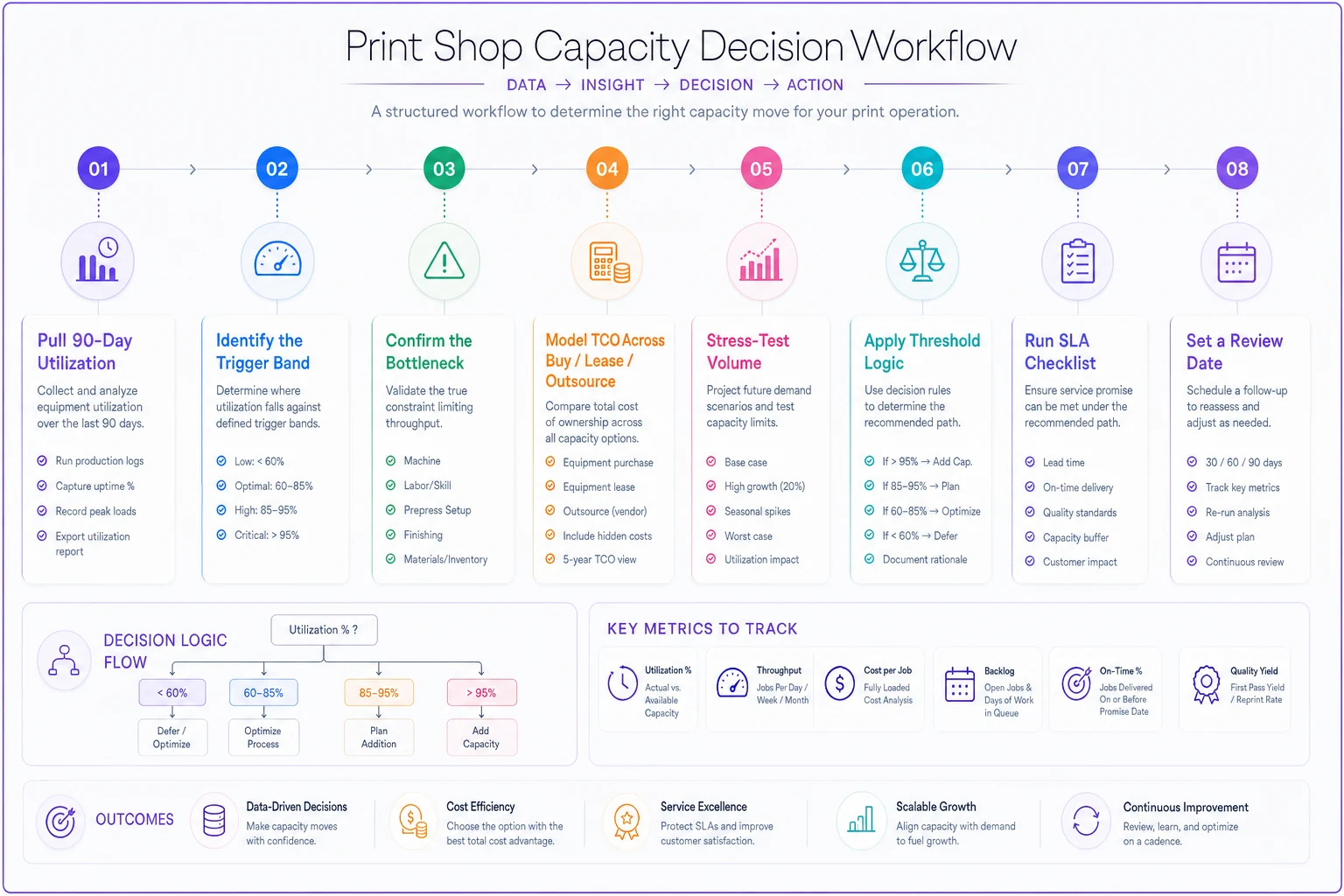
A simple visual of the decision sequence can help align teams on who owns each step and the handoffs between data, modeling, and contracting.
The value of writing this down as a process — rather than deciding fresh each time — is that it removes emotion and salesmanship from a high-stakes call. Trade show excitement, a salesperson's urgency, the "we're so busy" panic — none of it survives contact with real utilization bands and modeled TCO.
What changes as you scale
At one press and a handful of staff, equipment decisions are rare and mostly binary — you can or can't afford it. The framework still helps, but the stakes are contained.
As you add machines, shifts, and volume, the picture gets more connected. A new press changes your finishing load. Adding a shift changes your utilization math because the same machine now has more available hours before it's "full." Buying capacity you can't staff is its own trap — the machine sits idle not because there's no work, but because there's nobody to run it.
This is where equipment planning and workforce planning stop being separate conversations. If you're thinking about pushing a machine harder by running longer hours, the operational side — quality control across shifts, staffing, handoffs — is worth understanding before you assume more hours automatically means more output. That's covered in Scale to multi-shift production without losing print quality: a staged operations roadmap.
The shops that scale cleanly treat capacity, equipment, and staffing as one system with linked triggers — not three separate decisions made by three different gut instincts on three different days.
A note on keeping the data honest
The hard part of this framework isn't the math. It's having utilization numbers you actually trust. Most shops running on spreadsheets and memory can't tell you true productive hours per machine, which means every equipment decision starts from a guess.
When your job data, machine time, and capacity are flowing through a connected operational platform rather than scattered notebooks, pulling a clean 90-day utilization number takes minutes instead of a painful afternoon of reconstruction. The point isn't the software itself — it's that a repeatable framework only works if the inputs are reliable, and reliable inputs come from data you're capturing automatically rather than reconstructing from memory.
Bringing it together
A print shop equipment investment framework isn't about being cautious or aggressive with CAPEX. It's about making the same disciplined call every time: read the utilization band, model the true cost across buy/lease/outsource, stress-test the volume, and pick the path the numbers support.
Do that consistently and the panic-buys stop. The trade-show impulse purchases stop. The presses sitting at 40% utilization bleeding fixed cost stop. What you're left with is a shop where every machine on the floor is there because the throughput justified it — and where the next equipment decision is a calm, repeatable process instead of a gamble you make when you're already out of room.
A print shop equipment investment framework isn't about being cautious or aggressive with CAPEX. It's about making the same disciplined call every time: read the utilization band, model the true cost across buy/lease/outsource, stress-test the volume, and pick the path the numbers support.
Do that consistently and the panic-buys stop. The trade-show impulse purchases stop. The presses sitting at 40% utilization bleeding fixed cost stop. What you're left with is a shop where every machine on the floor is there because the throughput justified it — and where the next equipment decision is a calm, repeatable process instead of a gamble you make when you're already out of room.
Ready to simplify your print shop operations?
Join 500+ print shops using GoInkly to save time, reduce errors, and improve customer satisfaction.