

Every print shop has a version of the same job sitting in a folder somewhere: the one where a customer ordered 500 business cards with 1/16" of live text hanging off the edge, approved the proof, then blamed the shop when the finals came back trimmed. Or the banner ordered at 300 DPI that was actually a 72 DPI JPEG stretched to fill. Or the "spot UV" order placed on a stock that can't take spot UV.
These aren't design problems. They're configurator problems. The order form let something through that should have been stopped at the door.
Most shops treat their online product configurator like a glorified shopping cart — pick size, pick quantity, upload file, pay. That works fine until you realize how many daily headaches trace back to orders that were technically "complete" but operationally broken. This post is about the specific patterns that stop those orders from ever reaching your prepress team.
The three places a print order goes wrong
Before getting into recipes, it helps to separate where invalid orders actually come from, because the fix is different depending on the source.
The first is field-level input — the customer types or selects something that's internally inconsistent. A 4/0 job with a "double-sided coating" option checked. A quantity of 37 on a product that only gangs in multiples of 250.
The second is option combinations — each individual choice looks valid, but together they're impossible to run. Foil stamping on a synthetic stock your foil machine won't hold. A fold pattern that doesn't exist for the chosen flat size. These pass any single-field check and still produce an order nobody can actually build.
The third is the uploaded artwork itself — the metadata says one thing, the file says another. Wrong dimensions, no bleed, RGB where you need CMYK, fonts not embedded, resolution too low for the print size.
A configurator that only validates the first bucket — which is most of them — catches maybe a third of real problems. The interesting work is in buckets two and three.
Field-level validation recipes that actually match how print works
Standard web validation assumes fields are independent. Print orders aren't. A useful validation layer for print SKUs is mostly about relationships between fields, not the fields themselves.
Eliminate order confusion and delays.
GoInkly helps you manage every print order efficiently from submission to delivery.
- Centralized order tracking
- Production workflow management
- Inventory and supply monitoring
No credit card required
Here are the recipes worth building first, roughly in order of how often they actually save you:
-
Quantity-to-imposition matching. If a SKU gangs 8-up, reject or auto-round quantities that don't fit the sheet math cleanly. Don't let someone order 900 when your press runs 1,000-count sheets and the 100-unit overage costs you a full extra sheet run.
-
Sides vs. finishing dependency. Coating, laminate, and per-side options should be locked to the number of printed sides. A 4/0 job cannot have back-side spot gloss. This one check alone kills a surprising number of prepress kickbacks.
-
Size-to-fold validity. Fold options should be a function of flat dimensions, not a free-standing dropdown. A tri-fold needs a minimum panel width; a gate fold needs even more. If the flat size can't physically fold that way, the option shouldn't appear.
-
Stock weight vs. process limits. Scoring, folding, and certain digital presses have GSM ranges. A 400gsm cover stock that "folds" without a score will crack — flag it before checkout, not at the bench.
-
Turnaround vs. finishing. Same-day rush plus a finishing step that requires 24-hour cure time is a contradiction. The turnaround selector should read from the finishing choices, not sit beside them.
Lock finishing options to the selected number of printed sides at the UI layer to avoid back-and-forth with customers.
The pattern underneath all of these: no field on a print form should validate in isolation. Almost every real-world invalid order is a valid-looking combination.
UX constraints: stop the bad choice before it's made
Validation that fires after someone picks something is already too late in one important way — it trains customers to see your form as annoying. The better move is making invalid states impossible to reach in the first place.
The core principle is progressive disclosure driven by prior selections. Instead of showing every option and rejecting the wrong combos, you reveal only what's still valid given what's already been chosen.
A typical example: customer picks a 5.5" × 8.5" flyer. The fold dropdown then only offers "flat, half-fold, tri-fold" — not the gate and Z-folds that don't work at that size. They pick "matte 100lb text." The coating options that don't adhere to matte stock simply aren't there. By the time they hit the artwork step, every remaining choice is actually buildable.
This does two things at once. It shrinks the customer's decision space, which speeds up ordering, and it eliminates whole categories of downstream error. The mistake most shops make is dumping all 40 options on one screen because "power users want to see everything." Power users don't want to see everything — they want their order to not get kicked back.
A few UX constraints worth enforcing directly in the interface:
| Constraint pattern | What it prevents | How it shows up to the customer |
|---|---|---|
| Dependent dropdowns | Impossible option combos | Later options repopulate when earlier ones change |
| Grayed-out with reason | Silent confusion | "Spot UV unavailable on uncoated stock" tooltip |
| Live imposition preview | Quantity/waste surprises | "Rounded to 500 to fill the sheet" note near price |
| Min/max input bounds | Out-of-range quantities | Field won't accept below MOQ, suggests nearest valid |
| Bleed/safe-zone overlay | Trimmed content | Visual template shown on the upload step |
The grayed-out-with-reason pattern matters more than it looks. When you hide an option entirely, savvy customers assume you don't offer it and go somewhere else. When you gray it out and explain why it's unavailable for their current setup, they adjust the earlier selection and stay in the funnel.
Server-side preflight: the checks you can't trust the browser to do
Everything above is front-end. Front-end validation is for user experience — it's helpful, it's fast, and it's completely spoofable. Anyone with a modified request or a stale cached form can push a garbage order straight through. The real gate lives on the server.
Server-side preflight is where you actually inspect the uploaded file against the ordered SKU. This is the step most shops either skip entirely or bolt on manually at prepress — which is exactly the manual bottleneck that a decent ecommerce-to-production integration is supposed to remove. If a human has to open every file to check bleed and DPI, you haven't automated ordering, you've just moved the queue somewhere else.
A practical server-side preflight sequence for print SKUs:
-
Re-validate the option combination. Never trust that the front end enforced the rules. Re-run the field-dependency logic server-side against the SKU's real capability table. This catches spoofed and stale submissions.
-
Read the file's true dimensions and unit. Compare declared trim size to the artwork's actual page size, accounting for bleed. A "3.5 × 2" business card should arrive as 3.75 × 2.25 with bleed — flag anything off by more than tolerance.
-
Check effective resolution at print size. Not the raw DPI tag — the effective DPI after the image is scaled to the ordered dimensions. This is where the stretched-72-DPI-JPEG disaster gets caught.
-
Confirm color space and ink coverage. RGB files on a CMYK job, or total ink coverage above your press limit (often around 280–300% for coated stock), get flagged before rip.
-
Verify fonts and transparency. Non-embedded fonts and unflattened transparency are the two silent killers that look fine on the customer's screen and blow up at output.
-
Return a structured result, not a pass/fail. The preflight should output what failed and how far off it was, because that feeds your error messaging downstream.
Here's the typical server-side preflight flow:
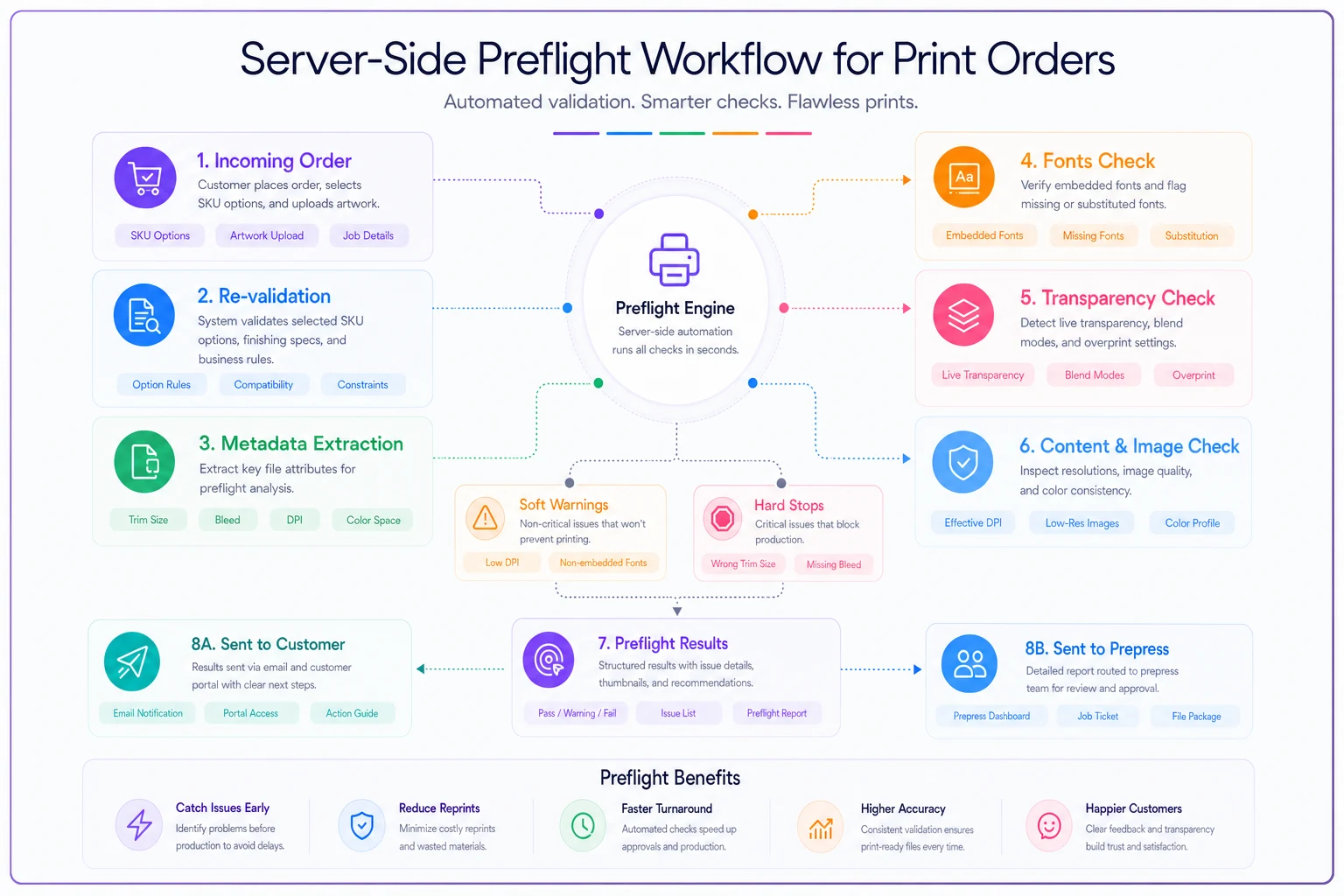
Preflight isn't a wall, it's a triage step. Some failures are hard stops — no artwork, wrong dimensions entirely. Some are soft warnings the customer can accept with an informed acknowledgment, like low-ish resolution that's probably fine for a banner viewed from ten feet away. Treating everything as a hard stop kills conversions. Treating everything as a warning puts bad jobs on your floor. The structured result lets you decide per-check, which is the only approach that actually works in practice.
Error messaging patterns that actually get fixed
A preflight that returns "Error: file invalid" is worse than no preflight, because now the customer is frustrated and still doesn't have a printable file. The messaging is half the system.
The pattern that works has three parts in every message:
-
What's wrong, in the customer's language. Not "resolution below threshold" — "This image will look blurry at the size you ordered."
-
Why it matters for their specific job. "At 24×36", your file works out to about 90 DPI. For a banner viewed from a distance that's borderline; for something people read up close, it'll look soft."
-
The exact next action. "Upload a version at least 3600 pixels wide, or reduce the print size to 18×27" where your current file will look sharp."
That third part is what separates a helpful preflight from an abandoned cart. Most shops write the first sentence and stop there.
For soft warnings, add an explicit informed-consent step — a checkbox that says something like "I understand this file is below our recommended resolution and I accept the print quality as-is." This does double duty: it lets legitimate borderline jobs through, and it gives you a clean paper trail when someone complains about the exact thing they already acknowledged. That single logged checkbox has settled more quality disputes than any reprint policy.
When to build the full stack — and when not to
When the full preflight stack makes sense: you're taking artwork uploads directly from customers, you run more than a handful of SKUs with real finishing complexity, and your prepress team is spending real hours fixing or bouncing files. If file-related kickbacks are a daily occurrence, server-side preflight pays for itself faster than most shops expect.
When it's overkill: you're a design-first shop where your own team builds every file, or your volume is low enough that a person eyeballing each order is genuinely cheaper than building and maintaining the rules. Automated preflight has a real maintenance cost — every new stock, every new press, every new finishing option needs its capability data kept current. A shop with a dozen SKUs and a careful owner doesn't need this yet.
Who should not start here: shops whose SKU data is a mess. If your product catalog doesn't have clean, structured attributes — stock weights, press limits, imposition counts, valid fold-by-size tables — no configurator logic can enforce rules that don't exist in a usable form. Fix the SKU data model first. The same discipline that makes a clean barcode and labeling rollout work — consistent, structured product identifiers — is the foundation the configurator reads from. Garbage catalog, garbage validation.
A real scenario
A mid-size shop running mostly short-run marketing collateral — business cards, flyers, small-format banners, somewhere around 60 to 80 online orders a week — was bouncing roughly 15–20% of customer-uploaded orders back for file problems. Wrong dimensions and low resolution were the top two by a wide margin. Each bounce meant an email, a wait, a re-upload, and a re-check. Prepress was losing somewhere around 8–10 hours a week just on that loop, and a chunk of those bounced orders never came back at all.
They rebuilt the configurator in stages. First, dependent dropdowns so fold and finishing options matched the chosen size and stock — that alone cut impossible-combination orders to near zero. Then a server-side preflight checking true dimensions, effective DPI, and color space, with three-part error messages and a consent checkbox for borderline resolution.
File-related bounce rate dropped to roughly 4–5% over the following couple of months, and most of what remained was genuine hard-stop stuff that needed a human review anyway. Prepress got most of that weekly time back. The less obvious win: the abandoned-order rate on flagged jobs fell too, because customers who got a clear "here's exactly how to fix it" message actually fixed it instead of giving up.
Pulling it together
The whole point of a print configurator isn't to sell — it's to only accept orders you can actually produce as ordered. Field validation catches the internally inconsistent stuff. UX constraints prevent impossible combinations from being chosen in the first place. Server-side preflight is the honest gate that inspects the real file against the real SKU. Skip any one layer and the gaps show up on your production floor, in your prepress hours, and in reprint costs.
Start with your own kickback log. Whatever file and order problems show up most often there are exactly the rules worth encoding first — not theoretical edge cases, the ones already costing you time this month.
Start with your own kickback log. Whatever file and order problems show up most often there are exactly the rules worth encoding first — not theoretical edge cases, the ones already costing you time this month.
Ready to simplify your print shop operations?
Join 500+ print shops using GoInkly to save time, reduce errors, and improve customer satisfaction.