


Most print shops that cross roughly $1.5M in revenue hit the same wall: every job is still treated as a custom quote, every customer gets a slightly different deal, and the only person who really understands the pricing logic is the owner. That works fine at 20 orders a week. It falls apart at 200.
Productization is the fix, but it's widely misunderstood. People think it means slapping fixed prices on a web store and calling it a day. That's the cosmetic version. The real work is building the systems underneath a packaged offer — the SKU taxonomy, the acceptance criteria that tie an SLA to your actual capacity, the fulfilment mapping, and the change-control scripts your CSRs and ops leads use when reality deviates from the package.
This is a systems article. It's about how these pieces connect, where they break as you grow, and what the whole machine looks like when it runs well.
The core problem: your quoting logic lives in one person's head
There's a pattern you see constantly in shops that never productized. A customer calls, the owner or a senior estimator eyeballs the spec, pulls a number that's partly margin math and partly "what will this account tolerate," and the quote goes out. The logic is real — it's just invisible. Nothing written down anywhere.
-
New CSRs can't quote without escalating, so the owner becomes a bottleneck on every non-trivial job.
-
Pricing drifts. Two similar jobs for two similar customers get quoted $400 apart because two different people estimated them on two different days.
-
Fulfilment has no stable promise to work against, because "whatever we told the customer" changes per order.
Productization is really about moving that invisible logic into a shared, versioned structure that other people can operate. Once it lives in a SKU taxonomy and a pricing band table, the shop stops depending on heroics.
The mistake most shops make is trying to productize everything. You don't. You productize the 60–70% of your volume that's actually repeatable, and you leave a clean "custom" lane for the rest. More on that later.
Step one: build a SKU taxonomy that reflects how you actually produce
A SKU taxonomy for a print shop isn't a product list. It's a structured way of describing a job so that pricing, capacity, and fulfilment all read from the same definition. If your SKUs only describe what the customer buys and not how you make it, the whole system leaks.
Eliminate order confusion and delays.
GoInkly helps you manage every print order efficiently from submission to delivery.
- Centralized order tracking
- Production workflow management
- Inventory and supply monitoring
No credit card required
A workable taxonomy has layers. Here's the structure that holds up across digital, offset, and wide-format shops:
Base product → substrate → size → finishing → quantity band → SLA tier
Each layer is a dimension, and each dimension has a fixed set of allowed values. That constraint is the point. When any value is allowed, you're back to custom quoting.
Worked SKU examples
Two packaged offers from a mid-size commercial shop:
| SKU code | Product | Substrate | Size | Finishing | Qty band | SLA tier |
|---|---|---|---|---|---|---|
BC-16PT-STD-250 | Business cards | 16pt C2S | 3.5×2 | Matte lam, both sides | 250 | Standard (5 biz days) |
BC-16PT-RSH-500 | Business cards | 16pt C2S | 3.5×2 | Matte lam, both sides | 500 | Rush (2 biz days) |
PST-100#-STD-1000 | Postcards | 100# gloss cover | 6×9 | None | 1,000 | Standard (5 biz days) |
BRO-100#-STD-500 | Tri-fold brochure | 100# gloss text | 8.5×11 | Score + fold | 500 | Standard (6 biz days) |
Notice what the SKU code encodes: substrate, size class, speed, quantity. A CSR reading BC-16PT-RSH-500 knows the material, the turnaround promise, and roughly what the shop floor has to do — without asking anyone.
Quantity bands matter more than people expect. Printing 250 vs 500 business cards is barely a cost difference on a digital press, but 250 vs 5,000 is a different production path entirely. Your bands should break where your cost curve breaks, not at round marketing numbers. If your gang-run threshold is 1,500 pieces, that's where a band boundary belongs.
Step two: write SLA-to-capacity acceptance criteria
This is the part shops skip, and it causes the most pain. An SLA is a promise. Capacity is what you can actually deliver. Acceptance criteria are the rules that decide whether a given order is allowed to accept a given SLA based on current capacity.
Without this, you productize your way straight into a pile of missed deadlines. You've now made a written 2-day rush promise, and your CSRs will sell it whether or not the floor can absorb it.
Acceptance criteria are threshold rules. A simple, real version:
-
Rush tier (2 biz days) is only accepted if current rush queue load is below 40% of daily rush capacity AND the substrate is in stock AND no outsourced finishing is required.
-
Standard tier (5 biz days) is accepted if the standard queue has open slots within the next 2 production days.
-
Economy tier (8–10 biz days) is always accepted — it's the overflow valve.
The threshold numbers come from your capacity model. If you haven't mapped your true throughput by production path, that work comes first — it ties directly into the profitability architecture of mapping capacity and true job cost into price bands. You can't set honest acceptance thresholds without knowing what your presses and finishing stations actually clear per shift.
Sample acceptance thresholds
| SLA tier | Max concurrent jobs in tier | Substrate rule | Finishing rule | Auto-accept? |
|---|---|---|---|---|
| Rush (2 day) | 6 active | Must be in-stock | No outsourced steps | Only if load < 40% |
| Standard (5 day) | 25 active | In-stock or 1-day reorder | In-house only | Yes if slots open |
| Economy (8–10 day) | Unlimited | Any | Any | Always |
The "max concurrent jobs" number is your release valve. When the rush tier is full, the system — or the CSR following the script — doesn't say no. It offers the next tier down, usually at a lower price. That's a feature, not a limitation. You're protecting delivery reliability, which is what packaged offers live or die on.
Step three: map every SLA to a fulfilment path
An SLA tier isn't just a date. It's a commitment to a specific sequence of production steps with specific priority. SLA-to-fulfilment mapping makes that sequence explicit so the floor knows exactly how a rush job moves differently than a standard one.
Here's how a rush SKU flows versus a standard SKU:
Rush path (-RSH-):
Order accepted → preflight within 2 hours → proof auto-approved if customer is on file with approved template → jumps to front of press queue → finishing reserved same-day → QC → ship by cutoff. No batching with other jobs.
Standard path (-STD-):
Order accepted → preflight within 1 business day → proof sent, 24h approval window → batched into next gang run with matching substrate → press → finishing in sequence → QC → ship within SLA window.
The difference isn't speed for its own sake. The rush job skips batching, which is where the real time goes in a standard job. That's why rush costs more — you're giving up gang-run efficiency. If your pricing doesn't reflect the lost batching efficiency, your rush tier quietly loses money on every order.
Visual workflow: rush vs standard fulfillment path.
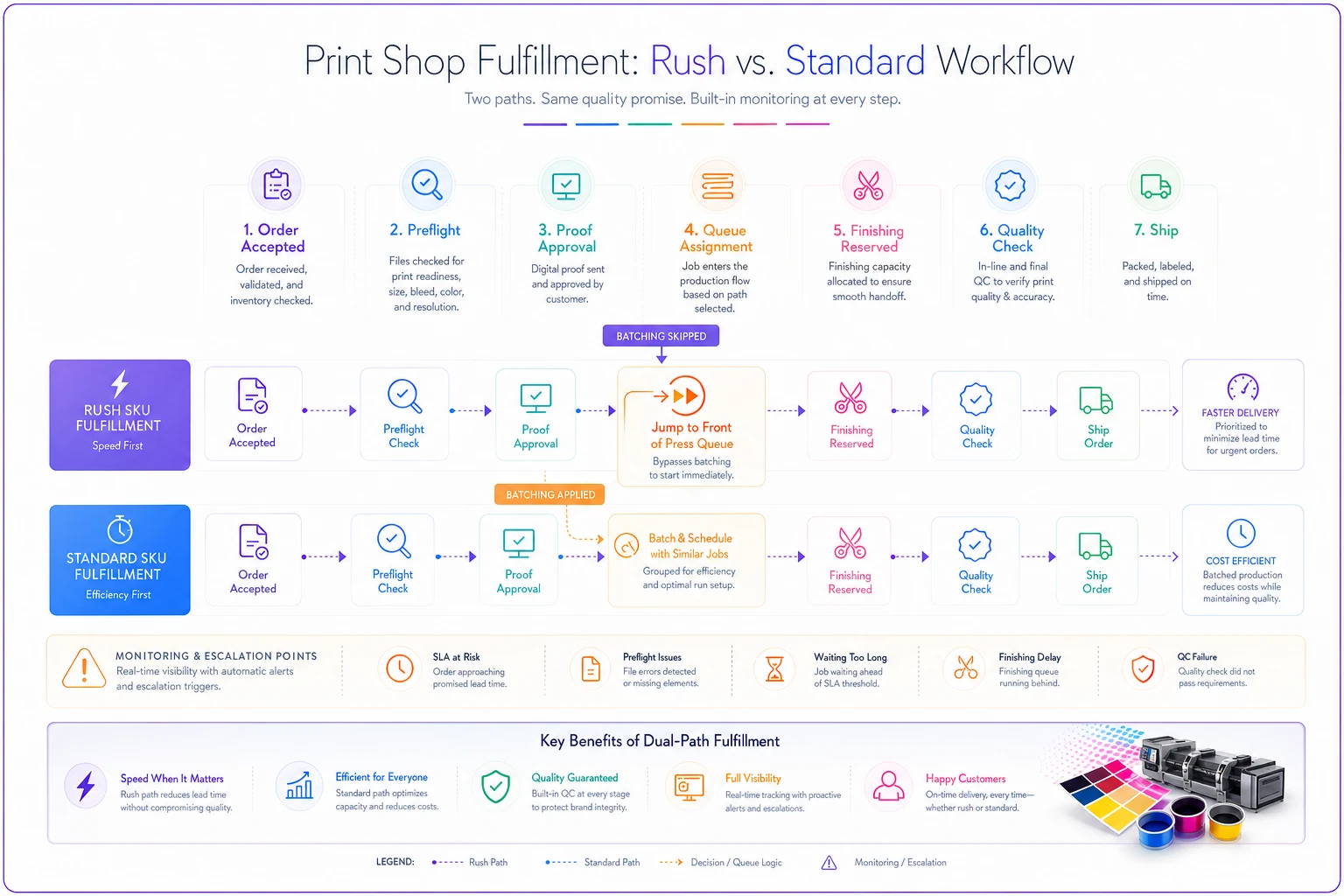
This mapping also tells you exactly where a job can fail its SLA: preflight backlog, proof approval delay, substrate stockout, finishing bottleneck. Each of those becomes a monitoring point. When a job stalls at any of them, it should trigger an escalation before the deadline is blown, not after.
Step four: build scalable pricing bands
Packaged SKUs need packaged prices, but a single fixed price per SKU is too rigid and a fully custom quote is too slow. The middle path is pricing bands: a price that varies within a defined range based on a small number of inputs — usually quantity band and SLA tier, occasionally a material surcharge.
If you've already built a modular quoting structure for custom work, this extends naturally from it. The modular quoting framework of setup, run and finishing price bands is the right foundation — productized SKUs are essentially pre-solved instances of that same setup/run/finishing math, locked into standard values.
A pricing band for the business card example:
| SKU | Economy | Standard | Rush |
|---|---|---|---|
| 250 qty | $38 | $46 | $68 |
| 500 qty | $52 | $62 | $92 |
| 1,000 qty | $78 | $94 | $138 |
The rush premium here runs about 45–48% over standard. That's not arbitrary — it reflects the batching efficiency you lose plus the queue disruption cost. Shops that set rush at a flat "+$20" regardless of job size get punished on larger rush orders.
Bands scale better than fixed prices because when input costs move, you adjust the band table once and every SKU updates. When you quoted everything custom, a paper price increase meant re-educating every estimator. Standardized SKUs also make channel-level analysis far more tractable — consistent cost structure means it's actually possible to measure channel profitability including hidden labor, returns and packaging once orders flow through standardized products.
The migration: moving top customers onto packaged offers
Building the system is half the job. The harder half is migrating existing accounts — especially your best ones — without blowing up relationships. These customers are used to their custom pricing, and some of them are getting deals that won't map cleanly to a band.
Don't migrate everyone at once. Start with accounts whose order history already looks like a repeatable SKU. A customer who orders the same 1,000 6×9 postcards every six weeks is a gift — they're already buying a product, they just don't have a SKU name for it yet.
Migration checklist
-
[ ] Pull 12 months of order history per target account and cluster orders by spec.
-
[ ] Identify which recurring orders already match (or nearly match) a packaged SKU.
-
[ ] Flag accounts where custom pricing sits more than ~10% below the matching band — these need a conversation, not a silent switch.
-
[ ] Map each recurring order to its target SKU and SLA tier.
-
[ ] Prepare a "grandfather" band for accounts you can't move to list pricing yet.
-
[ ] Rewrite the account's saved quote templates in the CRM to reference SKU codes.
-
[ ] Brief the CSR who owns the relationship with the exact script.
-
[ ] Switch, then watch the first two orders closely for fulfilment deviations.
The accounts priced well below band are the delicate ones. A common pattern: a loyal customer locked in pricing three years ago that's now 15–20% under what the band says. You don't yank that overnight. You either grandfather them with a documented expiry, or fold the gap into a volume commitment — "we'll hold this pricing if you commit to X per quarter."
When migration is a bad idea
-
Accounts whose orders are genuinely one-off and never repeat.
-
High-complexity jobs with constant spec changes — large-format environmental graphics, custom packaging.
-
A small handful of relationship accounts where the custom-quote conversation is the value to them.
Forcing a packaged SKU onto genuinely custom work is how you lose your most profitable jobs. Keep the custom lane clean and respected. Productization is about standardizing the repeatable majority, not pretending the whole shop is a vending machine.
Change-control scripts for CSRs and ops
This is where most productization efforts quietly fail. You build solid SKUs and bands, then the first week a customer asks for "the standard postcard but on a heavier stock," and the CSR improvises. Within a month, every SKU has a dozen undocumented variations and you're back to custom chaos with extra steps.
CSR script: customer requests an off-SKU modification
-
Identify the requested change (substrate, size, finishing, quantity outside bands).
-
Check the modification matrix
is this an approved variant with a defined surcharge, or a custom escalation?
-
If approved variant — apply the surcharge, keep the SLA tier, log the variant code.
-
If custom escalation — move to the custom quote lane, flag that SLA now needs re-acceptance against capacity.
-
Never verbally promise the packaged SLA on a modified job without re-running acceptance criteria.
Ops script: capacity breach on an accepted rush order
-
Flag the breach as soon as the job stalls at any monitored fulfilment point.
-
Check remaining buffer against SLA deadline.
-
If recoverable with overtime or reprioritization — escalate to shift lead, log the cost.
-
If not recoverable — trigger the customer-communication script before the deadline, offer the fallback (partial ship, next-tier timing with credit).
-
Record the breach cause against the fulfilment path so the threshold can be tuned.
That last step is what makes the whole system learn. Every acceptance threshold you set is a guess until real breaches tell you where it's wrong. A shop that logs breach causes for a quarter will find their rush threshold was set too high and their standard proof window was too generous — and they'll fix both with data instead of argument.
Log breach causes for a quarter so you can tune thresholds with real data.
That last step is what makes the whole system learn. Every acceptance threshold you set is a guess until real breaches tell you where it's wrong. A shop that logs breach causes for a quarter will find their rush threshold was set too high and their standard proof window was too generous — and they'll fix both with data instead of argument.
Where software fits (and where it doesn't)
You can run a basic version of all this in a spreadsheet and a disciplined CRM. Plenty of shops do, up to a point. The SKU taxonomy lives in a sheet, the pricing bands in another tab, the acceptance thresholds written on a laminated card at the counter.
That breaks around the point where SLA acceptance needs to check live capacity. A human can't reliably eyeball whether the rush queue is under 40% load at 4pm on a Thursday while also taking the order. Operational software earns its place here — a platform that reads current queue load, validates the SLA against acceptance thresholds automatically, and either confirms the tier or offers the fallback without a CSR having to call the floor. The same system holds the SKU taxonomy and band tables as a single source of truth, so a quote in the CRM and a job on the floor are reading the same definition.
The point isn't automation for its own sake. Acceptance criteria and fulfilment mapping are only as good as their enforcement. A rule nobody checks in real time is just a suggestion. Software that quietly enforces "don't accept rush when the rush queue is full" prevents the exact failure that makes customers stop trusting your packaged offers.
That said, don't start there. Start with the taxonomy and the band math on paper. If you can't define it in a spreadsheet, no software will save you — it'll just automate the confusion faster.
A real scenario
A commercial shop running around $2.1M annually, mostly business cards, postcards, and brochures for local businesses and a couple of franchise accounts. Every order quoted custom. The owner was personally touching roughly 70% of quotes, and turnaround promises were inconsistent enough that about one in eight rush jobs shipped late.
They productized the top three product lines — business cards, postcards, tri-folds — into around 18 SKUs across three SLA tiers, with acceptance thresholds tied to their actual two-press capacity. Migration covered their 22 highest-volume accounts over roughly two months. Three accounts got grandfathered pricing with a six-month expiry; the rest mapped cleanly to bands.
The changes within a quarter: CSRs quoted packaged SKUs without escalating, which pulled the owner out of maybe 60% of quote traffic. Late rush shipments dropped from roughly one in eight to about one in twenty, because the acceptance thresholds stopped the shop from over-promising. And the rush tier, which had been a vague "+$20," started carrying its real premium — rush work that had been running close to break-even was now contributing actual margin. Revenue didn't spike overnight, but the operation got noticeably calmer and the owner got their week back.
Pulling it together
Productizing print services isn't about becoming a commodity web-to-print shop. It's about taking the repeatable majority of your work and giving it a stable structure — a SKU taxonomy that describes how you actually produce, acceptance criteria that keep your SLA promises inside your real capacity, fulfilment paths that tell the floor exactly how each tier moves, and pricing bands that flex without re-educating your whole team every time costs shift.
These systems connect in one direction: the SKU defines the job, the SLA tier sets the promise, acceptance criteria protect the promise against capacity, fulfilment mapping delivers it, and change-control scripts keep deviations from eroding the whole thing. Pull any one piece out and the others get shaky.
Start small — three product lines, three tiers, your twenty best repeat accounts. Build the taxonomy before the software. Log your breaches so your thresholds get smarter. And keep a clean custom lane for the work that genuinely deserves it. The shops that do this well don't lose their craft; they just stop spending senior people's time re-deriving the same quote for the hundredth time.
Productizing print services isn't about becoming a commodity web-to-print shop. It's about taking the repeatable majority of your work and giving it a stable structure — a SKU taxonomy that describes how you actually produce, acceptance criteria that keep your SLA promises inside your real capacity, fulfilment paths that tell the floor exactly how each tier moves, and pricing bands that flex without re-educating your whole team every time costs shift.
These systems connect in one direction: the SKU defines the job, the SLA tier sets the promise, acceptance criteria protect the promise against capacity, fulfilment mapping delivers it, and change-control scripts keep deviations from eroding the whole thing. Pull any one piece out and the others get shaky.
Start small — three product lines, three tiers, your twenty best repeat accounts. Build the taxonomy before the software. Log your breaches so your thresholds get smarter. And keep a clean custom lane for the work that genuinely deserves it. The shops that do this well don't lose their craft; they just stop spending senior people's time re-deriving the same quote for the hundredth time.
Ready to simplify your print shop operations?
Join 500+ print shops using GoInkly to save time, reduce errors, and improve customer satisfaction.